Freedom251 › Certificate Maker Software
ToolsOnDuty Certificate Maker
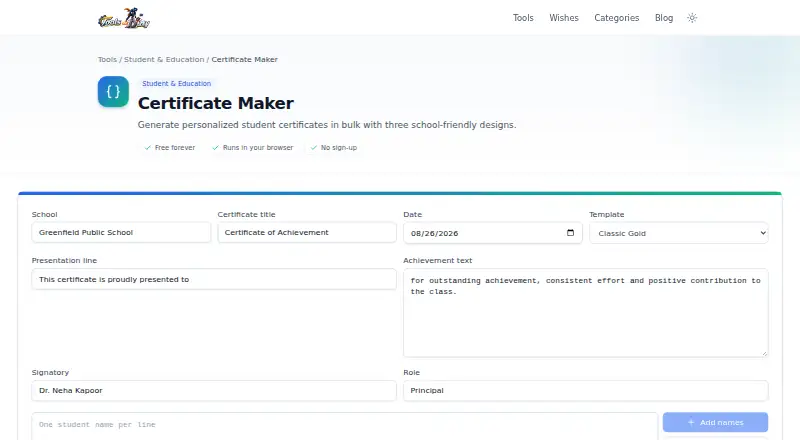
What ToolsOnDuty Certificate Maker is
ToolsOnDuty Certificate Maker is a browser-based tool for teachers preparing personalized certificates for students, individually or in batches. It offers classic, modern, and playful designs, with fields for school, award, and signature details. For a class, names can be pasted one per line or imported from a CSV or Excel roster with a Name column. Duplicate names are skipped, and each student receives a separate printable page. The pages can be downloaded together as a multi-page PDF or printed. Users can also save and restore a JSON backup, while drafts autosave in the browser. Certificate data is processed on the user's device and is not uploaded to a server; school data stays in that browser's local storage unless exported. Downloaded PDFs have no watermark. The Free plan costs nothing, is free forever, requires no sign-up, and has no usage limits. The product is available on the web and does not offer a free trial.
Who it suits
This tool suits teachers creating certificates for students or a whole class. Its roster import, batch PDF output, and local draft saving support classroom certificate preparation.
What it does well
- Offers classic, modern, and playful templates.
- Imports CSV or Excel rosters with a Name column.
- Creates separate printable pages in one PDF.
- Duplicate roster names are skipped.
- Downloaded PDFs have no watermark.
What to know first
- The listed platform is web.
- Drafts remain in the browser's local storage unless exported.
- No free trial is listed.
Plans
| Plan | Billed and limits | Price |
|---|---|---|
| Free | Free forever · runs in your browser · no sign-up · no usage limits | Free |
As toolsonduty.com lists them, read 8 Oct 2026. The maker's own page has the final word.
Getting started
- Open https://toolsonduty.com/certificate-maker in a web browser.
- Choose a classic, modern, or playful template.
- Enter school, award, and signature details.
- Paste student names one per line, or import a CSV or Excel roster with a Name column.
- Download the multi-page PDF, print the certificates, or save a JSON backup.
Verdict
Certificate Maker supports classroom certificate batches, roster imports, and printable multi-page PDF output. Its free plan has no sign-up or usage limits, and certificate data stays on the user's device unless exported.
Questions
Is Certificate Maker free?
Yes. Its Free plan costs nothing and is free forever, with no usage limits.
Do I need to sign up?
No. The Free plan requires no sign-up.
Can I make certificates in bulk?
Yes. Paste names one per line or import a CSV or Excel roster with a Name column. The tool skips duplicate names and creates a separate printable page for each student.
What formats can I export?
You can download the certificates together as a multi-page PDF, print them, or use JSON backup and restore.
Does the tool upload student information?
The product page says certificate data is processed on your device and never uploaded to a server. School data stays in the browser's local storage unless you export it.
Who makes Certificate Maker?
ToolsOnDuty says its founder and lead developer, TJ, builds and maintains it. It says it typically responds to messages within a couple of business days.
Facts from ToolsOnDuty Certificate Maker's own pages
- Audience
- The product is presented as a classroom tool for teachers creating certificates for students or a whole class. · toolsonduty.com, 8 Oct 2026
- Bulk output
- The tool creates a separate printable certificate page for each student and can download them as one multi-page PDF. · toolsonduty.com, 8 Oct 2026
- Company
- ToolsOnDuty says it is built and maintained by TJ, its founder and lead developer, who has over 10 years of experience building web applications and developer tools. · toolsonduty.com, 8 Oct 2026
- Customization
- Users can enter school, award and signature details, and certificates share the same award text, date and signatory. · toolsonduty.com, 8 Oct 2026
- Data handling
- The page says certificate data is processed on the user's device and never uploaded to a server; school data remains in this browser's local storage unless exported. · toolsonduty.com, 8 Oct 2026
- Designs
- It offers classic, modern and playful certificate templates. · toolsonduty.com, 8 Oct 2026
- Duplicate handling
- The tool skips duplicate names when creating certificates from a class roster. · toolsonduty.com, 8 Oct 2026
- Purpose
- Certificate Maker helps teachers create classroom-ready personalized student certificates in bulk. · toolsonduty.com, 8 Oct 2026
- Roster input
- Names can be pasted one per line or imported from CSV or Excel rosters with a Name column. · toolsonduty.com, 8 Oct 2026
- Saving and export
- The tool locally autosaves drafts and supports PDF download, printing, and JSON backup and restore. · toolsonduty.com, 8 Oct 2026
- Support
- ToolsOnDuty says it typically responds to messages within a couple of business days. · toolsonduty.com, 8 Oct 2026
- Watermarks
- The product page says downloaded PDFs have no watermark. · toolsonduty.com, 8 Oct 2026
Where ToolsOnDuty Certificate Maker stands on Freedom251
- Certificate Maker Software#21 of 28