Freedom251 › Certificate Maker Software
MailMyCertificate
What MailMyCertificate is
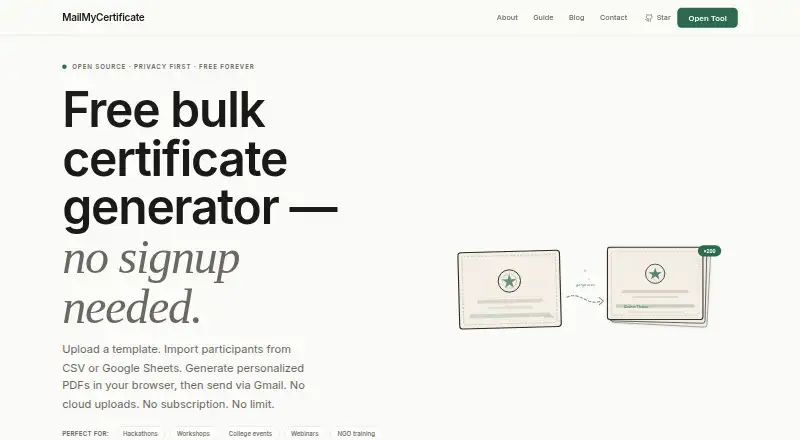
MailMyCertificate turns a certificate template and participant list into personalized PDF certificates, which you can download together as a ZIP or email individually through Gmail. Import participants from a CSV file or a public Google Sheets URL, then use the visual editor to place participant fields on a PNG or JPG template. PDF templates are not supported. You can also work with Google Forms responses exported to Sheets. Certificate generation runs in your browser, and participant data and generated PDFs are stored locally on your device. Gmail delivery uses Google OAuth and requests the gmail.send permission; the app says it cannot access your inbox or contacts. While an email is being sent, its backend temporarily receives recipient details, message content, and the PDF attachment, and says it does not intentionally keep them afterward. The service is free, with unlimited certificates, no signup, and no paid tiers. The field editor works best on desktop, and its guide recommends sending about 400 emails per batch, subject to Gmail API limits and browser performance.
Who it suits
It suits hackathon and tech-fest organizers, college clubs, workshop and webinar hosts, and NGOs that need to issue certificates in batches. It may also suit teams that cannot upload participant data to a vendor.
What it does well
- Free, with unlimited certificates and no signup.
- Imports CSV files and public Google Sheets URLs.
- Downloads certificates as a ZIP or sends them through Gmail.
- Certificate generation and PDFs stay on your device.
- Open-source project under the MIT licence.
What to know first
- PDF certificate templates are not supported.
- The field editor works best on desktop.
- Email batches are subject to Gmail and browser limits.
Limits
The guide recommends about 400 emails per batch, subject to Gmail API limits and browser performance. Editing is best done on desktop; mobile is described for downloading after setup.
Plans
| Plan | Billed and limits | Price |
|---|---|---|
| Free | No payment, ever · Unlimited certificates · no signup · no paid tiers | Free |
As mailmycertificate.tech lists them, read 7 Oct 2026. The maker's own page has the final word.
Getting started
- Open the MailMyCertificate website
- Prepare recipients in a CSV file or public Google Sheet
- Upload a PNG or JPG certificate template
- Place participant fields with the visual editor
- Generate certificates in a batch
- Download the PDFs as a ZIP or connect Gmail through Google OAuth
Verdict
MailMyCertificate covers batch certificate creation and Gmail delivery without a signup or paid tier. Check the template format and desktop editor limitations before setting up a large batch.
Questions
How much does MailMyCertificate cost?
The Free plan costs nothing, with no payment ever. It includes unlimited certificates, no signup, and no paid tiers.
Which recipient sources are supported?
You can import a CSV file or use a public Google Sheets URL. Workflows may also use Google Forms responses exported to Sheets.
Can it send certificates by email?
Yes. Certificates can be sent individually through Gmail using Google OAuth and the gmail.send scope.
Does it access Gmail inbox content?
The app says it cannot access your inbox or contacts. During sending, its backend temporarily receives recipient details, message content, and the PDF attachment.
Is MailMyCertificate open source?
Yes. It is a single-developer project under the MIT licence, built by Akshat Thakur.
Facts from MailMyCertificate's own pages
- Data handling
- During email sending, the backend temporarily receives recipient details, message content, and the PDF attachment, and says it does not intentionally retain them after sending. · mailmycertificate.tech, 7 Oct 2026
- Delivery
- Certificates can be downloaded together as a ZIP or sent individually by email through Gmail. · mailmycertificate.tech, 7 Oct 2026
- Email security
- For Gmail delivery, the app requests the gmail.send scope and says it cannot access the user’s inbox or contacts. · mailmycertificate.tech, 7 Oct 2026
- Import and templates
- It accepts CSV files or public Google Sheets URLs and PNG or JPG certificate templates; PDF templates do not work. · mailmycertificate.tech, 7 Oct 2026
- Integrations
- The maker describes workflows using Google Sheets, Google Forms responses exported to Sheets, and Gmail via Google OAuth. · mailmycertificate.tech, 7 Oct 2026
- Local processing
- Certificate generation runs in the browser, with participant data and generated PDFs stored locally on the user’s device. · mailmycertificate.tech, 7 Oct 2026
- Notable limits
- The visual field editor works best on desktop; mobile is described as suitable for downloading after setup. · mailmycertificate.tech, 7 Oct 2026
- Personalization
- Users place participant fields on the template in a visual editor before generating certificates in a batch. · mailmycertificate.tech, 7 Oct 2026
- Project and license
- The product is a single-developer open-source project under the MIT licence, built by Akshat Thakur. · mailmycertificate.tech, 7 Oct 2026
- Purpose
- It turns a certificate template and participant list into personalized PDFs and can email them through the user’s Gmail account. · mailmycertificate.tech, 7 Oct 2026
- Sending limits
- The guide recommends about 400 emails per batch, subject to Gmail API limits and browser performance. · mailmycertificate.tech, 7 Oct 2026
- Support
- The maker says replies to contact inquiries usually arrive within a few days rather than within hours. · mailmycertificate.tech, 7 Oct 2026
- Who it is for
- The maker identifies hackathon and tech-fest organizers, college clubs, workshop and webinar hosts, NGOs, and teams that cannot upload participant data to a vendor as intended users. · mailmycertificate.tech, 7 Oct 2026
Where MailMyCertificate stands on Freedom251
- Certificate Maker Software#19 of 28