Freedom251 › AI Audio Mixing Software

TonalBrain
What TonalBrain is
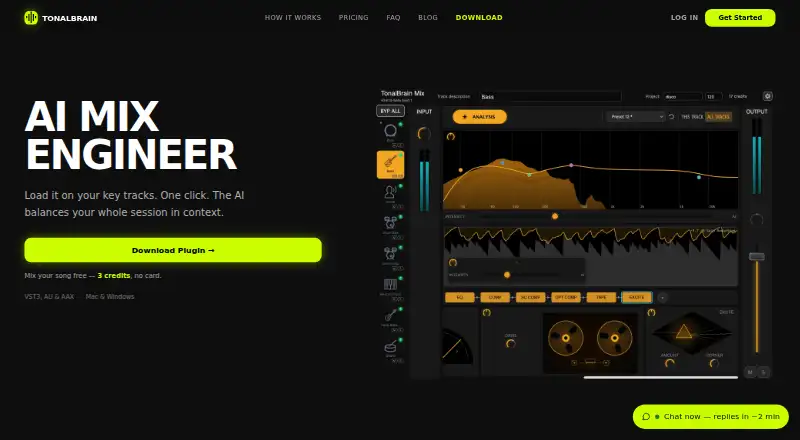
TonalBrain is an AI audio plugin that analyzes multitrack sessions for masking, dynamic collisions, and balance issues, then generates mixing settings. A run supports up to 24 tracks, and a project can have up to four snapshots for analyzing separate song sections. The plugin applies EQ and compression across tracks, with optional de-essing, stereo width, sidechain and optical compression, tape saturation, and harmonic excitation. Modules can be edited, removed, and reordered. Each analysis is saved as a preset; switching presets updates every track at once. TonalBrain is available as VST3, AU, and AAX for compatible DAWs including Ableton Live, Logic Pro, Pro Tools, FL Studio, Cubase, Reaper, and Studio One. It supports macOS 10.15 or later, including native Apple Silicon M1/M2/M3, and 64-bit Windows 10 or 11. The maker says raw audio remains on the user's machine, while spectral analysis data is sent to its servers to calculate settings. One-time plans are Starter at 9.00 USD, Creator at 25.00 USD, and Studio at 59.00 USD.
Who it suits
TonalBrain is for producers and engineers working with multitrack sessions or stem groups in a compatible DAW. The maker recommends a dedicated mastering tool rather than TonalBrain for stereo full mixes.
What it does well
- Analyzes up to 24 tracks per run
- Allows four section snapshots per project
- Preset changes update all tracks at once
- Supports VST3, AU, and AAX
- Raw audio stays on the user's machine
What to know first
- Not intended for stereo mastering
- Requires macOS 10.15 or later or 64-bit Windows 10 or 11
- Analysis data is sent to the maker's servers
Limits
The Starter plan is a one-time $9.00 USD purchase with 50 credits, and each analysis run uses one credit. Each run supports up to 24 tracks; credits do not expire.
Plans
| Plan | Billed and limits | Price |
|---|---|---|
| Creator | One-time purchase · 200 credits · $0.13/credit · 1 credit per analysis run · Up to 24 tracks per run · Credits never expire · Mac & Windows | $25, paid once |
| Studio | One-time purchase · 600 credits · $0.10/credit · 1 credit per analysis run · Up to 24 tracks per run · Credits never expire · Mac & Windows | $59, paid once |
| Starter | One-time purchase · 50 credits · $0.18/credit · 1 credit per analysis run · Up to 24 tracks per run · Credits never expire · Mac & Windows | $9, paid once |
As tonalbrain.com lists them, read 3 Oct 2026. The maker's own page has the final word.
Getting started
- Visit tonalbrain.com.
- Choose a plan: Starter is a one-time $9.00 USD purchase with 50 credits; Creator and Studio are also one-time purchases.
- Install the plugin on macOS 10.15 or later or 64-bit Windows 10 or 11.
- Load its VST3, AU, or AAX format in a compatible DAW.
- Run an analysis on a multitrack session or stem group, using one credit per run.
TonalBrain is an AI mixing plugin for multitrack producers who want a starting mix generated from an analysis rather than a blank session. It suits users working in supported DAWs on macOS or Windows, particularly those who value editable processing and one-time credit purchases. Its strongest case is fast, repeatable mix balancing; it is a poor fit when you need stereo mastering or more than 24 tracks in one run.
Overview
TonalBrain analyzes a multitrack session for masking, dynamic collisions, and balance problems, then creates settings for the tracks. A run handles up to 24 tracks, so it is aimed at songs or stem groups of moderate size rather than very large orchestral or post-production sessions. You can save four section snapshots per project, allowing analysis of different song sections instead of treating the arrangement as uniform.
Raw audio remains on your computer. Spectral analysis data is sent to TonalBrain’s servers to calculate settings, and the maker says it does not store or share audio content or analysis data beyond processing the request. Account data is encrypted at rest by Supabase, Stripe handles payments without TonalBrain retaining complete card details, and the policy describes encryption in transit and at rest, secure authentication, access controls, and recurring security reviews. Email support usually responds within a few hours.
Key features
Generated, editable processing
The plugin applies EQ and compression across every track and can add de-essing, stereo widening, sidechain and optical compression, tape saturation, and harmonic excitation. Modules can be edited, removed, or reordered. That makes the output a workable set of decisions rather than a locked render: engineers can keep corrective EQ while discarding saturation, or change the processing order to suit the session.
Snapshots and A/B recall
Each analysis run is saved as a preset. Switching presets updates every track at once, which is useful for comparing alternate analyses without manually matching settings. The four-snapshot limit means it is best used for a small number of clearly defined sections, not an unlimited archive of arrangement variations.
Plugin compatibility
TonalBrain ships as VST3, AU, and AAX for compatible hosts including Ableton Live, Logic Pro, Pro Tools, FL Studio, Cubase, Reaper, and Studio One. It supports macOS 10.15 or later with native Apple Silicon M1, M2, and M3 support, plus 64-bit Windows 10 and 11. The broad format and DAW coverage makes it practical for most modern desktop studios, but it remains a plugin rather than a standalone web workflow.
Pricing
All three plans are one-time purchases. There is a free plan, but no free trial; the paid plans differ by credit allowance and effective analysis cost. One credit buys one analysis run, and credits never expire.
| Plan | Price | Included | Best for |
|---|---|---|---|
| Starter | 9.00 USD once | 50 credits, $0.18 per credit, up to 24 tracks per run, Mac and Windows | Occasional users testing an AI-assisted workflow |
| Creator | 25.00 USD once | 200 credits, $0.13 per credit, up to 24 tracks per run, Mac and Windows | Regular individual production |
| Studio | 59.00 USD once | 600 credits, $0.10 per credit, up to 24 tracks per run, Mac and Windows | Frequent mixing and larger ongoing workloads |
Starter keeps the upfront cost low but gives up the lower per-run rate of Creator and Studio. Studio is the economical choice only if you will actually use its 600 analyses; there is no recurring renewal to maintain, but unused credits are tied to the purchase rather than a subscription cycle.
Platforms
TonalBrain runs on macOS 10.15 or later, including native M1/M2/M3 Macs, and 64-bit Windows 10 or 11. It requires a compatible DAW and supports VST3, AU, and AAX formats.
Who it's for
Choose TonalBrain if you mix multitrack songs or stem groups and want automated EQ, dynamics, and optional spatial or coloration modules that remain under your control. The credit system suits producers who prefer a one-time purchase to a subscription. It is less suitable for stereo-mastering work, sessions beyond 24 tracks per run, or anyone seeking a browser-based tool.
Pros and cons
- Pros: Editable and reorderable processing lets you refine or remove generated decisions; whole-session preset switching makes A/B comparisons quick; native Apple Silicon support and VST3, AU, and AAX formats cover major DAWs; credits never expire; raw audio stays local.
- Cons: Each run is capped at 24 tracks; only four section snapshots can be saved per project; spectral analysis data leaves the machine for processing; it is not intended for stereo mastering; there is no free trial.
Alternatives
StemDesk is the better choice if you need Linux support, local AI, stem separation, and WAV, MP3, FLAC, or AAC export, with a free plan that includes compressor, gate, and limiter plugins.
Box fits Mac users who want a free tier with session scanning, basic mix analysis, and a stereo-field view.
NeuroMix AI is preferable for a browser workflow with five mixing sessions and five downloads per month on its free tier, though uploads are limited to 10 MB and files are retained for seven days.
MIXaiR is an alternative paid desktop option for Linux, macOS, and Windows; pricing is handled through Salsa Sound for a trial.
StemMaster suits users who prefer a monthly or annual subscription and support for up to three machines.
Cryo Mix is a paid web alternative with a free trial.
EZmix 3 is a paid desktop alternative with a free trial; the listed upgrade requires owning an earlier EZmix version.
FUSER is another paid macOS and Windows plugin with a free trial and a one-time price of 59.00 GBP.
Browse the AI Audio Mixing Software list for more options.
Verdict
TonalBrain is a sensible pick for desktop producers who want fast, editable starting settings and predictable one-time costs. Its main reason to choose it is the combination of whole-session recall, flexible processing modules, and non-expiring credits. Look elsewhere if your work centers on stereo mastering, exceeds 24 tracks per analysis, requires Linux or web access, or demands a trial before paying.
Verdict
TonalBrain generates editable mixing settings for multitrack projects and provides multiple processing modules. Its stated use is mixing sessions or stem groups, not stereo mastering.
Questions
Is TonalBrain free?
A free plan is available, but the listed Starter plan is a one-time $9.00 USD purchase for 50 credits. No free trial is offered.
How much do the paid plans cost?
Starter costs $9.00 USD once for 50 credits, Creator costs $25.00 USD once for 200 credits, and Studio costs $59.00 USD once for 600 credits. Each analysis run uses one credit, and credits do not expire.
Which systems and DAWs does it support?
It supports macOS 10.15 or later, including native Apple Silicon M1, M2, and M3, and 64-bit Windows 10 or 11. It is available as VST3, AU, and AAX for compatible DAWs including Ableton Live, Logic Pro, Pro Tools, FL Studio, Cubase, Reaper, and Studio One.
What does an analysis do?
It analyzes a multitrack session for masking, dynamic collisions, and balance issues, then generates mixing settings. It applies EQ and compression to every track and offers additional processing modules.
Does TonalBrain send audio to its servers?
The maker says raw audio stays on the user's machine. Spectral analysis data is sent to its servers to calculate mix settings.
Is it designed for mastering?
The maker recommends it for individual multitrack sessions or stem groups and recommends a dedicated mastering tool for stereo full mixes.
Facts from TonalBrain's own pages
- A/B presets
- Each analysis run is saved as a preset, and switching presets updates every track at once. · tonalbrain.com, 3 Oct 2026
- Account and payment security
- The privacy policy says account data is stored by Supabase encrypted at rest and Stripe processes payments without TonalBrain storing complete card details. · tonalbrain.com, 3 Oct 2026
- Audio privacy
- The maker says raw audio stays on the user's machine; spectral analysis data is sent to its servers to calculate mix settings, and it says it does not store or share audio content or analysis data beyond processing the request. · tonalbrain.com, 3 Oct 2026
- Data safeguards
- The privacy policy lists encryption in transit and at rest, secure authentication, regular security reviews and updates, and access controls for authorized personnel. · tonalbrain.com, 3 Oct 2026
- Headquarters
- Montréal, Quebec, Canada · tonalbrain.com, 28 Sept 2026
- Not intended for mastering
- The maker recommends individual multitrack sessions or stem groups and recommends a dedicated mastering tool for stereo full mixes. · tonalbrain.com, 3 Oct 2026
- Plugin formats and DAWs
- It is available as VST3, AU, and AAX for compatible DAWs including Ableton Live, Logic Pro, Pro Tools, FL Studio, Cubase, Reaper, and Studio One. · tonalbrain.com, 3 Oct 2026
- Processing
- The plugin applies EQ and compression on every track, and can add de-essing, stereo width, sidechain and optical compression, tape saturation, and harmonic excitation; modules are editable, removable, and reorderable. · tonalbrain.com, 3 Oct 2026
- Section snapshots
- Users can save up to 4 section snapshots per project for analysis across different song sections. · tonalbrain.com, 3 Oct 2026
- Support
- Support is handled by email, and the contact page says response time is usually within a few hours. · tonalbrain.com, 3 Oct 2026
- System requirements
- The plugin supports macOS 10.15 or later, including native Apple Silicon M1/M2/M3, and 64-bit Windows 10 or 11. · tonalbrain.com, 3 Oct 2026
- Track capacity
- The maker says a run supports up to 24 tracks. · tonalbrain.com, 3 Oct 2026
- What it does
- TonalBrain is an AI audio plugin that analyzes multitrack sessions to identify masking, dynamic collisions, and balance issues, then generates mixing settings. · tonalbrain.com, 3 Oct 2026
Where TonalBrain stands on Freedom251
- AI Audio Mixing Software#5 of 41