Freedom251 › AI Audio Mixing Software
Auto Instrument EQ
What Auto Instrument EQ is
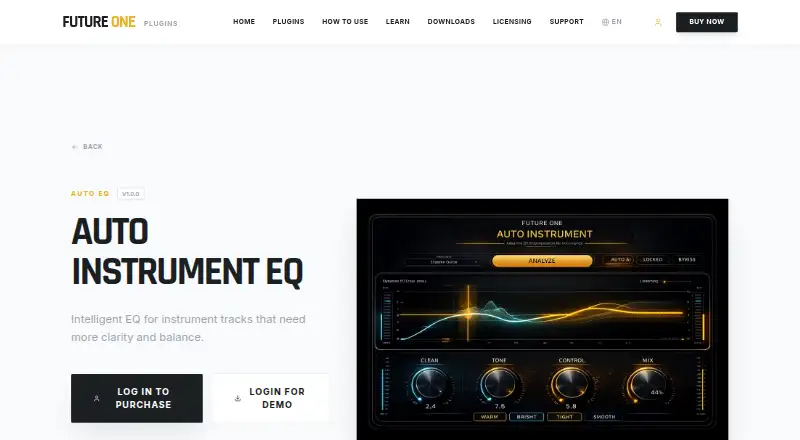
Auto Instrument EQ is an equalizer plugin for instrument tracks that analyzes audio and adjusts it to reduce muddiness, improve tonal balance, and add definition. In AUTO mode, users select Vocal, Drum, Instrument, or Bass as the analysis context; MANUAL mode provides knobs for adjusting parameters. The listed build is a 64-bit VST3 plugin for Windows 10 and Windows 11, and it works with Windows DAWs that support VST3. Examples include FL Studio, Ableton Live, Cubase, Reaper, Studio One, Cakewalk, and PreSonus. The maker offers a fully functional demo with all features unlocked, though periodic white noise is played during the trial. There is no free plan. The listed price is €15, paid once. The maker says activation is online initially, after which the studio can remain offline, and each license permits up to two simultaneous machine activations. Premium technical support is included with every purchase. The maker says its tools are intended for musicians and creators seeking fast musical results, rather than professional mix engineers or people looking for deep technical control.
Who it suits
It suits musicians and creators, including home recordists and creators using AI-generated instrumentals, who want quick EQ adjustments. It may not suit professional mix engineers or users seeking deep technical control.
What it does well
- Automatic analysis targets muddiness and tonal balance.
- AUTO mode offers four analysis contexts.
- MANUAL mode provides knob-based parameter adjustments.
- Fully functional trial demo; premium support with purchase.
What to know first
- No free plan.
- Windows build only; macOS version is in development.
- Trial includes periodic white noise.
- Not aimed at deep technical control.
Limits
There is no free plan. The trial demo has periodic white noise, and the listed macOS version is still in development.
Plans
| Plan | Billed and limits | Price |
|---|---|---|
| Auto Instrument EQ | Intelligent EQ for instrument tracks | €15, paid once |
As futureoneaudio.com lists them, read 7 Oct 2026. The maker's own page has the final word.
Getting started
- Visit https://futureoneaudio.com/plugins/auto-instrument for the plugin.
- Try the fully functional demo, which includes periodic white noise during the trial.
- Install the 64-bit VST3 build on Windows 10 or Windows 11.
- Load it in a DAW that supports VST3, such as FL Studio, Ableton Live, Cubase, Reaper, Studio One, Cakewalk, or PreSonus.
- Choose AUTO or MANUAL mode and select a source context in AUTO mode.
- Purchase the plugin for €15, paid once and activate the license online initially.
Verdict
Auto Instrument EQ combines automatic source analysis with manual parameter adjustment in a Windows VST3 plugin. Its stated focus is fast musical results, not detailed control for professional mixing.
Questions
How much does Auto Instrument EQ cost?
The Auto Instrument EQ plan costs €15, paid once.
Is there a free plan or trial?
There is no free plan. A fully functional demo with all features unlocked is available, with periodic white noise during the trial.
Which systems does the listed build support?
The listed 64-bit VST3 build supports Windows 10 and Windows 11. The macOS version is in development.
Which DAWs can use the plugin?
It works with Windows DAWs that support VST3. Examples include FL Studio, Ableton Live, Cubase, Reaper, Studio One, Cakewalk, and PreSonus.
Can the studio run offline?
Activation is online initially; afterward, the studio can stay offline.
How many computers can use one license at the same time?
A license allows up to two simultaneous machine activations.
Facts from Auto Instrument EQ's own pages
- Audio analysis
- It analyzes the source to reduce muddiness, improve tonal balance, and add definition automatically. · futureoneaudio.com, 7 Oct 2026
- Demo
- The maker says its plugins have fully functional demos with all features unlocked and periodic white noise during the trial. · futureoneaudio.com, 7 Oct 2026
- Integrations
- The maker says its plugins work in DAWs that support VST3 on Windows or AU on macOS, and names FL Studio, Ableton Live, Cubase, Reaper, Studio One, Cakewalk, PreSonus, and Logic Pro as examples. · futureoneaudio.com, 7 Oct 2026
- Intended users
- Future One Audio says its tools are made for musicians and creators seeking fast musical results, including home recordists and creators using AI-generated instrumentals. · futureoneaudio.com, 7 Oct 2026
- Licensing
- The maker's licensing page says activation is online initially, after which the studio can stay offline, and allows up to two simultaneous machine activations per license. · futureoneaudio.com, 7 Oct 2026
- macOS availability
- The product page says the macOS version is in development and lists its installation path as coming soon. · futureoneaudio.com, 7 Oct 2026
- Manual control
- MANUAL mode lets users adjust the parameters with knobs. · futureoneaudio.com, 7 Oct 2026
- Notable limit
- Future One Audio says its tools are not made for professional mix engineers or people seeking deep technical control. · futureoneaudio.com, 7 Oct 2026
- Plugin format
- The listed build is a 64-bit VST3 plugin. · futureoneaudio.com, 7 Oct 2026
- Privacy
- The maker says it collects data needed for license activation and essential security checks, does not share session data or personal information with third parties, and uses strictly anonymous plugin analytics to improve DSP performance. · futureoneaudio.com, 7 Oct 2026
- Purpose
- Auto Instrument EQ is an intelligent equalizer for instrument tracks that need more clarity and balance. · futureoneaudio.com, 7 Oct 2026
- Support
- The maker says premium technical support is included with every purchase. · futureoneaudio.com, 7 Oct 2026
- Supported sources
- AUTO mode lets users choose Vocal, Drum, Instrument, or Bass as the analysis context. · futureoneaudio.com, 7 Oct 2026
- Windows compatibility
- The product page lists Windows 10 and Windows 11 compatibility. · futureoneaudio.com, 7 Oct 2026
Where Auto Instrument EQ stands on Freedom251
- AI Audio Mixing Software#7 of 41