Freedom251 › Firewall Management Software
TinyWall
What TinyWall is
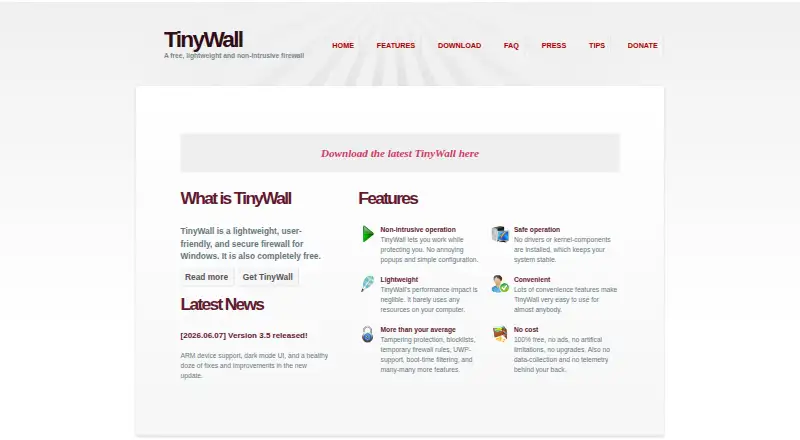
TinyWall is a free firewall for Windows designed for private users, family PCs, and small-office or home-office computers. It avoids real-time popups for blocked actions and offers several ways to whitelist applications. Controls include whitelist learning, timed rules, quick modes, IPv6 support, and integrated port and domain blocklists. Users can view established and blocked connections, as well as open ports. TinyWall protects Windows Firewall settings from modification and includes hosts-file protection and filtering at boot. Its maker says the program installs no drivers or kernel components. After installation, it blocks most network communication until users whitelist the programs they need, so the maker advises against installing it over a remote connection. The latest version supports desktop Windows 11 and Windows 10 version 21H2 (build 19044) or newer; version 3.2.5 also supports Windows 8.1, 8, 7, and Windows Server 2019, 2016, and 2012 R2. TinyWall is open-source and costs nothing, with no ads or paid upgrades.
Who it suits
TinyWall suits private users, family computers, and small-office or home-office Windows PCs. The maker says it is not well suited to headless machines, servers, or networks with more than five computers.
What it does well
- No real-time popups for blocked actions
- Whitelist learning and timed rules
- Shows connections and open ports
- Protects Windows Firewall settings and hosts file
- Free, with no ads or paid upgrades
What to know first
- Blocks most network communication until programs are whitelisted
- No command-line interface or remote management
- No HIPS, anti-malware, or antivirus modules
- Latest version requires Windows 10 version 21H2 or newer
Limits
The free plan costs nothing. TinyWall is a firewall only and does not include HIPS, anti-malware, or antivirus modules; its FAQ also says it lacks command-line, remote-management, and domain-controller integration.
Plans
| Plan | Billed and limits | Price |
|---|---|---|
| TinyWall | 100% free · no ads · no paid upgrades | Free |
As tinywall.pados.hu lists them, read 11 Oct 2026. The maker's own page has the final word.
Getting started
- Visit https://tinywall.pados.hu/.
- Install TinyWall on a supported Windows desktop.
- Whitelist the programs that need network access.
- Use its firewall controls to set timed rules or quick modes.
- Avoid installing it over a remote connection.
TinyWall is a free, lightweight firewall for desktop Windows computers. It suits private users, families, and small home or office setups that want a quiet, restrictive firewall rather than constant alerts.
Overview
TinyWall uses Windows Firewall as its foundation and takes a whitelist-first approach. After installation it blocks most network communication until you allow the programs you need. That gives a deliberately tight starting point, but it can interrupt applications and services until they are approved. Installing it over a remote connection is risky because the initial blocking can sever that session.
The design is aimed at one computer or a small number of family and office PCs, not infrastructure administration. TinyWall is not well suited to headless machines, servers, or networks with more than five computers. It also remains a firewall only: HIPS, anti-malware, and antivirus functions are not included.
Key features
Quiet application control
TinyWall does not produce real-time popups for blocked actions. Instead, users can whitelist applications through several methods, including learning mode. This avoids interruptive prompts, but it places responsibility on the user to recognize which software needs access and configure it.
Rules and visibility
Timed rules and quick modes make temporary or rapid policy changes practical. IPv6 support and built-in port and domain blocklists extend control beyond basic application approval. Lists of established and blocked connections, along with open ports, provide a useful view of current exposure and activity.
Protection and architecture
TinyWall protects Windows Firewall settings from modification, adds hosts-file protection, and filters traffic during boot. The maker says it installs no drivers or kernel components, which may appeal to users who prefer a smaller system footprint. The FAQ says it collects no personal or anonymized information; an update check that can be disabled sends the installed version. TinyWall is open-source.
Pricing
TinyWall — free: The plan is 100% free, has no ads, and has no paid upgrades. There is no trial period because the product itself is free. This is a straightforward fit for anyone protecting a supported personal or small-office Windows desktop without a software budget. It does not add centralized administration or broader endpoint security, so organizations needing those capabilities must look elsewhere.
Platforms
The current version runs on desktop Windows 11 and Windows 10 version 21H2 (build 19044) or newer. TinyWall 3.2.5 also supports Windows 8.1, Windows 8, Windows 7, Windows Server 2019, Windows Server 2016, and Windows Server 2012 R2.
Who it's for
Choose TinyWall for a private computer, family PC, or small home-office installation where one user can handle application whitelisting and local firewall decisions. Its popup-free behavior is particularly appropriate for people who dislike repeated permission dialogs but are comfortable checking blocked connections and adjusting rules themselves.
It is a poor fit for headless systems, server fleets, or larger networks. The lack of a command-line interface, remote management, and domain-controller integration makes coordinated administration difficult. Anyone expecting malware detection or antivirus protection will also need separate security software.
Pros and cons
Pros
- Free without ads or paid upgrades: full access has no purchase cost or subscription renewal.
- Restrictive starting posture: blocking most communication until whitelisting gives users a clear control baseline.
- Strong local visibility: connection, blocked-connection, and open-port lists help explain what the firewall is doing.
- Broad rule tools: timed rules, quick modes, IPv6 support, and port and domain blocklists support more than simple allow/deny prompts.
- Small-footprint design: no drivers or kernel components are installed, according to the maker.
Cons
- Setup can disrupt connectivity: required programs must be whitelisted after installation, and remote installation can cut off access.
- No centralized control: no command-line interface, remote management, or domain-controller integration limits it to local administration.
- Firewall scope only: antivirus, anti-malware, and HIPS protection are absent.
- Narrow deployment target: the maker does not recommend it for headless machines, servers, or networks with more than five computers.
Alternatives
For a Linux or self-hosted firewall with capacity selected during setup, consider CacheGuard-OS; excess capacity can slow or block traffic.
Choose Comodo Internet Security instead when you want a Windows suite combining antivirus, firewall, and other security features, with paid tiers beyond its free offering.
Google Cloud Firewall Policies is the better direction for API or web-managed cloud firewall rules based on IP ranges, ports, and protocols.
For centralized reporting and alerting tied to SonicWall firewall support, consider SonicWall Network Security Manager.
Gufw is a free Linux alternative with no paid plans or usage limits stated.
Forcepoint Next Generation Firewall targets physical, virtual, and cloud deployments across multiple platforms, with pricing by request.
AlgoSec is a paid platform for broader policy management, with pricing handled through a demo or buying discussion.
Check Point DDoS Protector is another paid option for DDoS-focused protection.
Verdict
TinyWall is a strong choice for a Windows desktop owner who wants a free, quiet firewall with a restrictive baseline and useful local connection visibility. Choose it when you can manage whitelists on each machine and do not need malware protection. Look elsewhere for remote or domain-based administration, server and larger-network deployments, or an all-in-one security suite.
Verdict
TinyWall offers firewall controls and connection visibility for supported Windows desktops. Consider its initial network blocking and lack of remote management before choosing it for a computer or network.
Questions
How much does TinyWall cost?
The TinyWall plan is free, with no ads or paid upgrades.
Which Windows versions are supported?
The latest version runs on desktop Windows 11 and Windows 10 version 21H2, build 19044, or newer. Version 3.2.5 also supports Windows 8.1, 8, 7, and Windows Server 2019, 2016, and 2012 R2.
Is TinyWall open source?
Yes. TinyWall's FAQ describes it as open-source and links to its GitHub source repository.
Does TinyWall include antivirus or anti-malware?
No. TinyWall is a firewall only and does not include HIPS, anti-malware, or antivirus modules.
Does TinyWall collect personal information?
Its FAQ says it collects no personal or anonymized information. The optional update check sends the installed version.
Is TinyWall suited to servers or larger networks?
The maker says it is not well suited to headless machines, servers, or networks with more than five computers. It also lacks remote management and domain-controller integration.
Facts from TinyWall's own pages
- Application visibility
- TinyWall can list established and blocked connections and open ports. · tinywall.pados.hu, 11 Oct 2026
- Current compatibility
- The latest version runs on desktop Windows 11 and Windows 10 version 21H2 (build 19044) or newer. · tinywall.pados.hu, 11 Oct 2026
- Data collection
- The FAQ says TinyWall collects no personal or anonymized information, though its optional-to-disable update check sends the installed version. · tinywall.pados.hu, 11 Oct 2026
- Firewall controls
- Features include whitelist learning, timed rules, quick modes, IPv6 support, and integrated port and domain blocklists. · tinywall.pados.hu, 11 Oct 2026
- Free plan
- Yes · tinywall.pados.hu, 21 Sept 2026
- Installation behavior
- After installation TinyWall blocks most network communication until the user whitelists needed programs, and the maker warns against installing it over a remote connection. · tinywall.pados.hu, 11 Oct 2026
- Intended users
- TinyWall is intended for private users, small-office or home-office computers, and family PCs; the maker says it is not well suited to headless machines, servers, or networks with more than five computers. · tinywall.pados.hu, 11 Oct 2026
- Management limits
- The FAQ says TinyWall lacks a command-line interface, remote management, and domain-controller integration. · tinywall.pados.hu, 11 Oct 2026
- Older compatibility
- TinyWall 3.2.5 also supports Windows 8.1, 8, 7, and Windows Server 2019, 2016, and 2012 R2. · tinywall.pados.hu, 11 Oct 2026
- Open source
- The FAQ states TinyWall is open-source and links to its source repository on GitHub. · tinywall.pados.hu, 11 Oct 2026
- Popup-free design
- TinyWall does not show real-time popups for blocked actions; users can whitelist applications through several methods. · tinywall.pados.hu, 11 Oct 2026
- Product
- TinyWall is a lightweight, user-friendly firewall for Windows. · tinywall.pados.hu, 11 Oct 2026
- Security protections
- TinyWall protects Windows Firewall settings from modification and includes hosts-file protection and boot-time filtering. · tinywall.pados.hu, 11 Oct 2026
- Security scope
- TinyWall is a firewall only and does not include HIPS, anti-malware, or antivirus modules. · tinywall.pados.hu, 11 Oct 2026
- Support
- The FAQ directs users with crashes or GUI availability problems to email the maker and attach logs from C:\ProgramData\TinyWall when present. · tinywall.pados.hu, 11 Oct 2026
- System design
- The maker says TinyWall installs no drivers or kernel components. · tinywall.pados.hu, 11 Oct 2026
Where TinyWall stands on Freedom251
- Firewall Management Software#7 of 29
- Firewall Software#23 of 81
- Computer Security#9 of 30