Freedom251 › Firewall Management Software
Google Cloud Firewall Policies
What Google Cloud Firewall Policies is
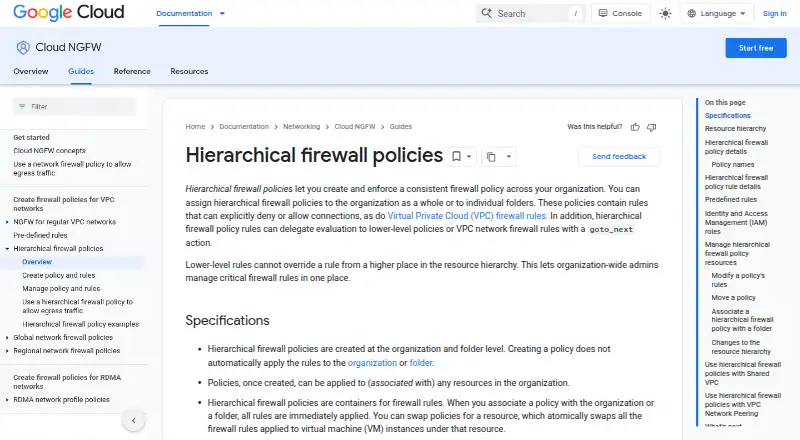
Google Cloud Firewall Policies let organization administrators apply consistent firewall rules across an organization or selected folders. Rules can allow or deny connections, or hand evaluation to lower-level policies or VPC firewall rules. A policy takes effect only after it is associated with an organization or folder; it cannot be assigned directly to a project. Rules can target VPC networks and VM service accounts, but not instance tags. With a security profile group, matching traffic can be sent through a firewall endpoint for Layer 7 inspection, including URL filtering and intrusion detection and prevention. Administrators can manage policies through the Google Cloud console, gcloud CLI, or documented Terraform resources for rules with logging enabled. Logs are available in Cloud Logging and its supported export destinations. Essentials rules based on standard network attributes cost nothing. Hierarchical policy rates are free, billed per VM covered, with the rate depending on rule attributes; policies covering no VMs incur no charge.
Who it suits
It suits organization-wide administrators who need centralized control of firewall rules across folders and their resources. Teams can manage policies through the console, CLI, or Terraform.
What it does well
- Free Essentials rules for standard network attributes
- Rules can allow, deny, or delegate evaluation
- Layer 7 inspection includes URL filtering and intrusion detection
- Logs can be viewed and exported through Cloud Logging
What to know first
- Policies must attach to an organization or folder
- Hierarchical rules cannot target instance tags
- Logging records only TCP and UDP connections
- Rules must be updated individually
Limits
Cloud NGFW Essentials rules based on standard network attributes are no charge. Hierarchical firewall policies with 500 or fewer rule attributes are listed as free, billed $0.001369863 / 1 hour per VM covered; policies with 501 or more attributes are listed as free, billed $0.002054795 / 1 hour per VM covered. There is no charge when a policy applies to no VMs. Rule logging covers TCP and UDP connections, and existing connections might not appear until idle for at least 10 minutes; policies also do not support RDMA-profile VPC networks, and an individual rule cannot mix IPv4 and IPv6 ranges.
Plans
| Plan | Billed and limits | Price |
|---|---|---|
| Cloud NGFW Essentials | No charge for Essentials rules. · Rules based on standard network attributes, including IP ranges, ports, and protocols | Free |
| Hierarchical firewall policies (501 or more attributes) | $0.002054795 / 1 hour per VM covered by the policy. · Price calculated per VM per month · 501 or more rule attributes · no charge if policy applies to no VMs | Free |
| Hierarchical firewall policies (500 or fewer attributes) | $0.001369863 / 1 hour per VM covered by the policy. · Price calculated per VM per month · 500 or fewer rule attributes · no charge if policy applies to no VMs | Free |
| Cloud NGFW Standard | $0.0193 / 1 gibibyte evaluated; billed for eligible internet ingress and egress traffic. · FQDN objects · threat intelligence | $0.02 a month |
| Cloud NGFW Enterprise | $1.75 / 1 hour per deployed endpoint, plus $0.0193 / 1 gibibyte inspected. · Layer 7 IDPS and URL filtering · endpoint deployment charge | $1.75 a month |
As cloud.google.com lists them, read 7 Oct 2026. The maker's own page has the final word.
Getting started
- Open the Google Cloud Firewall Policies website.
- Manage policies in the Google Cloud console or with the gcloud CLI.
- Associate a hierarchical policy with an organization or folder to enforce it.
- Define rules that allow, deny, or delegate evaluation as needed.
- Use a security profile group and firewall endpoint for Layer 7 inspection if required.
- Review policy logs in Cloud Logging or export them to a supported destination.
Google Cloud Firewall Policies gives organization administrators a way to govern firewall rules across Google Cloud organizations and folders. It suits teams that need centralized control with delegated evaluation; it is a poor fit for policies that must attach directly to projects or target instance tags.
The main appeal is hierarchical enforcement backed by cloud management and logging. Per-VM charges for covered hierarchical policies, individual rule updates, and targeting constraints should shape the decision.
Overview
Administrators can apply consistent rules across an organization or selected folders, then use goto_next to hand evaluation to lower-level policies or VPC firewall rules. That combination is useful when central teams need to set guardrails without taking every decision out of lower-level teams. Policies take effect only after association with an organization or folder; they cannot be assigned directly to projects.
Key features
Rules can allow or deny connections and target VPC networks or VM service accounts. The absence of instance-tag targeting matters for teams whose network policy relies on tags. Each rule can contain IPv4 or IPv6 ranges, but not both.
Hierarchical rules can route matching traffic through a firewall endpoint for Layer 7 inspection, including URL filtering and intrusion detection and prevention. This extends the policy model beyond basic network attributes, but endpoint deployment and inspection carry separate Cloud NGFW Enterprise charges.
Management is available through the Google Cloud console and gcloud CLI. A Terraform resource supports firewall policy rules with logging enabled, but rules must be updated individually; there is no batch-update mechanism. IAM roles govern who can create, associate, modify, delete, and view effective policies and rules, which supports controlled administration across teams.
Policy logs can be viewed in Cloud Logging and exported to its supported destinations. Logging records only TCP and UDP connections, and existing connections may not produce entries until idle for at least 10 minutes. Policies also do not support VPC networks using an RDMA network profile.
Google Cloud states that its services undergo independent verification and hold security, privacy, and compliance certifications; its Services ISMS has ISO/IEC 27001 certification. That is relevant context for organizations with assurance requirements, though it does not remove the product's operational constraints.
Pricing
The pricing model is freemium, with a free plan. Cloud NGFW Essentials is free, with no charge for Essentials rules based on standard network attributes such as IP ranges, ports, and protocols. It suits teams needing those basic rule attributes without a charge.
Hierarchical firewall policies (500 or fewer attributes) are free, billed at $0.001369863 / 1 hour per VM covered by the policy. Hierarchical firewall policies (501 or more attributes) are free, billed at $0.002054795 / 1 hour per VM covered. Both are calculated per VM per month and carry no charge when the policy applies to no VMs. The free headline price therefore does not mean covered policies are always free; larger policies cost more per covered VM.
Cloud NGFW Standard is $0.02 a month, billed at $0.0193 / 1 gibibyte evaluated for eligible internet ingress and egress traffic. It includes FQDN objects and threat intelligence. Cloud NGFW Enterprise is $1.75 a month, billed at $1.75 / 1 hour per deployed endpoint plus $0.0193 / 1 gibibyte inspected; it includes Layer 7 IDPS and URL filtering. Standard may suit traffic evaluation needs that call for its listed additions, while Enterprise is for teams requiring Layer 7 inspection and willing to pay both endpoint and inspection charges.
Platforms
The product is available through web and API access, with cloud deployment. That suits administrators managing Google Cloud policies programmatically or through the console.
Who it's for
Organization-wide administrators responsible for critical firewall rules across folders and their resources are the clearest fit. Teams that need centralized governance plus delegated evaluation can use the hierarchy to balance consistency and local policy control. Look elsewhere if project-level attachment, instance-tag targeting, RDMA-profile VPC support, or bulk rule updates are essential.
Pros and cons
- Pros: Organization- and folder-level enforcement with goto_next gives central administrators a way to set controls while allowing lower-level evaluation.
- Pros: IAM role controls, Cloud Logging export, console and CLI management, and Terraform support provide several ways to govern and automate administration.
- Pros: Optional Layer 7 inspection adds URL filtering and intrusion detection and prevention for teams that need those controls.
- Cons: Policies cannot attach directly to projects, and rules cannot target instance tags, limiting fit for some resource-governance models.
- Cons: Covered hierarchical policies incur per-VM charges, and Enterprise inspection also has endpoint and per-gibibyte charges.
- Cons: Rules are updated individually, while logging is limited to TCP and UDP and may lag for existing connections.
Alternatives
Firewall Management Software is a useful category to browse when comparing firewall-management options more broadly.
- Comodo Internet Security is a freemium Windows option with a free plan; choose it when you need its Windows-focused antivirus, firewall, and security features.
- SonicWall Network Security Manager offers centralized management and alerting included with SonicWall firewall support, plus a free trial; consider it when managing SonicWall firewalls is the priority.
- AlgoSec is a paid platform for API, Linux, self-hosted, and web environments; consider it if those deployment options better match your environment.
- Check Point DDoS Protector is a paid option for Linux, self-hosted, and web platforms.
- pfSense has a free-download Community Edition and a Plus option; consider it for a Linux or self-hosted firewall-management platform.
- CacheGuard-OS is free indefinitely, with capacity selected during setup; consider it when a Linux or self-hosted option with that capacity model fits.
- WatchGuard FireCloud is a paid service with a free trial and broad platform support; consider it if its user-licensed Internet Access plan suits your needs.
- Hillstone Security Management is a paid option with API and self-hosted platforms.
Verdict
Choose Google Cloud Firewall Policies if you administer organization-wide Google Cloud network controls and want hierarchical enforcement with delegated evaluation and optional Layer 7 inspection. Its centralized model is the main reason to choose it; project attachment, tag targeting, and per-rule update work are the main reasons to look elsewhere.
Verdict
Google Cloud Firewall Policies centralize firewall rule enforcement across organizations and folders, with delegation, logging, and optional Layer 7 inspection. Note the attachment requirement, targeting limits, and individual rule updates when planning policy management.
Questions
Is there a free plan?
Yes. The pricing note lists a free plan, and Cloud NGFW Essentials rules based on standard network attributes are no charge.
How are hierarchical firewall policies priced?
Policies with 500 or fewer rule attributes are listed as free and billed $0.001369863 / 1 hour per VM covered. Policies with 501 or more attributes are listed as free and billed $0.002054795 / 1 hour per VM covered; a policy covering no VMs has no charge.
Which platforms are supported?
The listed platforms are API and web. Management is documented through the Google Cloud console and gcloud CLI.
Can a hierarchical policy be assigned to a project?
No. It must be associated with an organization or folder to be enforced.
Can the rules inspect traffic at Layer 7?
Yes. With a security profile group, matching traffic can go through a firewall endpoint for Layer 7 inspection, including URL filtering and intrusion detection and prevention.
What limits apply to logging?
Firewall policy rule logging records TCP and UDP connections. Existing connections might not generate entries until they have been idle for at least 10 minutes.
Facts from Google Cloud Firewall Policies's own pages
- Compliance
- Google Cloud states that its services undergo independent verification and achieve security, privacy, and compliance certifications; the Google Cloud Services ISMS has ISO/IEC 27001 certification. · cloud.google.com, 7 Oct 2026
- Intended users
- The product is designed for organization-wide administrators who need to manage critical firewall rules centrally across folders and their resources. · docs.cloud.google.com, 7 Oct 2026
- Layer 7 inspection
- Hierarchical rules can use a security profile group to send matching traffic through a firewall endpoint for Layer 7 inspection, including URL filtering and intrusion detection and prevention. · docs.cloud.google.com, 7 Oct 2026
- Logging
- Firewall policy logs can be viewed in Cloud Logging and exported to destinations supported by Cloud Logging export. · docs.cloud.google.com, 7 Oct 2026
- Logging limit
- Firewall policy rules logging records only TCP and UDP connections, and existing connections might not produce entries until idle for at least 10 minutes. · docs.cloud.google.com, 7 Oct 2026
- Management tools
- Google documents management through the Google Cloud console and gcloud CLI, and documents a Terraform resource for firewall policy rules with logging enabled. · docs.cloud.google.com, 7 Oct 2026
- Other limits
- Hierarchical firewall policies do not support VPC networks using an RDMA network profile, and an individual rule can include IPv4 or IPv6 ranges but not both. · docs.cloud.google.com, 7 Oct 2026
- Policy attachment
- A policy is enforced only after it is associated with an organization or folder, and hierarchical policies cannot be assigned directly to projects. · docs.cloud.google.com, 7 Oct 2026
- Purpose
- Hierarchical firewall policies let organizations enforce consistent firewall rules across an organization or individual folders. · docs.cloud.google.com, 7 Oct 2026
- Rule evaluation
- Rules can allow or deny connections or use the goto_next action to delegate evaluation to lower-level policies or VPC firewall rules. · docs.cloud.google.com, 7 Oct 2026
- Rule updates
- Hierarchical policy rules are updated individually, and the documentation says there is no mechanism to batch update rules in a policy. · docs.cloud.google.com, 7 Oct 2026
- Security controls
- Identity and Access Management roles govern who can create, associate, modify, delete, and view effective hierarchical firewall policies and rules. · docs.cloud.google.com, 7 Oct 2026
- Targeting
- Rules can target VPC networks and VM service accounts, but hierarchical firewall policies do not support targeting by instance tags. · docs.cloud.google.com, 7 Oct 2026
Where Google Cloud Firewall Policies stands on Freedom251
- Firewall Management Software#3 of 29