Freedom251 › Session Recording Software
tinyreplay
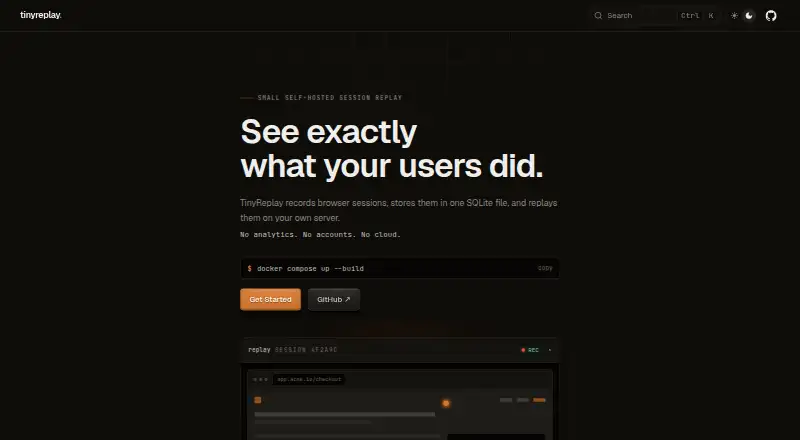
What tinyreplay is
tinyreplay is an open-source browser session replay tool that collects browser activity through an SDK, saves replay batches in SQLite, and presents them in a local dashboard. It is aimed at indie developers and small teams who want to inspect sessions without adopting a full analytics platform. The SDK captures console and error messages, as well as network method, URL, status, and duration metadata. It does not read network bodies or headers, cookies, or browser storage beyond its session ID in sessionStorage. Input masking is enabled by default, and teams can mark elements for masking or exclusion before replay events are sent. Session data stays in a local SQLite database; retention remains off unless RETENTION_DAYS is configured. The project can run from source or in Docker, with the SQLite data directory mounted to preserve data. The browser SDK is available as a server-served UMD bundle or through the @tinyreplay/sdk npm package. Its MIT-licensed, pre-1.0 project status means APIs, storage, configuration, and dashboard behavior may change before version 1. The documented ingestion defaults are 100 requests per minute per IP and a maximum body size of 5,000,000 bytes.
Who it suits
tinyreplay suits indie developers and small teams who need to inspect browser sessions and prefer local SQLite storage over a full analytics platform. It is a fit for projects that can manage their own deployment and access controls.
What it does well
- Input masking is enabled by default.
- Marked elements can be masked or excluded.
- Session data is stored in local SQLite.
- SDK can be served as UMD or installed through npm.
- MIT-licensed and free to self-host.
What to know first
- It does not provide mobile SDKs or mobile app capture.
- It lacks funnels, heatmaps, feature flags, and user profiles.
- No hosted storage or accounts are provided.
- The project is pre-1.0 and may change before version 1.
Limits
The free self-hosted plan has no hosted storage or accounts. Documented defaults cap ingestion at 100 requests per minute per IP and 5,000,000 bytes per request body.
Plans
| Plan | Billed and limits | Price |
|---|---|---|
| Open-source (self-hosted) | Self-hosted · no hosted storage or accounts · pre-1.0 | Free |
As tinyreplay.hane.studio lists them, read 9 Oct 2026. The maker's own page has the final word.
Getting started
- Visit https://tinyreplay.hane.studio/ for the project.
- Choose to run it from source or use its Docker image.
- Mount the SQLite data directory when deploying so data persists.
- Load the browser SDK as a server-served UMD bundle or install @tinyreplay/sdk through npm.
- Configure Basic authentication or an ingestion token as needed; use TLS and stronger reverse-proxy access control before external exposure.
Verdict
Choose tinyreplay if you want a free, open-source way to inspect browser sessions with local SQLite storage and masking controls. Look elsewhere if you need hosted storage, mobile capture, or features such as funnels and heatmaps.
Questions
How much does tinyreplay cost?
Its Open-source (self-hosted) plan is free.
Is tinyreplay open source?
Yes. The repository is MIT-licensed.
Where is session data stored?
Replay batches are stored in a local SQLite database. Retention is off unless RETENTION_DAYS is configured.
What does the browser SDK capture?
It records console and error messages plus network method, URL, status, and duration metadata. It does not read network bodies or headers, cookies, or browser storage except its session ID in sessionStorage.
Can tinyreplay be deployed with Docker?
Yes. The project documents Docker deployment and advises mounting the SQLite data directory for persistence.
Does tinyreplay include mobile capture or analytics features?
It does not provide mobile SDKs, funnels, heatmaps, feature flags, or user profiles.
Facts from tinyreplay's own pages
- Access controls
- Dashboard Basic authentication and an ingestion token can be enabled through configuration, and the project advises using TLS and stronger access control via a reverse proxy before external exposure. · github.com, 9 Oct 2026
- Audience
- It is intended for indie developers and small teams inspecting browser sessions without adopting a full analytics platform. · github.com, 9 Oct 2026
- Captured data
- The SDK records console and error messages plus network method, URL, status, and duration metadata; it does not read network bodies or headers, cookies, or browser storage aside from its session ID in sessionStorage. · github.com, 9 Oct 2026
- Deployment
- The project documents running from source or using its Docker image, with the SQLite data directory mounted for persistence. · github.com, 9 Oct 2026
- Ingestion limits
- The documented defaults are 100 ingest requests per minute per IP and a maximum request body of 5,000,000 bytes. · github.com, 9 Oct 2026
- Integration
- A browser SDK can be loaded as a server-served UMD bundle or installed as the @tinyreplay/sdk npm package. · github.com, 9 Oct 2026
- License and support
- The repository is MIT-licensed and directs security issue reports to a private channel described in its security policy. · github.com, 9 Oct 2026
- Local storage
- Session data is stored in a SQLite database, and retention is off by default unless RETENTION_DAYS is configured. · github.com, 9 Oct 2026
- Maturity
- tinyreplay is pre-1.0, and its APIs, storage format, configuration, and dashboard behavior may change before version 1. · github.com, 9 Oct 2026
- Notable omissions
- The project says it does not provide funnels, heatmaps, feature flags, user profiles, mobile SDKs, hosted storage, SSO, distributed ingestion, or compliance guarantees. · github.com, 9 Oct 2026
- Privacy masking
- Input masking is enabled by default, and marked elements can be masked or excluded before replay events are sent to the server. · github.com, 9 Oct 2026
- Purpose
- tinyreplay records browser sessions with a browser SDK, stores replay batches in local SQLite, and displays them in a local dashboard. · github.com, 9 Oct 2026
Where tinyreplay stands on Freedom251
- Session Recording Software#15 of 30