Freedom251 › Collage Maker Software
TileKoala
What TileKoala is
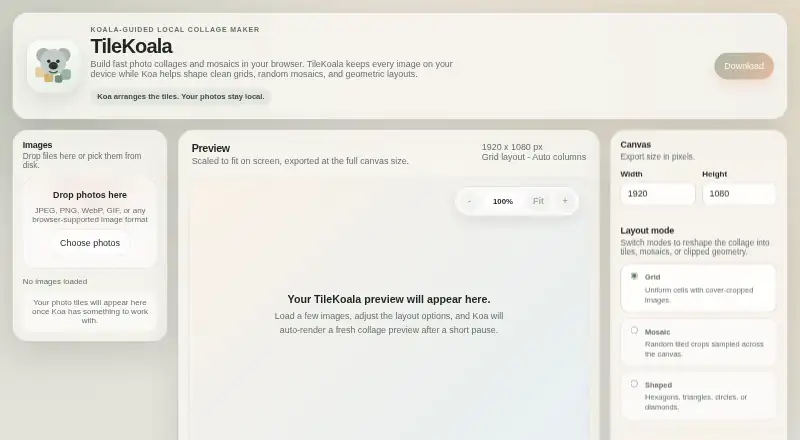
TileKoala is a free browser-based tool for creating photo collages and mosaics while keeping image files on the user's device. It offers grid layouts with uniform, cover-cropped cells, as well as mosaics made from randomly sampled tiled crops. Shaped layouts include hexagons, triangles, circles, and diamonds. Users can add JPEG, PNG, WebP, GIF, or other formats supported by their browser, set canvas dimensions, and download a PNG or JPEG. The stated maximum canvas size is 10000 by 10000 pixels. TileKoala says it runs entirely in the browser, without uploads, external requests, sign-up, analytics, dependencies, or tracking. It can also be run as a single HTML file opened directly in a browser. Downloaded files contain an embedded EXIF/XMP credit linking to TileKoala; the page says no other additions are made. The maker is Small Red Flowers, based in Vancouver, British Columbia. The tool is intended for creators preparing collages to share, print, or edit further.
Who it suits
TileKoala suits creators who want to assemble photos into grid, mosaic, or shaped collages in a browser. Its local processing may appeal to people who want images to stay on their device.
What it does well
- Free plan includes PNG and JPEG exports.
- Supports grid, mosaic, and shaped layouts.
- Canvas can be up to 10000 by 10000 pixels.
- Images are processed in the browser, according to the page.
- Can run from a single HTML file.
What to know first
- Exported files include a TileKoala credit.
- Use depends on formats supported by the browser.
Limits
The Free plan supports PNG or JPEG export and a maximum canvas size of 10000 × 10000 pixels. Exported files include an embedded EXIF/XMP credit linking to TileKoala.
Plans
| Plan | Billed and limits | Price |
|---|---|---|
| Free | Runs in browser · PNG or JPEG export · Canvas up to 10000 × 10000 pixels | Free |
As tilekoala.com lists them, read 11 Oct 2026. The maker's own page has the final word.
Getting started
- Open https://tilekoala.com/ in a browser
- Load TileKoala as a single HTML file if preferred
- Add supported image files such as JPEG, PNG, WebP, or GIF
- Choose a grid, mosaic, or shaped layout and set canvas dimensions
- Download the result as PNG or JPEG
Verdict
TileKoala offers several collage styles and image exports without uploading source images, according to its page. Note the embedded credit in downloaded files and the browser-supported format requirement.
Questions
How much does TileKoala cost?
The Free plan costs nothing.
Where does TileKoala process images?
It runs entirely in the browser, and the page says images are never uploaded or sent anywhere.
What layouts are available?
TileKoala offers grid, mosaic, and shaped layouts, including hexagons, triangles, circles, and diamonds.
Which image formats can be added?
You can add JPEG, PNG, WebP, GIF, and other formats supported by the browser.
Which export formats and canvas size are supported?
Exports are PNG or JPEG. The stated maximum canvas size is 10000 × 10000 pixels.
Is sign-up required?
The page says TileKoala has no sign-up, analytics, external requests, dependencies, or tracking.
Facts from TileKoala's own pages
- Distribution
- TileKoala works as a single HTML file opened directly in a browser, according to the page. · tilekoala.com, 11 Oct 2026
- Downloaded file metadata
- Downloaded files include an embedded EXIF/XMP credit linking back to TileKoala, and the page says nothing else is added. · tilekoala.com, 11 Oct 2026
- Export
- Users can set canvas dimensions and download a PNG or JPEG; the page states a maximum canvas size of 10000 by 10000 pixels. · tilekoala.com, 11 Oct 2026
- Grid controls
- Grid layouts use uniform cells with cover-cropped images, and the columns can be set to auto-fit. · tilekoala.com, 11 Oct 2026
- Headquarters
- Vancouver, British Columbia, Canada · tilekoala.com, 28 Sept 2026
- Image input
- Users can add JPEG, PNG, WebP, GIF, or other browser-supported image formats. · tilekoala.com, 11 Oct 2026
- Intended users
- The page describes the tool as helping creators turn a folder of photos into collages for sharing, printing, or further editing. · tilekoala.com, 11 Oct 2026
- Layouts
- It offers grid, mosaic, and shaped layouts, including hexagons, triangles, circles, and diamonds. · tilekoala.com, 11 Oct 2026
- Local processing
- The page says TileKoala runs entirely in the browser and images are never uploaded or sent anywhere. · tilekoala.com, 11 Oct 2026
- Maker
- The page identifies Small Red Flowers as the maker and says it is grown in Vancouver, BC. · tilekoala.com, 11 Oct 2026
- Mosaic controls
- Mosaic layouts use random tiled crops sampled across the canvas. · tilekoala.com, 11 Oct 2026
- Privacy
- The page says there are no uploads, analytics, external requests, sign-up, dependencies, or tracking. · tilekoala.com, 11 Oct 2026
- Purpose
- TileKoala makes photo collages and mosaics in a browser while keeping images on the user's device. · tilekoala.com, 11 Oct 2026
Where TileKoala stands on Freedom251
- Collage Maker Software#28 of 34