Freedom251 › Pomodoro Timer Apps
Tide
What Tide is
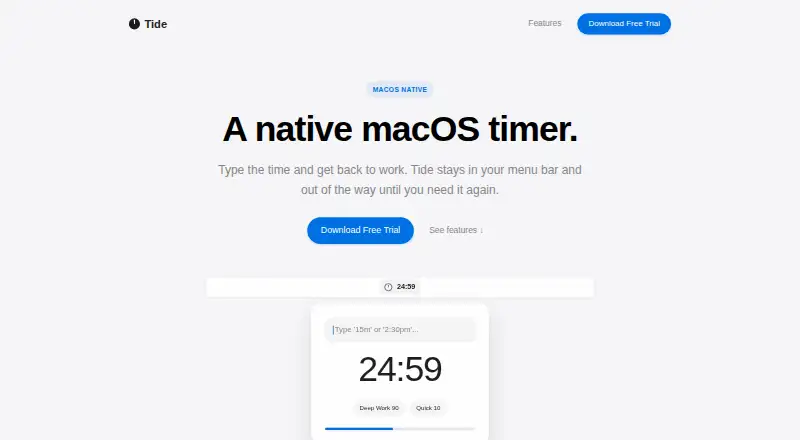
Tide is a native macOS menu bar timer for countdowns and focus cycles. Its menu bar window offers regular countdowns alongside classic 25/5 Pomodoro sessions. You can create a timer by entering a duration such as “15m” or “25 minutes,” or a clock time such as “2:30 pm.” Favorite durations can be saved as presets and started with one click. Tide can repeat focus blocks automatically, while the remaining time stays visible in the menu bar. Custom intervals and automatic break starts are supported. Subtle alert sounds are designed to work with macOS Focus and Do Not Disturb. The maker presents Tide for deep work, meetings, indie builders, and Pomodoro users. It has no accounts, projects, or dashboards. The app runs locally, creates no account, and sends no usage data; it also includes no third-party analytics or advertising. A free trial is offered. The Tide — Lifetime License costs $2.99 as a one-time payment, includes all features and free updates in the 1.x series, with no subscriptions or upsells.
Who it suits
Tide suits macOS users who want menu bar timers for deep work, meetings, or Pomodoro cycles. It also fits people who prefer local operation without accounts or dashboards.
What it does well
- Regular and 25/5 Pomodoro timers
- Quick duration and clock-time entry
- One-click presets for favorite durations
- Automatic focus-block repeating
- Local operation without analytics or advertising
What to know first
- macOS is the only listed platform
- No free plan
- Lifetime license costs 2.99 USD once
Plans
| Plan | Billed and limits | Price |
|---|---|---|
| Tide — Lifetime License | One-time payment · All features included · Free updates in the 1.x series · No subscriptions or upsells | $2.99, paid once |
As tideapp.co lists them, read 10 Oct 2026. The maker's own page has the final word.
Verdict
Tide keeps countdowns and Pomodoro cycles in a focused macOS menu bar window. Its one-time license, local operation, presets, and repeat cycles suit users who want a compact timer without accounts.
Facts from Tide's own pages
- Alerts
- Tide includes subtle alert sounds and says they work with macOS Focus and Do Not Disturb. · tideapp.co, 10 Oct 2026
- Auto-repeat
- Tide can automatically loop focus blocks, with the remaining time updating in the menu bar. · tideapp.co, 10 Oct 2026
- Intended users
- The site describes uses for deep work, meetings, indie builders, and people who use Pomodoro cycles. · tideapp.co, 10 Oct 2026
- Local data
- The privacy policy says the macOS app runs locally, creates no account, sends no usage data, and includes no third-party analytics or advertising. · tideapp.co, 10 Oct 2026
- No account
- The maker says Tide has no accounts, projects, or dashboards. · tideapp.co, 10 Oct 2026
- Presets
- Users can save favorite durations and start them with one click. · tideapp.co, 10 Oct 2026
- Product
- Tide is a native macOS menu bar timer designed to stay out of the way until needed. · tideapp.co, 10 Oct 2026
- Purchase data
- The privacy policy says a payment provider processes purchases, but its identity and linked privacy policy are shown as placeholders. · tideapp.co, 10 Oct 2026
- Quick add
- Users can enter durations or times such as “15m,” “25 minutes,” or “2:30 pm” to create a timer. · tideapp.co, 10 Oct 2026
- Support data
- The privacy policy says support emails may include the sender’s email address, message, and any information they choose to attach. · tideapp.co, 10 Oct 2026
- Timer modes
- It offers regular countdown timers and classic 25/5 Pomodoro cycles in the same menu bar window. · tideapp.co, 10 Oct 2026
- Trial
- The maker advertises a free trial but does not state its duration on the page. · tideapp.co, 10 Oct 2026
Where Tide stands on Freedom251
- Pomodoro Timer Apps#28 of 28