Freedom251 › File Shredder Software
The Devourer
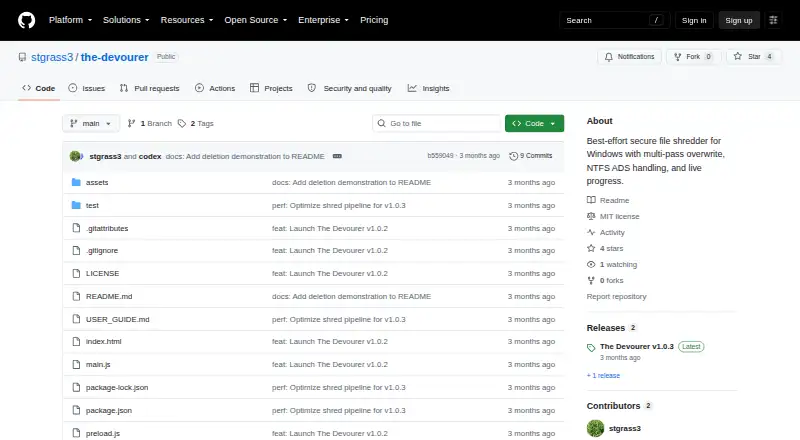
What The Devourer is
The Devourer is a free, open-source portable utility for shredding one regular file at a time on Windows 10 or Windows 11 x64. It overwrites the file’s primary stream and detected NTFS alternate data streams through four passes: zeroes, ones, cryptographically secure random data, then zeroes. Normal, Aggressive, and Extreme modes offer different approaches: Aggressive adds a Windows ReTrim request, while Extreme also writes temporary random data into free space on the same volume. Before overwriting, the app checks media type, TRIM, BitLocker, and Volume Shadow Copies and displays warnings where needed. It refuses directories, symbolic links, reparse points, files with multiple hard links, and files locked by another process. File processing stays local, without telemetry, analytics, accounts, remote storage, automatic uploads, or a runtime network API. The packaged app needs no installer; administrator access is required only for Aggressive and Extreme modes. The project uses the MIT License. Its guide says the release executable is unsigned and recommends obtaining it from the official repository and comparing its SHA-256 checksum. The tool offers best-effort deletion, not guaranteed physical erasure across wear leveling, snapshots, backups, cloud-sync replicas, or other copies.
Who it suits
The Devourer suits Windows users who want a portable, local utility for overwriting individual files, with Normal mode described as appropriate for most users. Extreme mode is a special-case choice for users willing to accept potentially long operation and heavy drive writes.
What it does well
- Free and open source under the MIT License.
- Runs portably on Windows 10 and Windows 11 x64.
- Uses four overwrite passes on primary and detected NTFS alternate streams.
- Offers Normal, Aggressive, and Extreme modes.
- Processes files locally without telemetry or runtime network API.
What to know first
- Handles one regular file at a time; folders and drives are not supported.
- Physical erasure cannot be guaranteed across wear leveling or external copies.
- Aggressive and Extreme modes require administrator access.
- The release executable is not code-signed.
Limits
The free portable app handles one regular file at a time and does not wipe folders or drives. It cannot guarantee physical erasure across SSD wear leveling, snapshots, backups, cloud-sync replicas, or other external copies.
Plans
| Plan | Billed and limits | Price |
|---|---|---|
| The Devourer | Portable Windows x64 app · one regular file at a time · no installer | Free |
As github.com lists them, read 9 Oct 2026. The maker's own page has the final word.
Getting started
- Open the official GitHub repository and its release page.
- Download The-Devourer-1.0.3-portable-x64.exe for Windows 10/11 x64.
- Compare the executable’s SHA-256 checksum as advised in the user guide.
- Run the portable app; no installer is required.
- Choose a mode and select a regular file to process.
- Use administrator access for Aggressive or Extreme mode.
Verdict
Choose The Devourer for portable, local shredding of individual files on a supported Windows x64 system. Its checks and selectable modes support different deletion scenarios, but it cannot guarantee erasure from SSD wear leveling, snapshots, backups, cloud-sync replicas, or other copies. Look elsewhere if you need folder or whole-drive wiping.
Questions
How much does The Devourer cost?
The plan is listed as free. The project is open source under the MIT License.
Is there a free trial?
No. The Devourer is free, and its listed free-trial status is no.
Which platforms does it support?
It runs on Windows 10 or Windows 11 x64.
Can it wipe folders or drives?
No. It handles one regular file at a time; folder and drive wiping are not supported.
Does it work offline and keep files local?
The runtime app processes files locally and has no runtime network API, accounts, remote storage, automatic uploads, telemetry, or analytics.
Is the release executable signed?
The user guide says it is not code-signed and advises downloading from the official repository and comparing its SHA-256 checksum.
Facts from The Devourer's own pages
- Deletion modes
- It offers Normal, Aggressive, and Extreme modes; Aggressive adds a Windows ReTrim request, and Extreme also fills same-volume free space with temporary random data. · github.com, 9 Oct 2026
- Download
- The release page offers The-Devourer-1.0.3-portable-x64.exe for Windows 10/11 x64. · github.com, 9 Oct 2026
- License
- The project is available under the MIT License. · github.com, 9 Oct 2026
- Limitations
- It cannot guarantee physical erasure across SSD wear leveling, snapshots, backups, cloud-sync replicas, or other external copies. · github.com, 9 Oct 2026
- Overwrite
- It overwrites the primary file stream and detected NTFS alternate data streams with four passes: zeroes, ones, cryptographically secure random data, and zeroes. · github.com, 9 Oct 2026
- Privacy
- The runtime app processes files locally and has no telemetry, analytics, accounts, remote storage, automatic uploads, or runtime network API. · github.com, 9 Oct 2026
- Purpose
- The Devourer is a portable Windows utility for best-effort, multi-pass local file shredding. · github.com, 9 Oct 2026
- Requirements
- The packaged app runs on Windows 10 or Windows 11 x64, and administrator access is required only for Aggressive and Extreme modes. · github.com, 9 Oct 2026
- Safety checks
- It rejects directories, symbolic links, reparse points, multiply hard-linked files, and files locked by another process. · github.com, 9 Oct 2026
- Security architecture
- The Electron renderer is sandboxed with context isolation, disabled Node integration, and a narrow preload API. · github.com, 9 Oct 2026
- Signing
- The user guide states that the release executable is not code-signed and advises downloading from the official repository and comparing its SHA-256 checksum. · github.com, 9 Oct 2026
- Storage warnings
- Before overwriting, it checks media type, TRIM, BitLocker, and Volume Shadow Copies, and displays warnings where needed. · github.com, 9 Oct 2026
- Support
- The user guide directs users with persistent problems to open an issue on the GitHub issue tracker and says not to attach the sensitive file. · github.com, 9 Oct 2026
- Who it is for
- The user guide describes Normal mode as appropriate for most users and Extreme mode as a special-case option that can take a long time and write heavily to the drive. · github.com, 9 Oct 2026
Where The Devourer stands on Freedom251
- File Shredder Software#18 of 27