Freedom251 › Texture Libraries
Texturelabs
What Texturelabs is
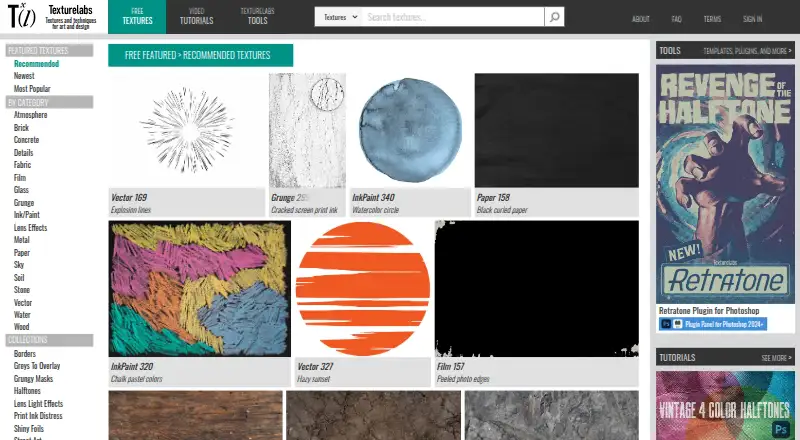
Texturelabs is an online source of original textures, tutorials, and custom tools for art and design. Its texture categories range from atmosphere, brick, concrete, and fabric to paper, sky, stone, water, and wood. Tutorials cover Photoshop and After Effects. The Tools section includes Photoshop actions, brushes, gradient maps, patterns and plugins, as well as After Effects templates, bulk downloads, and lossless textures. Resources may be used in personal and commercial projects such as film, advertising, print, apparel, and video games, subject to restrictions: they cannot be resold, redistributed, or repackaged as competing design products, or used to train or assist AI image-generation systems. Retratone offers print-style halftones, pattern styles, custom inks, and 100 saveable presets. Distressor is a Photoshop panel with 14 distress styles. The free textures and tutorials plan costs nothing. One-time paid options include Distressor at 39.00 USD, bulk downloads and lossless textures at 40.00 USD, and Retratone at 45.00 USD.
Who it suits
It suits artists and designers looking for textures, tutorials, or Photoshop and After Effects resources, including for commercial projects within the stated terms.
What it does well
- Free original textures and tutorials are available.
- Commercial use is allowed under the stated terms.
- Includes tutorials for Photoshop and After Effects.
- Retratone includes 100 built-in presets.
- Offers bulk downloads and lossless textures.
What to know first
- Resources cannot be resold or repackaged as competing products.
- AI image-generation training or assistance is prohibited.
- Plugins require specified Photoshop versions and Creative Cloud installation.
- Initial plugin activation requires an internet connection.
Limits
The free textures and tutorials plan provides those resources; paid options include bulk downloads and lossless textures, Distressor for Photoshop, and Retratone for Photoshop. Distressor is limited to one user and up to two devices and requires Photoshop 2022+; Retratone requires Photoshop 2024+ and is listed for one user and up to two devices.
Plans
| Plan | Billed and limits | Price |
|---|---|---|
| Free textures and tutorials | Free original textures and tutorials · commercial use allowed under terms | Free |
| Distressor Plugin for Photoshop | One-time purchase · Photoshop 2022+ · one user · up to two devices | $39, paid once |
| Bulk Downloads + Lossless Textures | One-time pass · Bulk downloads · lossless textures · Texturelabs login access | $40, paid once |
| Retratone Plugin for Photoshop | Limited time launch price · Photoshop 2024+ · one user · up to two devices | $45, paid once |
As texturelabs.org lists them, read 4 Oct 2026. The maker's own page has the final word.
Getting started
- Visit https://texturelabs.org/ to browse textures, tutorials, and tools.
- Choose free textures and tutorials, or select a listed one-time purchase.
- For Retratone, use Photoshop 2024 or later and install through Adobe Creative Cloud.
- For Distressor, use Photoshop 2022 or later and install through Adobe Creative Cloud.
- For either plugin, have a license key and an internet connection for initial activation.
Overview
Texturelabs is a web-based source of original photographic textures, tutorials and creative tools for visual artists and designers. It suits people building texture-led work in Photoshop or After Effects, especially those who want free assets before committing to a focused plugin. Its main trade-off is clear: commercial use is permitted, but redistribution and AI-training use are not.
Key features
The library covers atmosphere, brick, concrete, fabric, film, glass, grunge, ink and paint, metal, paper, sky, stone, water and wood. That variety makes it a useful source for image-based materials across different kinds of design, though it is not a general-purpose design application. Assets are photographic and come in JPG, PNG and EPS formats.
Photoshop and After Effects tutorials are paired with a Tools section containing Photoshop actions, brushes, gradient maps, patterns and plugins, plus After Effects templates, bulk downloads and lossless textures. This makes Texturelabs more than a texture catalogue for users of those Adobe applications; the tutorials can help users put the resources to work.
Retratone makes print-style halftones, with multiple pattern styles, custom inks and 100 built-in presets that can be saved. Distressor is a Photoshop panel for distress effects, offering 14 styles based on real-world samples. Both are specific creative tools rather than broad editing environments. Retratone requires Photoshop 2024 or later, while Distressor requires Photoshop 2022 or later; both are installed through Adobe Creative Cloud. Initial activation requires a license key and an internet connection.
Textures can be used in personal and commercial work, including film, advertising, print, apparel and video games. They cannot be resold, redistributed or repackaged as texture packs, templates, stock assets or competing design products. Texturelabs also prohibits using its resources to train or assist AI image-generation models or algorithms. Those terms suit creators using the assets in finished work, not businesses looking to redistribute source materials or incorporate them into AI workflows.
Pricing
The free textures and tutorials plan costs nothing and allows commercial use under the stated terms. It is the natural starting point for anyone who needs source textures or instruction without buying a tool.
Distressor costs $39, paid once as a one-time purchase. It covers one user on up to two devices and requires Photoshop 2022 or later, making it the lower-cost plugin option for artists who specifically want distress effects. Retratone costs $45, paid once at a limited time launch price, also for one user on up to two devices; its Photoshop 2024+ requirement makes it a narrower fit despite its saved presets and print-style treatments.
Bulk Downloads + Lossless Textures costs $40, paid once as a one-time pass and includes bulk downloads, lossless textures and Texturelabs login access. This is the paid option for users who need those download features rather than a Photoshop effect. The free plan remains useful for ordinary texture and tutorial access, while paid plans add particular tools or download capabilities rather than a broad subscription bundle.
Platforms
Texturelabs is available on the web, macOS and Windows. Retratone and Distressor specifically depend on Adobe Photoshop and Creative Cloud installation, so the platform listing alone does not make either plugin suitable for every desktop setup.
Who it's for
Texturelabs is a strong fit for designers, artists and video creators seeking photographic textures, Adobe-app tutorials or a particular halftone or distress effect. It is less suitable for anyone who needs unrestricted redistribution rights, AI-training material, or a plugin compatible with an older Photoshop version than its minimum requirement.
Pros and cons
- Pros: A broad set of texture categories and JPG, PNG and EPS assets gives creators several kinds of photographic source material.
- Pros: Free textures and tutorials allow users to start without a purchase, and commercial use is allowed within the stated terms.
- Pros: The one-time plugin purchases offer defined effects, with Distressor supporting Photoshop 2022+ and up to two devices for one user.
- Cons: Retratone requires Photoshop 2024+, and both plugins require Creative Cloud installation, limiting their appeal to users outside that setup.
- Cons: The ban on resale, redistribution and AI-training use rules out several common ways of reusing asset libraries.
Alternatives
ambientCG is the better choice for users seeking free downloadable assets under a CC0 license, with access across web, desktop and API platforms. Mextures suits readers comparing paid texture packs and memberships, including an X-Film Overlay Pack at $10 a month and a yearly membership at $89 a year.
Poliigon is worth considering when PBR textures, models and HDRIs matter alongside local search and drag-and-drop import in its free Polydex Core plan. SketchUp Texture Club offers a free account with up to 15 low- and medium-resolution downloads per day, while some textures are unavailable on that tier.
Textures.com offers a free sample selection through a free account and a Starter plan at $13 a month with 1,000 credits per month. Architextures may suit personal and educational users who want standard texture downloads for free, with a paid Pro plan for high-resolution downloads.
CGBookcase is a free alternative with 566 textures under a CC0 1.0 license and a free, open-source tiling tool. FreePBR is another option for readers comparing free PBR textures.
Verdict
Choose Texturelabs if you want original photographic textures and tutorials at no cost, or if Retratone’s halftones or Distressor’s distress effects match a specific Photoshop workflow. The free entry point and focused one-time purchases are its strongest advantages. Look elsewhere if you need broad redistribution rights, AI-training use, or tools that do not depend on the stated Photoshop versions and Creative Cloud installation.
Verdict
Texturelabs combines free assets and tutorials with paid downloads and Photoshop plugins. Check the reuse restrictions and the listed Photoshop requirements before using its resources or plugins.
Questions
Are Texturelabs textures free?
The Free textures and tutorials plan costs nothing. Paid options include bulk downloads and lossless textures, as well as Photoshop plugins.
Can I use the textures commercially?
Yes. Personal and commercial use is allowed under the stated terms, including in film, advertising, print, apparel, and video games. Resources cannot be resold, redistributed, or repackaged as competing design products.
What does Retratone do, and what does it cost?
Retratone provides print-style halftones, pattern styles, custom inks, and 100 built-in presets that can be saved. Its listed limited-time launch price is $45 as a one-time purchase; it requires Photoshop 2024+.
What does Distressor do, and what does it cost?
Distressor is a Photoshop panel for distress effects with 14 styles based on real-world samples. It costs $39 as a one-time purchase and requires Photoshop 2022+.
Can Texturelabs resources be used to train AI image-generation systems?
No. The site prohibits using its resources to train or assist AI image-generation models or algorithms.
How are the plugins installed and activated?
Retratone and Distressor require Adobe Photoshop and installation through Adobe Creative Cloud. Activation requires a license key and an internet connection for the initial activation.
Facts from Texturelabs's own pages
- AI restriction
- The site prohibits using its resources to train or assist AI image generation models or algorithms. · texturelabs.org, 4 Oct 2026
- Analytics and store
- The privacy policy says Texturelabs uses WooCommerce for its store and Google Analytics to understand site use. · texturelabs.org, 4 Oct 2026
- Commercial use
- Textures may be used in personal and commercial work, including film, advertising, print, apparel, and video games, subject to the stated restrictions. · texturelabs.org, 4 Oct 2026
- Distressor features
- Distressor is a Photoshop panel for applying distress effects and offers 14 styles based on real-world samples. · texturelabs.org, 4 Oct 2026
- Founded
- 2018 · texturelabs.org, 28 Sept 2026
- Integrations
- Retratone and Distressor require Adobe Photoshop and installation through Adobe Creative Cloud; their listed minimum versions are Photoshop 2024+ and 2022+, respectively. · texturelabs.org, 4 Oct 2026
- Plugin activation
- Plugin activation requires a license key and an active internet connection for the initial activation only. · texturelabs.org, 4 Oct 2026
- Redistribution limits
- Texture resources may not be resold, redistributed, or repackaged as texture packs, templates, stock assets, or other competing design products. · texturelabs.org, 4 Oct 2026
- Retratone features
- Retratone offers print-style halftones, multiple pattern styles, custom inks, and 100 built-in presets with the option to save presets. · texturelabs.org, 4 Oct 2026
- Security
- The privacy policy says card payments are processed through Stripe, sensitive information is transmitted using SSL, and payment card details are not stored on Texturelabs servers after a transaction. · texturelabs.org, 4 Oct 2026
- Support
- The FAQ says the site is run by one person and invites users to contact the maker by email for help. · texturelabs.org, 4 Oct 2026
- Texture library
- Textures are offered in categories including atmosphere, brick, concrete, fabric, film, glass, grunge, ink and paint, metal, paper, sky, stone, water, and wood. · texturelabs.org, 4 Oct 2026
- Tools
- The Tools section includes Photoshop actions, brushes, gradient maps, patterns and plugins, After Effects templates, bulk downloads, and lossless textures. · texturelabs.org, 4 Oct 2026
- Tutorials
- The site provides Photoshop and After Effects tutorials. · texturelabs.org, 4 Oct 2026
- What it is
- Texturelabs is an online source of free, original textures, tutorials, and custom tools for art and design. · texturelabs.org, 4 Oct 2026
Where Texturelabs stands on Freedom251
- Texture Libraries#18 of 27