Freedom251 › Photo Preset Libraries
Mextures
by Mextures
What Mextures is
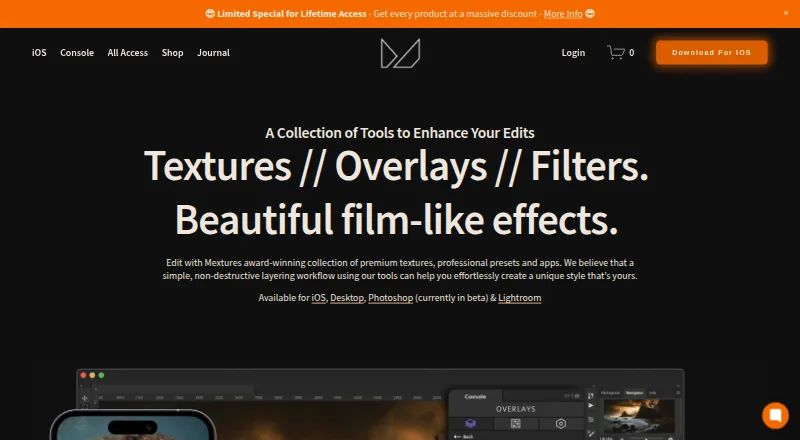
Mextures provides photo-editing textures, overlays, film presets, and tools for creating film-like effects. Its iOS editor offers unlimited layers that can be moved, hidden, rotated, and adjusted for opacity. The iOS product page lists more than 200 stackable textures, including grain, dust, light leaks, and color gradients, along with 30 film presets and more than 300 Formulas. Formula Manager lets users import other people’s Formulas and export their own. Film Presets work with Console, Lightroom CC 2021/2022, Final Cut Pro, and Adobe Premiere, with separate software-specific versions required for separate purchases. Console is a free Photoshop plugin, but the maker warns that its current version crashes with the latest Photoshop and macOS Sonoma. Film Presets are not conversion LUTs, so RAW or LOG footage needs normalization first. The iOS app costs 1.99 USD once, while the X-Film Overlay Pack costs $10 a month. Commercial projects are permitted, but resale or redistribution requires written consent.
Who it suits
Mextures suits photographers, filmmakers, and designers working on projects such as portraits, album art, social media, or blogs. Its layers, textures, and Formula sharing also suit users who want to build and exchange film-like edits.
What it does well
- Unlimited adjustable layers in the iOS app
- More than 200 stackable textures
- 30 film presets and over 300 Formulas
- Commercial client projects are permitted
What to know first
- Console currently crashes with latest Photoshop and macOS Sonoma
- RAW or LOG footage needs normalization before Film Presets
- Resale or redistribution requires written consent
Limits
The $10 a month X-Film Overlay Pack includes 11 overlays at 4000 x 4000 pixels. The 1.99 USD once iOS app offers in-app purchases. Mextures Yearly Membership is $89 a year, and desktop purchase does not unlock iOS in-app purchases.
Plans
| Plan | Billed and limits | Price |
|---|---|---|
| X-Film Overlay Pack | 11 overlays · 4000 x 4000 pixels | $10 a month |
| Mextures Yearly Membership | Per Year · all products during subscription · packs released during subscription · beta Console access · desktop purchase does not unlock iOS in-app purchases | $89 a year |
| Console | Photoshop plugin · currently in beta · maker notes crash issue with latest Photoshop and macOS Sonoma | Free |
| Mextures Lifetime Membership | Pay Once · all Mextures products for life · future overlay and color grade packs · beta Console access · desktop purchase does not unlock iOS in-app purchases | $139, paid once |
| Mextures Photo Editor | iOS app · in-app purchases also offered | $1.99, paid once |
As mextures.com lists them, read 20 Sept 2026. The maker's own page has the final word.
Getting started
- Visit the Mextures website to view its products and plans
- Choose the 1.99 USD once Mextures Photo Editor for iOS, or a listed membership
- Choose the $10 a month X-Film Overlay Pack if you need its 11 overlays
- Install the free Console Photoshop plugin if your Photoshop and operating system are compatible
- Select the Film Preset version for the editing software you use
Mextures is a photo-effects toolkit that combines an iOS editor with film presets, textures and shareable editing recipes. It best suits photographers and visual creators building layered, film-like images; it is less suited to workflows that need RAW or LOG conversion before applying looks.
Overview
Mextures centers on stacking textures and effects rather than serving as an all-purpose photo editor. Its adjustable iOS layers give users room to revise a look element by element, and Formula sharing makes those treatments easier to reuse. Desktop use is less straightforward: Console is free but in beta, and its maker warns that the current version crashes with the latest Photoshop and macOS Sonoma.
Key features
- Layer-based editing: The iOS app supports unlimited layers that can be moved, hidden, rotated and adjusted for opacity. That flexibility is useful when a single preset is too blunt, though it is specifically an effects workflow rather than a complete editing suite.
- Texture and preset collection: The iOS product includes more than 200 stackable textures, including grain, dust, light leaks and color gradients, along with 30 film presets and more than 300 professionally created Formulas. The range supports stylized images, but its emphasis is on texture and film character.
- Formula Manager: Users can import Formulas from other Mextures users and export their own. That makes it easier to share or reuse an effect recipe instead of rebuilding the same layered treatment from scratch.
- Desktop and video use: Console is a free Photoshop plugin, compatible with Photoshop CC 2016–2023 on Windows 10 or newer and macOS 11 or newer. Film Presets also work with Console, Lightroom CC 2021/2022, Final Cut Pro and Adobe Premiere, with software-specific versions requiring separate purchases. These presets are not conversion LUTs, so RAW or LOG footage must be normalized first; the current Console beta crash warning also makes it a cautious choice for desktop reliance.
- Usage rights: The terms allow texture use in personal projects and work for commercial or paid clients, but resale or redistribution requires written consent.
Pricing
Mextures is paid overall, with a free Console plugin and a paid iOS app. The app costs $1.99, paid once, with in-app purchases also offered. It is the lowest-cost route into the editor, but desktop purchases do not unlock iOS in-app purchases.
- X-Film Overlay Pack: $10 a month for 11 overlays at 4000 x 4000 pixels. It suits someone seeking a specific overlay pack rather than the full product collection.
- Mextures Yearly Membership: $89 a year, billed Per Year. It includes all products during the subscription, packs released during that subscription and beta Console access. The subscription framing means its all-product access is tied to the membership period.
- Mextures Lifetime Membership: $139 a month, billed Pay Once. It includes lifetime access to all Mextures products, future overlay and color-grade packs, with no yearly subscription. Its stated billing term is Pay Once, unlike the yearly plan.
- Console: free for the Photoshop plugin. It is the no-cost desktop option, but remains in beta and carries the current crash warning.
Film Presets require versions for the relevant software, which are separate purchases. No free trial is offered.
Platforms
Mextures lists iOS, macOS and Windows. The iOS editor is the layer-based app; Console is for Photoshop on supported Windows and macOS systems. The maker also names Lightroom CC 2021/2022, Final Cut Pro and Adobe Premiere as compatible with Film Presets, with separate software-specific versions required.
Who it's for
Mextures is a strong fit for photographers, filmmakers and designers making work where texture and film-like effects are part of the intended look. The maker’s use cases include landscape, portrait and macro photography, album art, matte painting, social media and blogs. It is less appropriate when the central need is broad image correction or direct RAW/LOG conversion.
Pros and cons
Pros
- Unlimited adjustable iOS layers allow individual effects to be revised instead of accepting a preset as a fixed result.
- More than 200 textures, 30 film presets and 300-plus Formulas provide a varied effects palette.
- Formula import and export support sharing and reusing custom looks.
- Commercial client use is permitted for the textures, while the free Console plugin offers a desktop entry point.
Cons
- Console is in beta and the current version crashes with the latest Photoshop and macOS Sonoma, limiting confidence in a desktop-first setup.
- Film Presets are not conversion LUTs; RAW and LOG footage needs normalization before their use.
- Software-specific Film Preset versions require separate purchases, and desktop purchases do not unlock iOS in-app purchases.
- Textures cannot be resold or redistributed without written consent.
Alternatives
Choose VSCO if a freemium option across web, iOS and Android with a 15-preset free Starter plan or a 200-plus preset Plus plan better fits your platform and preset needs.
Greater Than Gatsby is a better match for buyers seeking a large Lightroom preset bundle: its Complete Presets Bundle includes 641 presets for Lightroom CC and Classic CC, Camera Raw, Mac and PC.
Consider RNI Films for a freemium alternative available on Android, iOS, macOS and Windows.
Signature Edits may suit buyers who prefer one-time Lightroom preset collections, including a Clean & Classic collection at $59, paid once.
For a photographer-led preset toolkit, Visual Flow offers its B&W Mixer at $110, paid once.
Goodlight Presets is another paid alternative across Windows, macOS, iOS and Android.
Lumina Lightroom Presets offers a freemium option across Windows, macOS, iOS and Android.
PresetLove is a freemium alternative spanning web, Windows, macOS, iOS and Android.
For broader discovery, browse Photo Preset Libraries, Texture Libraries or Photo Editing Software.
Verdict
Choose Mextures if your priority is building distinctive, layered film-like effects in an iOS editor and sharing reusable Formula recipes. The breadth of textures and presets gives it a clear creative niche, but RAW/LOG normalization needs and Console’s beta crash issue are good reasons to look elsewhere for a dependable conversion or desktop-first workflow.
Verdict
Mextures combines a large texture and preset collection with layer-based iOS editing and Formula sharing. Check Console compatibility and the normalization requirement before choosing it for a desktop or video workflow.
Questions
Does Mextures have a free plan?
Yes. Console is described as a free Photoshop plugin, and future plugin updates will remain free. The Mextures Photo Editor is listed at $1.99, paid once.
How much does Mextures cost?
The listed options include the X-Film Overlay Pack at $10 a month, Mextures Yearly Membership at $89 a year, Mextures Lifetime Membership at $139 a month, and the Mextures Photo Editor at $1.99, paid once.
Which platforms does Mextures support?
The listed platforms are iOS, macOS, and Windows. Console works with Photoshop CC 2016–2023 on Windows 10 or newer and macOS 11 or newer.
Which editing applications work with Film Presets?
The maker lists Console, Lightroom CC 2021/2022, Final Cut Pro, and Adobe Premiere. Separate purchases require software-specific versions.
Can I use Mextures assets in commercial work?
Yes. The terms permit use in personal projects and projects for commercial or paid clients. Resale or redistribution requires written consent.
Does Mextures offer a free trial?
No. The listed free option is Console, which is currently in beta.
Facts from Mextures's own pages
- Audience
- The maker describes the collection as suitable for photographers, filmmakers, and designers, including landscape, portrait, macro, album art, matte painting, social media, and blogs. · mextures.com, 29 Sept 2026
- Commercial use
- The terms permit using the textures in personal projects and projects for commercial or paid clients, while prohibiting resale or redistribution without written consent. · mextures.com, 29 Sept 2026
- Current beta issue
- The maker warns that the current Console version crashes with the latest Photoshop and macOS Sonoma and says it is working on a fix. · mextures.com, 29 Sept 2026
- Desktop compatibility
- Console works with Photoshop CC 2016–2023 on Windows 10 or newer and macOS 11 or newer, according to its compatibility page. · mextures.com, 29 Sept 2026
- Editing workflow
- The iOS app supports unlimited layers that can be moved, hidden, rotated, and adjusted for opacity. · mextures.com, 29 Sept 2026
- Formula sharing
- The Formula Manager lets users import Formulas from other Mextures users and export their own to share. · mextures.com, 29 Sept 2026
- Founded
- 2012 · mextures.com, 28 Sept 2026
- Free plan
- No · mextures.com, 20 Sept 2026
- Free product
- Console is described as a free Photoshop plugin, and the maker says future plugin updates will remain free. · mextures.com, 29 Sept 2026
- Integrations
- The maker says Film Presets are compatible with Console, Lightroom CC 2021/2022, Final Cut Pro, and Adobe Premiere, with software-specific versions required for separate purchases. · mextures.com, 29 Sept 2026
- Preset limitation
- Film Presets are not conversion LUTs, so RAW or LOG footage needs to be normalized first. · mextures.com, 29 Sept 2026
- Presets
- The iOS product page says the app includes 30 film presets and more than 300 professionally created Formulas. · mextures.com, 29 Sept 2026
- Privacy
- The website privacy policy says it collects analytics such as browser, network, device, referring pages, and IP address, and shares this information with Squarespace for analytics. · mextures.com, 29 Sept 2026
- Product
- Mextures offers photo editing textures, overlays, film presets, and apps for creating film-like effects. · mextures.com, 29 Sept 2026
- Support
- The Console page directs questions to [email protected]. · mextures.com, 29 Sept 2026
- Textures
- The iOS product page describes more than 200 stackable textures, including grain, dust, light leaks, color gradients, and other textures. · mextures.com, 29 Sept 2026
Where Mextures stands on Freedom251
- Photo Preset Libraries#7 of 35
- Texture Libraries#7 of 27
- Photo Editing Software#87 of 160