Tenorshare PDNob
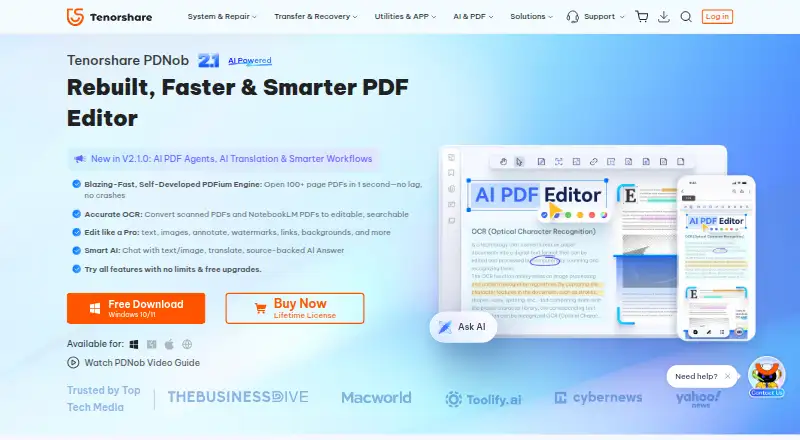
What Tenorshare PDNob is
Tenorshare PDNob is a PDF editor for Windows, macOS, and iOS with tools for changing text and images, annotating pages, creating forms, recognizing scans, and converting files. OCR turns scanned PDFs into editable, searchable documents and exports them to Word, Excel, PowerPoint, or image formats. Its AI features can summarize, translate, explain, rewrite, answer questions with source-linked responses, and assist with PDF tasks. Page tools support adding, deleting, rotating, reordering, splitting, merging, and batch processing. Protection options include password restrictions, redaction, watermarks, and AES-256 encryption. Desktop editing works offline, while cloud sync and AI require internet; the license checks online every 30 days. A free plan and time-unlimited trial are available, with limits on exports, OCR, conversion, batches, AI uses, and page count. Paid licenses include individual, AI add-on, and team options.
Who it suits
PDNob suits individuals or teams handling PDF editing, conversion, OCR, forms, and document organization across Windows, macOS, or iOS. Its AI and collaboration plans target users needing those additional services.
What it does well
- Edits PDF text, images, layouts, and annotations
- OCR creates editable, searchable files from scans
- Converts PDFs to Word, Excel, PowerPoint, and images
- Includes page organization and batch operations
- Desktop editing works offline
What to know first
- Trial limits exports, OCR, conversion, batches, and AI uses
- Cloud sync and AI require an internet connection
- License checks online every 30 days
- Individual and team plans have different allowances
Plans
| Plan | Billed and limits | Price |
|---|---|---|
| Individual 1 Year License | 1 year access · 2 users · 20 GB cloud storage | $159.98 a year |
| Individual Lifetime License | Lifetime access · 2 users · 20 GB cloud storage | $349.95, paid once |
| PDNob AI | Per year · Unlimited AI usage · web, iOS, and desktop · add-on for a PDNob plan | $39.99 a year |
| Team Plan | One-time purchase, lifetime access · 3 users minimum · 30 GB cloud storage · 9,000 AI credits | $524.95, paid once |
| PDNob Team Plan | One-time purchase, lifetime access · 3 users shown · 9,000 AI credits · 30 GB cloud storage · priority support | $104.99, paid once |
| 1 Year License | 1 year · 2 devices · 20 GB cloud storage · no watermark · free upgrades | $49.99 a year |
| Lifetime License | One-time purchase · 2 devices · 20 GB cloud storage · no watermark · lifetime access and free upgrades | $64.99, paid once |
As tenorshare.com lists them, read 20 Sept 2026. The maker's own page has the final word.
Verdict
PDNob covers a broad set of PDF editing, conversion, organization, protection, and AI tasks. Review trial restrictions and the connection requirements to match the license with your workflow.
Facts from Tenorshare PDNob's own pages
- AI tools
- AI features include PDF summaries, translation, chat with source-linked answers, rewriting, explanations, and an agent for PDF tasks. · tenorshare.com, 8 Oct 2026
- Annotation tools
- Yes · tenorshare.com, 20 Sept 2026
- Company
- Tenorshare says it was founded in 2007 and describes itself as a global software company; the opened company page does not state its headquarters. · tenorshare.com, 8 Oct 2026
- Compliance and certifications
- The trust page lists GDPR and CCPA alignment, PCI DSS, CMMI Level 3 assessment, ISO 9001, and ISO 56005, and says SOC 2 is in progress. · tenorshare.com, 8 Oct 2026
- Device limit
- An individual account can be used on up to two Windows or Mac computers simultaneously. · tenorshare.com, 8 Oct 2026
- Form creation
- Yes · tenorshare.com, 20 Sept 2026
- Free plan
- Yes · tenorshare.com, 20 Sept 2026
- OCR
- Yes · tenorshare.com, 20 Sept 2026
- OCR and conversion
- Its OCR converts scanned PDFs into editable, searchable files, and it converts PDFs to formats including Word, Excel, PowerPoint, and images. · tenorshare.com, 8 Oct 2026
- Offline and data handling
- Core desktop editing works offline and is performed locally; cloud sync and AI require internet, and the license checks online every 30 days. · tenorshare.com, 8 Oct 2026
- PDF conversion
- Yes · tenorshare.com, 20 Sept 2026
- PDF editing
- PDNob can edit PDF text and images, annotate documents, and adjust layouts, backgrounds, watermarks, headers, and footers. · tenorshare.com, 8 Oct 2026
- PDF organization
- Users can add, delete, rotate, reorder, split, and merge PDF pages, including batch processing. · tenorshare.com, 8 Oct 2026
- Protection
- The product supports password restrictions, redaction, watermarks, and AES 256-bit encryption. · tenorshare.com, 8 Oct 2026
- Security
- The trust page states that documents can be encrypted locally with AES-256 and that sensitive account data is encrypted at rest and in transit using AES-256, with TLS 1.2/1.3 transmission. · tenorshare.com, 8 Oct 2026
- Support and refunds
- The purchase page advertises 24/7 technical support and a 30-day money-back guarantee. · tenorshare.com, 8 Oct 2026
- Supported platforms
- Windows,macOS,iOS · tenorshare.com, 20 Sept 2026
- Team use
- The Team Plan is described as designed for businesses and commercial use, with centralized member and license management. · tenorshare.com, 8 Oct 2026
- Text editing
- Yes · tenorshare.com, 20 Sept 2026
- Trial limits
- The time-unlimited trial allows 20 watermark-free exported files, weekly OCR and conversion, batches of up to five files, and 20 AI uses with a 120-page-per-PDF limit. · tenorshare.com, 8 Oct 2026
Where Tenorshare PDNob stands on Freedom251
- PDF editors#21 of 102