Freedom251 › Home Builder Software
Tenon
What Tenon is
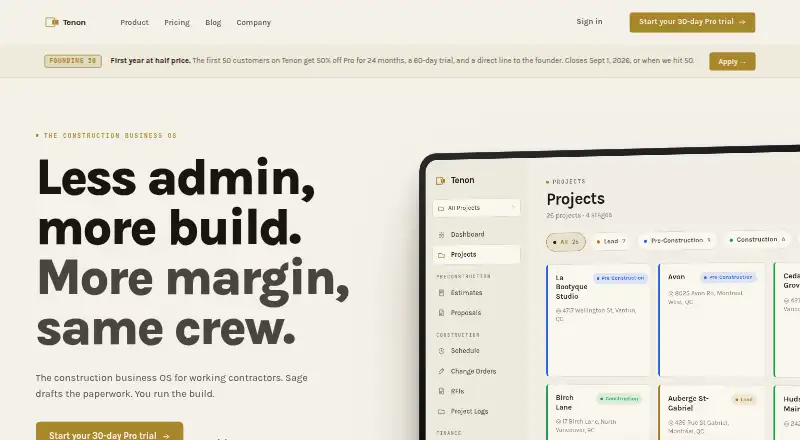
Tenon is construction management software for working contractors, bringing project and business workflows into one system. Its tools cover estimates, proposals, Gantt scheduling, daily logs, budgets, invoicing, change orders, RFIs, and client portals. Sage, its AI assistant, answers project questions, cites records, drafts change orders and proposals, and uses per-user permissions.
Native iOS and Android apps provide field logs, timers, and RFIs; the iOS app also supports Apple Watch and CarPlay. Tenon lists QuickBooks sync for invoicing and an MCP integration connecting to Claude.ai and other MCP clients. Field workers, subcontractors, and clients are free on every plan, while paid seats are for office users. Starter costs $49 per user per month and includes up to three Builder seats and unlimited Field seats. Pro is $129 per user per month, and Enterprise is $249 per user per month. There is no free plan, but a 30-day trial is offered. Data is stored in AWS Canada (ca-central-1), and customers can export it to CSV, PDF, or JSON.
Who it suits
Tenon suits working contractors who want project and business workflows in one system, including mobile tools for field workers. Its seat policy keeps field workers, subcontractors, and clients free, while paid seats are for office users.
What it does well
- Project tools include estimates, budgets, RFIs, and invoicing
- Sage can answer project questions and draft proposals
- Native iOS and Android field apps
- Customers can export data to CSV, PDF, or JSON
What to know first
- No free plan
- Starter includes up to three Builder seats
- SOC 2 Type II is in audit
Limits
Starter costs $49 a month per user and includes up to three Builder seats and limited Sage. There is no free plan, though Tenon offers a 30-day trial.
Plans
| Plan | Billed and limits | Price |
|---|---|---|
| Pro | per user / month · Full product · Schedule, timesheets, RFIs, takeoffs, permits, full Sage actions, MCP integration, portfolio view, advanced budget tracking | $129 a month |
| Enterprise | per user / month · For $10M+ GCs · SSO · Advanced RBAC · White-label client portal · Dedicated onboarding · SLA-backed support · Custom integrations / API access | $249 a month |
| Starter | per user / month · Up to 3 Builder seats · Unlimited Field seats · Core project management · Estimates + Proposals · Basic reporting · Limited Sage | $49 a month |
As usetenon.com lists them, read 8 Oct 2026. The maker's own page has the final word.
Getting started
- Open the Tenon website and start the 30-day trial.
- Choose Starter, Pro, or Enterprise based on the included features and seats.
- Set up office users; field workers, subcontractors, and clients can use free seats.
- Use the native iOS or Android app for field logs, timers, and RFIs.
- Connect QuickBooks for invoicing or use the MCP integration with Claude.ai and other MCP clients.
Verdict
Tenon combines contractor project tools, a project-focused AI assistant, and mobile field workflows. Compare the paid plan limits and features, and note that SOC 2 Type II is in audit.
Questions
Does Tenon have a free plan?
No. Tenon offers a 30-day trial.
How much do the plans cost?
Starter is $49 a month per user, Pro is $129 a month per user, and Enterprise is $249 a month per user.
Which users need paid seats?
Paid seats are for office users. Field workers, subcontractors, and clients are free on every plan.
Which platforms does Tenon support?
Tenon lists Android, iOS, macOS, and web. Its native iOS and Android apps include field logs, timers, and RFIs.
What integrations does Tenon list?
Tenon lists QuickBooks sync for invoicing and an MCP integration for Claude.ai and other MCP clients.
Can customers export their data?
Yes. Customers can export data to CSV, PDF, or JSON. Tenon says it does not hold data after cancellation.
Facts from Tenon's own pages
- AI assistant
- Sage answers project questions, cites records, drafts change orders and proposals, and uses per-user permissions. · usetenon.com, 8 Oct 2026
- Audience
- Tenon describes itself as built for working contractors, and its founder says he runs a remodeling company. · usetenon.com, 8 Oct 2026
- Compliance
- Tenon says SOC 2 Type II is in audit. · usetenon.com, 8 Oct 2026
- Data export
- Customers can export their data to CSV, PDF, or JSON, and the pricing page says Tenon does not hold data after cancellation. · usetenon.com, 8 Oct 2026
- Data hosting
- Tenon says customer data is stored in AWS Canada (ca-central-1). · usetenon.com, 8 Oct 2026
- Import limit
- The pricing FAQ says CSV import is available now and Procore API import is planned for Q3 2026. · usetenon.com, 8 Oct 2026
- Integrations
- Tenon lists a QuickBooks sync for invoicing and an MCP integration that connects to Claude.ai and other MCP clients. · usetenon.com, 8 Oct 2026
- Mobile field tools
- Tenon offers field logs, timers, and RFIs through native iOS and Android apps; its iOS app also supports Apple Watch and CarPlay. · usetenon.com, 8 Oct 2026
- Product
- Tenon is construction management software for working contractors, with project and business workflows in one system. · usetenon.com, 8 Oct 2026
- Project management
- Features include estimates, proposals, Gantt scheduling, daily logs, budgets, invoicing, change orders, RFIs, and client portals. · usetenon.com, 8 Oct 2026
- Seat policy
- Field workers, subcontractors, and clients are free on every plan; paid seats are for office users. · usetenon.com, 8 Oct 2026
- Support
- Enterprise includes a named Slack Connect contact and SLA-backed support response time. · usetenon.com, 8 Oct 2026
Where Tenon stands on Freedom251
- Home Builder Software#14 of 32