Freedom251 › Website Monitoring Software
Tallwatch
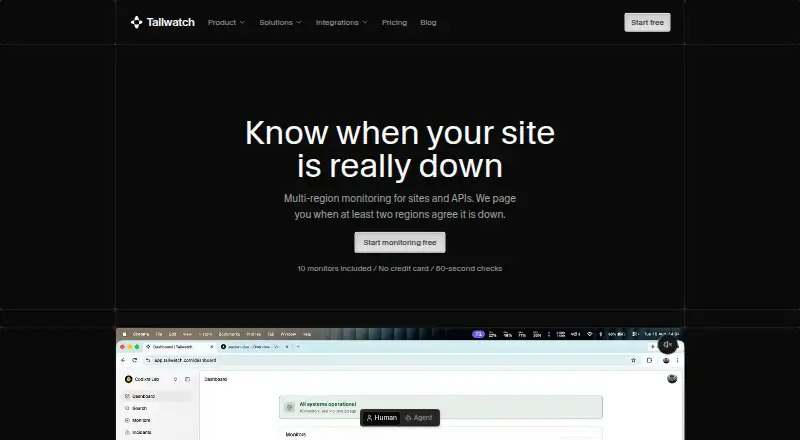
What Tallwatch is
Tallwatch monitors websites and APIs from multiple regions and opens an incident when at least two regions report the same failure in a check round. Its checks cover HTTP, keywords, ping, TCP, DNS, SSL, and heartbeat, using probes in Virginia, Frankfurt, Singapore, Sydney, São Paulo, and Oregon. Alert channels include email, Slack, Microsoft Teams, Telegram, Discord, PagerDuty, and signed webhooks. On-call rotations and escalation policies route incidents to responders until they acknowledge them. Status pages can be public or private, use a custom domain, and include incident history plus email or RSS subscribers. Developers can manage monitors and triage incidents through a REST API, CLI, or hosted MCP endpoint. The CLI runs on macOS, Linux, and Windows and can import monitors from UptimeRobot. A free plan includes 10 monitors and 60-second checks from three regions. Pro costs $11.99 per month billed annually or $14.99 per month billed monthly; Business costs $19.99 per month billed annually or $24.99 per month billed monthly. Tallwatch says it does not publish a formal customer uptime SLA with automatic credits.
Who it suits
It suits teams that need to monitor sites or APIs across regions, route incidents to responders, and publish status pages. Developers can also use its API, CLI, or hosted MCP endpoint to manage monitors and triage incidents.
What it does well
- Checks seven types of targets, including SSL and DNS.
- Incidents require matching reports from two regions.
- Offers seven alert channels.
- Status pages can be public or private.
- Free plan includes 10 monitors.
What to know first
- Free checks run every 60 seconds from three regions.
- Free includes one custom-domain status page.
- No formal customer uptime SLA with automatic credits.
- Account data is deleted after a 90-day retention period following termination.
Limits
The Free plan includes 10 monitors, 60-second checks from three regions, up to three team members, one custom-domain status page, and seven days of check history. Pro costs $11.99 a month billed annually and includes 100 monitors, up to 10 team members, 30-second checks, and 90 days of history. Business monitor use is subject to fair use.
Plans
| Plan | Billed and limits | Price |
|---|---|---|
| Free | per month · 10 monitors · 3 regions · 60-second checks · 3 team members · 1 status page · email and Slack alerts · 7-day history · on-call and escalation | Free |
| Pro | monthly · 100 monitors · 6 regions · 30-second checks · 10 team members · 3 status pages · 7 alert channels · 90-day history · programmable webhooks | $14.99 a month |
| Business | monthly · Unlimited monitors under fair use · unlimited members and status pages · 365-day history · priority support · branding removal · cross-team rollup | $24.99 a month |
As tallwatch.com lists them, read 15 Oct 2026. The maker's own page has the final word.
Getting started
- Visit https://tallwatch.com/.
- Start with the free plan or choose Pro or Business.
- Add website or API monitors and select supported check types.
- Configure alerts and on-call routing for responders.
- Publish a public or private status page with a custom domain if needed.
- Install the CLI on macOS, Linux, or Windows, or use the REST API or hosted MCP endpoint.
Tallwatch brings website and API checks, incident routing, and status pages into one service for teams that want to manage monitoring and response together. Its regional confirmation rule and broad alert-channel support are useful strengths, but the Free plan’s 60-second checks and three-region coverage are limiting for time-sensitive monitoring.
Overview
Tallwatch monitors targets from multiple regions and opens an incident when at least two regions report the same failure in one check round. That can prevent a lone regional probe failure from immediately triggering an incident, though it makes incident creation depend on regional agreement. With monitoring, on-call handling, escalation policies, and status pages in the same service, Tallwatch is a stronger fit for teams seeking a joined-up response workflow than for users who only need basic uptime checks.
Key features
Checks and regional coverage
Tallwatch supports HTTP, keyword, ping, TCP, DNS, SSL, and heartbeat checks, alongside latency monitoring, page health checks, and maintenance windows. Its six probe regions are Virginia, Frankfurt, Singapore, Sydney, São Paulo, and Oregon. The range of check types suits teams watching both web services and APIs; the two-region rule adds a confirmation step, but an incident opens only when reports agree within the same check round.
Alerting and response
Alert channels include email, Slack, Microsoft Teams, Telegram, Discord, PagerDuty, and signed webhooks. On-call rotations and escalation policies keep routing incidents to responders until someone acknowledges them. This combination can help teams coordinate response without relying on a separate alerting workflow, while the plan determines how many channels and other capabilities are available.
Status pages and developer access
Status pages can be public or private, use a custom domain, and provide incident history and email or RSS subscriptions. The Free plan includes one custom-domain page, while Pro allows three and Business removes the page limit. A REST API, CLI, and hosted MCP endpoint support monitor management and incident triage. The CLI runs on macOS, Linux, and Windows and can import monitors from UptimeRobot; MCP access uses scoped API keys, with read keys for inspection and write keys for actions such as pausing monitors and acknowledging incidents.
Pricing
Tallwatch has a Free plan, with paid plans starting at $11.99 a month when billed annually. The Free plan includes 10 monitors, 60-second checks from three regions, up to three team members, one custom-domain status page, email and Slack alerts, seven days of history, on-call and escalation features, and email support. It is a practical starting point for a small team, but the slower checks, limited regional coverage, and short history make it less suitable for monitoring that needs faster detection or broader geographic confirmation.
Pro costs $11.99 a month billed annually, or $14.99/month billed monthly. It raises capacity to 100 monitors and up to 10 team members, adds 30-second checks across all six regions and all seven alert channels, and includes three status pages, 90 days of history, programmable webhook payloads, and email support. This is the clearest fit for teams that need faster checks and the full regional and alerting range without unlimited scale.
Business costs $19.99 a month billed annually, or $24.99/month billed monthly. It offers unlimited monitors subject to fair use, unlimited team members and status pages, 365 days of history, priority support, cross-team rollup, and removal of Tallwatch branding. It suits larger or multi-team operations that need those scale and coordination features; smaller teams may not need its expanded limits. Tallwatch does not currently offer a formal customer uptime SLA with automatic credits.
Platforms
Tallwatch lists API, Linux, macOS, web, and Windows support. Its CLI is available for macOS, Linux, and Windows, while the hosted MCP endpoint and REST API provide developer access.
Who it's for
Tallwatch is best for teams that want multi-region website and API monitoring tied directly to on-call response, escalation, and status communication. It is less compelling for anyone who needs an uptime commitment backed by automatic credits, or whose monitoring requires faster checks than the Free plan provides.
Pros and cons
- Pros: Two-region confirmation before opening an incident can reduce reliance on a single probe’s report.
- Pros: Broad check types, six regions, and seven alert channels give teams options for monitoring and response as they move to Pro.
- Pros: On-call routing, custom-domain status pages, and developer tools bring response and communication features into the same service.
- Cons: Free checks run every 60 seconds and cover only three regions, making the entry tier less suitable for teams that need faster or wider monitoring.
- Cons: Business monitor capacity is subject to fair use, and Tallwatch does not provide a formal uptime SLA with automatic credits.
Alternatives
Dotcom-Monitor is worth considering for a free setup of up to 25 targets with checks as frequent as every five minutes from two locations and email alerts. Better Stack offers a free personal-project plan that combines 10 monitors and heartbeats with a status page, exception capacity, session replays, and retained logs and traces. UptimeRobot may suit hobby or nonprofit projects that need up to 50 monitors on a free plan with five-minute checks. Visual Sentinel is another freemium option with a free trial. Cronitor offers a free Hacker plan with five monitors, email and Slack alerts, one status page, and five-minute fastest checks. HostTracker has a free tier with two monitors and checks every 30 minutes, plus a 30-day free trial. Hyperping offers a free plan with 20 monitors, five-minute checks, one seat, and one basic status page. SolidPing is an alternative with a free-forever plan that includes 100 monitors, five team members, and a private-location agent.
For broader comparisons, see Website Monitoring Software and API Monitoring Tools.
Verdict
Choose Tallwatch if your team wants multi-region monitoring connected to on-call escalation and status pages, with a clear path from a small Free setup to faster, wider Pro checks. Look elsewhere if a formal uptime SLA with automatic credits is essential, or if the Free plan’s 60-second checks and three-region coverage cannot meet your monitoring needs.
Verdict
Tallwatch combines multi-region checks with alert routing, on-call features, and status pages. Compare plan limits and check intervals with your monitoring needs, and note that it does not offer a formal uptime SLA with automatic credits.
Questions
Does Tallwatch have a free plan?
Yes. The Free plan costs nothing and includes 10 monitors with 60-second checks from three regions.
What do paid plans cost?
Pro is $11.99 a month billed annually or $14.99 a month billed monthly. Business is $19.99 a month billed annually or $24.99 a month billed monthly.
Which platforms does Tallwatch support?
Tallwatch lists API, Linux, macOS, web, and Windows. Its CLI can be installed on macOS, Linux, and Windows.
Which alert channels are available?
Channels include email, Slack, Microsoft Teams, Telegram, Discord, PagerDuty, and signed webhooks.
Can I use a custom domain for a status page?
Yes. Status pages can use a custom domain and be public or private.
Does Tallwatch offer a formal uptime SLA?
Tallwatch says it does not currently publish a formal customer uptime SLA with automatic credits.
Facts from Tallwatch's own pages
- Alert integrations
- Confirmed incidents can be sent to email, Slack, Microsoft Teams, Telegram, Discord, PagerDuty or signed webhooks. · tallwatch.com, 15 Oct 2026
- Availability commitment
- Tallwatch says it does not currently publish a formal customer uptime SLA with automatic credits. · tallwatch.com, 4 Oct 2026
- Check types
- Supported checks are HTTP/HTTPS, keyword, ping, TCP/port, DNS, SSL-expiry and heartbeat checks. · tallwatch.com, 15 Oct 2026
- CLI
- The CLI manages monitors and incidents, runs test probes and supports UptimeRobot imports from a terminal. · tallwatch.com, 15 Oct 2026
- CLI package license
- The public @tallwatch/cli npm package is marked MIT licensed and exposes built-in TypeScript declarations. · npmjs.com, 15 Oct 2026
- CLI package version
- The npm listing shows @tallwatch/cli version 0.3.2 with a published package and a repository at github.com/nabinkhair42/tallwatch. · npmjs.com, 15 Oct 2026
- CLI platforms
- The CLI can be installed on macOS, Linux, and Windows and can import monitors from UptimeRobot. · tallwatch.com, 4 Oct 2026
- CLI requirements
- The official installer requires Node.js 20 or newer and supports macOS, Linux and Windows through shell, PowerShell or npm installation. · tallwatch.com, 15 Oct 2026
- Consensus behavior
- An incident opens when at least two regions report the same failure in one check round. · tallwatch.com, 4 Oct 2026
- Consensus detection
- An incident opens only when at least two checked regions report the same failure during one check round. · tallwatch.com, 15 Oct 2026
- Contracts SDK package
- The maker's npm profile lists @tallwatch/contracts as shared Zod schemas and TypeScript types for the Tallwatch REST API. · npmjs.com, 15 Oct 2026
- Data deletion
- The privacy policy says users may request early deletion and can also delete their account from settings. · tallwatch.com, 15 Oct 2026
- Data retention
- The terms state that after termination account data is retained for 90 days to allow reactivation and then permanently deleted. · tallwatch.com, 4 Oct 2026
- Developer access
- Tallwatch offers a REST API, CLI, and hosted MCP endpoint for managing monitors and triaging incidents. · tallwatch.com, 4 Oct 2026
- Documentation
- The monitors page links to separate setup guides for monitor types, creation, dependencies and maintenance windows on docs.tallwatch.com. · tallwatch.com, 15 Oct 2026
- External project description
- Nabin Khair's public portfolio describes Tallwatch as a multi-region service that monitors sites and APIs and alerts the appropriate people. · nabinkhair.com.np, 15 Oct 2026
- Funding and ownership
- A public post by the maker describes Tallwatch as a bootstrapped, pre-revenue project. · sotwe.com, 15 Oct 2026
- GitHub project listing
- The maker's GitHub profile lists Tallwatch as a downtime-monitoring service among his projects. · github.com, 15 Oct 2026
- Heartbeat monitoring
- Heartbeat monitors detect missed check-ins from cron jobs and background workers and do not require regional quorum. · tallwatch.com, 15 Oct 2026
- HTTP monitoring
- HTTP and HTTPS checks can validate status codes, response content, JSON paths, headers and latency. · tallwatch.com, 15 Oct 2026
- Incident response
- Tallwatch provides on-call rotations and escalation policies that route incidents to responders until acknowledged. · tallwatch.com, 4 Oct 2026
- Limit: missed-alert liability
- The terms disclaim liability for indirect losses including losses caused by missed or delayed alerts. · tallwatch.com, 15 Oct 2026
- Limit: no formal SLA
- The terms say Tallwatch is provided on an as-available basis and currently has no formal customer uptime SLA with automatic credits. · tallwatch.com, 15 Oct 2026
- Limit: SSO
- The pricing FAQ says SSO is on the Business roadmap rather than available today. · tallwatch.com, 15 Oct 2026
Where Tallwatch stands on Freedom251
- Website Monitoring Software#12 of 55
- API Monitoring Tools#14 of 27