Freedom251 › Kitchen Display System Software
Tabres KDS
What Tabres KDS is
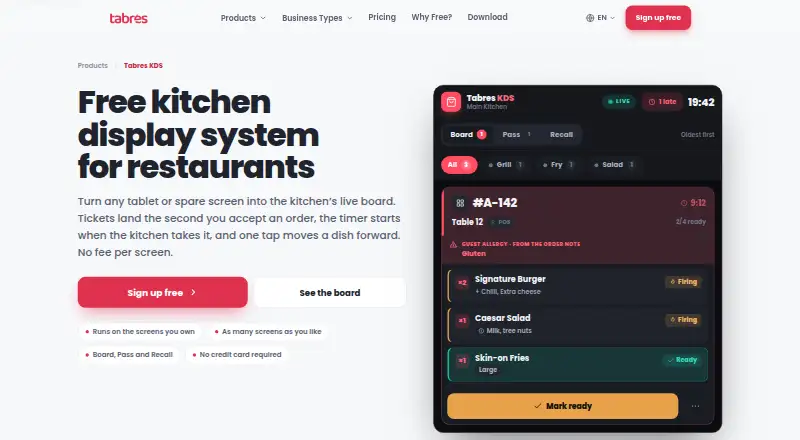
Tabres KDS is a web-based kitchen display system that presents a kitchen's open orders as live tickets. It receives Tabres POS, QR table, table, takeaway, and delivery orders, with Board, Pass, and Recall views sharing the same order data. Managers can configure kitchen stations and route categories so each order line appears at its assigned station. Cooks move lines through Queued, Firing, Ready, and Served, with actions determined by the ticket's current state. A timer starts when the business accepts an order; the display turns amber at five minutes and crimson at eight. Allergy notes and allergen labels appear on order lines, and an allergy note highlights the ticket strip in crimson. Kitchen screens omit prices, payment details, email addresses, and delivery addresses; a customer name appears only when staff need to call it out. The free plan is €0 per month and includes unlimited branches, employees, and kitchen displays, with no per-screen fee. A disconnected screen retains its last orders but cannot advance dishes until it reconnects. Screens are assigned to one kitchen and cannot show several branches.
Who it suits
Tabres KDS suits kitchens that receive orders through Tabres POS, QR table, table, takeaway, or delivery channels. Its station routing and ticket stages support staff handling orders across kitchen screens.
What it does well
- Routes order lines to configured kitchen stations.
- Board, Pass, and Recall share the same order data.
- Allergy notes and allergen labels appear on order lines.
- Free plan includes unlimited kitchen displays.
What to know first
- A disconnected screen cannot advance dishes.
- Each screen is assigned to one kitchen.
- One screen cannot show several branches.
Limits
The free plan costs €0 per month and includes unlimited branches, employees and kitchen displays, with no per-screen fee. When a screen is disconnected, it keeps its last orders visible but cannot advance dishes until it reconnects.
Plans
| Plan | Billed and limits | Price |
|---|---|---|
| Free | €0 per month and every month after this one · Unlimited branches · employees · kitchen displays · no per-screen fee · browser access | Free |
As tabres.com lists them, read 7 Oct 2026. The maker's own page has the final word.
Getting started
- Open the Tabres KDS website.
- Have a manager enroll each screen once.
- Assign each screen to one kitchen.
- Have cooks start their shifts with a PIN from the branch staff list.
- Use the Board, Pass or Recall view to work with the shared order data.
Verdict
Tabres KDS gives kitchen staff live order tickets with configurable routing and shared board views. Its free plan has no per-screen fee, but a screen cannot serve several branches and cannot advance dishes while disconnected.
Questions
How much does Tabres KDS cost?
Its Free plan costs €0 per month and includes unlimited branches, employees and kitchen displays, with no per-screen fee.
What platforms does Tabres KDS support?
It runs in a web browser and has wall, tablet and phone layouts.
Which orders can it display?
It receives Tabres POS, QR table, table, takeaway and delivery orders.
Can one screen display several branches?
No. Each screen is assigned to one kitchen and cannot show several branches.
What happens when a screen disconnects?
It keeps its last orders visible, but dishes cannot advance until it reconnects. Orders are saved on the server.
How do cooks sign in?
A manager enrolls the screen once, and cooks start shifts with a PIN from the branch staff list.
Facts from Tabres KDS's own pages
- Accessibility and layout
- The KDS page lists 44px touch targets, keyboard operation, reduced-motion support, and wall, tablet and phone layouts. · tabres.com, 7 Oct 2026
- Allergens
- Allergy notes and allergen labels appear on order lines, and an allergy note highlights the ticket strip in crimson. · tabres.com, 7 Oct 2026
- Board views
- It provides Board, Pass and Recall views that share the same order data. · tabres.com, 7 Oct 2026
- Connectivity limit
- A disconnected screen keeps its last orders visible but cannot advance dishes until it reconnects; orders are saved on the server. · tabres.com, 7 Oct 2026
- Headquarters
- Amsterdam, Netherlands; Baku, Azerbaijan · tabres.com, 28 Sept 2026
- Order sources
- The board receives Tabres POS, QR table, table, takeaway and delivery orders. · tabres.com, 7 Oct 2026
- Privacy on kitchen screens
- The board does not show prices, payment details, email addresses or delivery addresses; it shows a customer name only when staff need to call it out. · tabres.com, 7 Oct 2026
- Purpose
- Tabres KDS displays a kitchen’s open orders as a live board, with each order shown as a ticket. · tabres.com, 7 Oct 2026
- Screen assignment
- Each screen is assigned to one kitchen, and a screen cannot show several branches. · tabres.com, 7 Oct 2026
- Security
- Tabres’s privacy policy describes TLS encryption in transit, hashed staff PINs and session secrets, least-privilege access controls, monitoring, regular backups and EEA hosting. · tabres.com, 7 Oct 2026
- Sign-in
- A manager enrolls the screen once, and cooks start shifts with a PIN from the branch staff list. · tabres.com, 7 Oct 2026
- Station routing
- Managers can configure kitchen stations and route categories so each order line appears at the assigned station. · tabres.com, 7 Oct 2026
- Support
- Tabres directs product questions and customer support to its email and WhatsApp channels. · tabres.com, 7 Oct 2026
- Ticket workflow
- Cooks can move lines through Queued, Firing, Ready and Served, with actions determined by the ticket’s current state. · tabres.com, 7 Oct 2026
- Timers
- The server timestamp starts a ticket’s timer when the business accepts the order, and the page says the timer changes to amber at five minutes and crimson at eight. · tabres.com, 7 Oct 2026
Where Tabres KDS stands on Freedom251
- Kitchen Display System Software#16 of 49