Freedom251 › Kitchen Display System Software
Poscraft KDS
What Poscraft KDS is
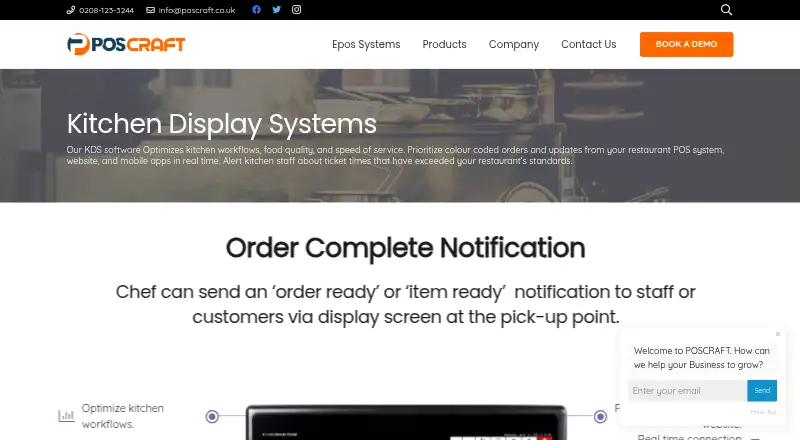
Poscraft KDS is kitchen display software for coordinating restaurant orders and preparation. It receives real-time updates from a restaurant POS system, website, and mobile apps, then presents orders with colour coding and a traffic-light summary. Staff can split products into preparation steps, prioritize tasks, route dishes to selected stations, and check item status. The system alerts kitchen staff when ticket times exceed the restaurant’s standards. Chefs can send an order-ready or item-ready notification to staff or customers through a display at the pickup point. It supports touchscreen and non-touch monitors, wall or countertop mounting, printing, and blinking new-order alerts. The product page describes it as customizable and lists custom kitchen status. It is listed for Windows, with dedicated display support, station routing, order status tracking, and an expo screen. Pricing details require care: a free plan and monthly plans are listed, but the pricing page does not identify those plans as KDS plans or explain several placeholder feature labels. POSCRAFT Limited develops point-of-sale software for retail and hospitality businesses.
Who it suits
Poscraft KDS may suit restaurant kitchens that need to route work across stations, track item status, and notify staff or customers when orders are ready. Its listed capabilities are aimed at hospitality workflows.
What it does well
- Receives real-time updates from POS, website, and mobile apps.
- Routes dishes to selected stations.
- Alerts staff when ticket times exceed standards.
- Supports touchscreen and non-touch monitors.
What to know first
- The listed monthly plans are not identified as KDS plans.
- Several plan features appear only as placeholders.
- Listed for Windows.
Limits
The free plan is listed as free with 1 User. Paid monthly entries show 2 Users for Standard at 20.00 USD, 10 Users for Business at 45.00 USD, and Unlimited Users for Professional at 80.00 USD; the pricing page does not identify these plans as KDS plans, and their feature entries are placeholders.
Plans
| Plan | Billed and limits | Price |
|---|---|---|
| Free | 1 User · Feature 2 · Feature 3 · Feature 4 | Free |
| Standard | 2 Users · Feature 2 · Feature 3 · Feature 4 | $20 a month |
| Business | 10 Users · Feature 2 · Feature 3 · Feature 4 | $45 a month |
| Professional | Unlimited Users · Feature 2 · Feature 3 · Feature 4 | $80 a month |
As poscraft.co.uk lists them, read 8 Oct 2026. The maker's own page has the final word.
Getting started
- Visit the Poscraft KDS website.
- Use a Windows setup with a dedicated display.
- Choose a free or paid option; paid pricing starts at $20/mo.
- Contact POSCRAFT Limited at [email protected] or 0208-123-3244 for assistance.
Verdict
Poscraft KDS covers order prioritization, preparation steps, station routing, and ready notifications. Confirm which pricing plan applies to KDS, since the listed plans and placeholder features are not clearly tied to it.
Questions
Is Poscraft KDS free?
A Free plan is listed as free. The pricing page does not identify the monthly plans as KDS plans.
How much do the paid plans cost?
Paid pricing is listed from $20/mo. The monthly entries show Standard at 20.00 USD, Business at 45.00 USD, and Professional at 80.00 USD.
Which platform does Poscraft KDS support?
The product is listed for Windows, with dedicated display support.
What can kitchen staff do with the system?
Staff can break products into preparation steps, prioritize tasks, route dishes to selected stations, and view item status summaries.
Who makes Poscraft KDS?
POSCRAFT Limited describes itself as a point-of-sale software development company serving retail and hospitality industries.
How can I contact the company?
The listed contact details are [email protected] and 0208-123-3244.
Facts from Poscraft KDS's own pages
- Company description
- POSCRAFT Limited describes itself as a point-of-sale software development company serving retail and hospitality industries. · poscraft.co.uk, 8 Oct 2026
- Customization
- The KDS page describes the system as fully customizable and lists custom kitchen status. · poscraft.co.uk, 8 Oct 2026
- Display and printing
- The KDS supports touchscreen or non-touch monitors, wall or countertop mounting, printing, and blinking new-order notifications. · poscraft.co.uk, 8 Oct 2026
- Headquarters
- 5 Beechwood Avenue, Potters Bar, England, UK · poscraft.co.uk, 28 Sept 2026
- Intended users
- Poscraft describes its POS systems as serving hospitality and retail businesses from small independents to large multi-site chains. · poscraft.co.uk, 8 Oct 2026
- KDS pricing caveat
- The pricing page lists four monthly plans, but does not identify them as KDS plans or explain the placeholder entries ‘Feature 2’, ‘Feature 3’, and ‘Feature 4’. · poscraft.co.uk, 8 Oct 2026
- Kitchen workflow
- Staff can break products into preparation steps, prioritize tasks, route dishes to selected stations, and view item status summaries. · poscraft.co.uk, 8 Oct 2026
- Order prioritization
- The KDS prioritizes colour-coded orders and uses a traffic-light system in its summary. · poscraft.co.uk, 8 Oct 2026
- Order updates
- It receives real-time updates from the restaurant POS system, website, and mobile apps. · poscraft.co.uk, 8 Oct 2026
- Purpose
- Poscraft KDS is kitchen display software intended to improve kitchen workflows, food quality, and service speed. · poscraft.co.uk, 8 Oct 2026
- Ready notifications
- Chefs can send an ‘order ready’ or ‘item ready’ notification to staff or customers through a display at the pickup point. · poscraft.co.uk, 8 Oct 2026
- Support contact
- The company lists [email protected] and 0208-123-3244 as contact details. · poscraft.co.uk, 8 Oct 2026
- Ticket alerts
- The software alerts kitchen staff when ticket times exceed the restaurant’s standards. · poscraft.co.uk, 8 Oct 2026
Where Poscraft KDS stands on Freedom251
- Kitchen Display System Software#14 of 49