Systweak PDF Editor
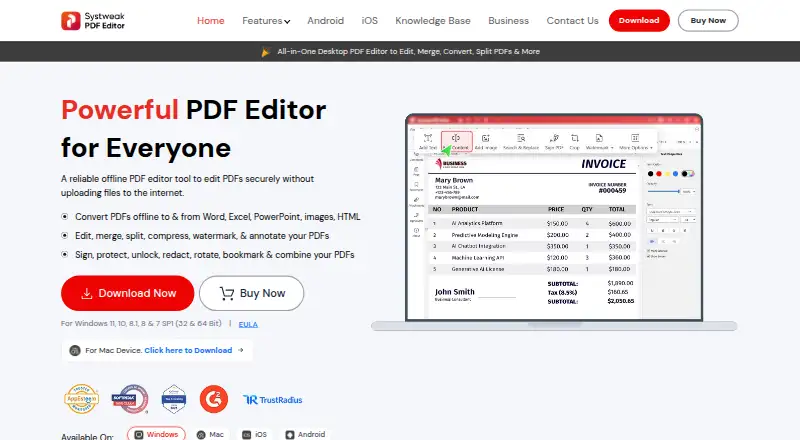
What Systweak PDF Editor is
Systweak PDF Editor is a paid PDF application with Windows and macOS desktop editions plus Android and iOS-compatible apps. The desktop product works offline and supports editing, merging, splitting, converting, compressing, annotating, signing, and securing PDF files. Windows editing can preserve a document’s original text and image style, font, color, and size. Conversion is available to and from Word, Excel, PowerPoint, image formats, and HTML, with batch conversion listed without size or page restrictions. Tools include OCR, electronic signatures, and certificate-based signatures using certificate files or the Windows Certificate Store. Security options include passwords, permissions, and permanent redaction processed locally. Website or reseller downloads provide a free seven-day trial that may watermark saved or exported PDFs and does not automatically charge afterward. Systweak also lists 24x7 email support and a 60-day money-back guarantee.
Who it suits
It suits people needing PDF editing and conversion on desktop or mobile devices. It also fits users who need OCR, signatures, local redaction, or offline editing.
What it does well
- Offline desktop PDF editing
- Conversion to major office formats
- OCR and electronic signatures
- Android and iOS apps available
- Seven-day trial without automatic charge
What to know first
- No free plan
- Trial may watermark saved PDFs
- Privacy policy lists data sharing
- Windows is the listed supported desktop platform
Plans
| Plan | Billed and limits | Price |
|---|---|---|
| Yearly Plan | Billed yearly; auto-renews and can be canceled anytime. Page shows CHF64.95 struck through and CHF45.47 / year. · Create, edit, merge and split PDFs · Convert PDFs · Password protect · Digital signatures · OCR · Compress, rotate and organize | 45.47 CHF a year |
| Lifetime Plan | Pay once, use forever. · Create, edit, merge and split PDFs · Convert PDFs · Password protect · Digital signatures · OCR · Compress, rotate and organize | 79.95 CHF, paid once |
As systweakpdfeditor.com lists them, read 12 Oct 2026. The maker's own page has the final word.
Verdict
Systweak PDF Editor combines offline desktop editing with conversion, OCR, signatures, and security tools. The seven-day trial offers a way to evaluate it, but trial watermarks and the lack of a free plan matter.
Facts from Systweak PDF Editor's own pages
- Android data
- The Google Play listing says the Android app collects no data and shares no data with third parties, and notes that All File Access permission is required to open, view and edit files on the device. · play.google.com, 12 Oct 2026
- Annotation tools
- Yes · systweakpdfeditor.com, 20 Sept 2026
- Company
- Systweak Software says it was founded in 1999 and is located in Jaipur, India. · systweakpdfeditor.com, 12 Oct 2026
- Compatibility
- The EULA lists Windows 11, 10, 8.1, 8 and 7 SP1, and identifies Windows and macOS editions. · systweakpdfeditor.com, 12 Oct 2026
- Conversion
- The product page lists conversion to and from Word, Excel, PowerPoint, image formats and HTML, and says batch conversion has no size or page restrictions. · systweakpdfeditor.com, 12 Oct 2026
- Editing
- The Windows product page says users can edit PDF text and images while retaining the original style, font, color and size. · systweakpdfeditor.com, 12 Oct 2026
- Enterprise licensing
- The EULA lists customizable enterprise and government licensing models including network floating licenses, a cloud or server-less version, and on-premises license management. · systweakpdfeditor.com, 12 Oct 2026
- Free plan
- No · systweakpdfeditor.com, 20 Sept 2026
- Mobile apps
- The official download page describes an Android app for scanning, creating, editing, annotating, signing and securing PDFs, and an iOS-compatible app for scanning, editing, signing and securing PDFs. · systweakpdfeditor.com, 12 Oct 2026
- OCR
- The product page says its OCR can make scanned PDFs and images editable and searchable, with batch processing and output options including Word, Excel and PowerPoint. · systweakpdfeditor.com, 12 Oct 2026
- PDF conversion
- Yes · systweakpdfeditor.com, 20 Sept 2026
- Privacy
- The privacy policy says application use may involve collection of device, software, IP address, operating system, product key and feature-usage information, and says such data may be shared with third-party vendors and partners. · systweakpdfeditor.com, 12 Oct 2026
- Product
- Systweak describes the desktop product as an offline PDF editor for editing, merging, splitting, converting, compressing and annotating PDFs. · systweakpdfeditor.com, 12 Oct 2026
- Security
- The product page says PDF protection includes password controls, permissions and permanent redaction, processed on the local machine. · systweakpdfeditor.com, 12 Oct 2026
- Signatures
- The product page describes electronic signatures and certificate-based PDF signatures using certificate files or the Windows Certificate Store. · systweakpdfeditor.com, 12 Oct 2026
- Support
- The pricing page advertises 24x7 email support at [email protected] and a 60-day money-back guarantee. · systweakpdfeditor.com, 12 Oct 2026
- Supported platforms
- Windows · systweakpdfeditor.com, 20 Sept 2026
- Text editing
- Yes · systweakpdfeditor.com, 20 Sept 2026
- Trial
- The EULA says the website or reseller Windows and Mac download is a free 7-day trial, may watermark PDFs saved or exported during the trial, and does not automatically charge when the trial ends. · systweakpdfeditor.com, 12 Oct 2026
Where Systweak PDF Editor stands on Freedom251
- PDF editors#85 of 102