Freedom251 › Podcast Transcription Software

Swell AI
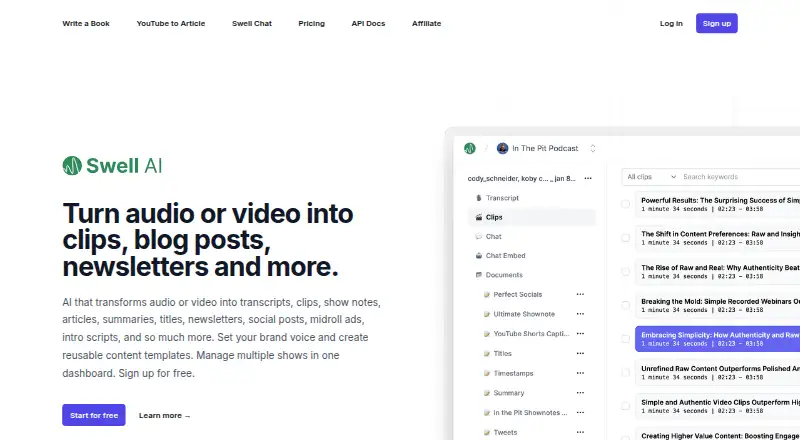
What Swell AI is
Swell AI converts audio and video into transcripts and a range of related content, including clips, show notes, articles, summaries, titles, newsletters, social posts, midroll ads, and intro scripts. Users can set a brand voice and create reusable templates. Its transcript editor supports highlighting and clipping sections, AI suggestions for transcript excerpts, and automatic speaker labels. Transcripts can be shared with a team or made available through a public link.
For podcast workflows, users can create a project for each show, configure its integrations, and manage shows from one dashboard. Episodes can be imported from an RSS feed or Apple Podcasts, and content files can be exported to Google Drive or Dropbox. Listed integrations also include YouTube, Zoom Cloud, OneDrive, webhooks, REST API, and Omny Studio. Swell AI describes an enterprise REST API for creating and managing template-driven content. Each uploaded episode also comes with a chatbot that audiences can ask about that episode. The service offers web and API platforms, a free Hobby plan, and paid plans including Studio at $29 a month and Agency at $49 a month.
Who it suits
Swell AI suits podcasters and teams that want to turn recordings into transcripts and publishable supporting content. Its separate show projects, integrations, team sharing, and episode chat also fit users managing multiple podcasts or involving audiences in episode discovery.
What it does well
- Creates transcripts and many types of supporting content from audio or video.
- Offers reusable templates and configurable brand voice.
- Transcript editor includes clipping, excerpt suggestions, and speaker labels.
- Supports separate podcast projects managed from one dashboard.
- Imports episodes from RSS feeds or Apple Podcasts.
- Uploaded episodes include an audience-facing chatbot.
What to know first
- Hobby is limited to 1 upload a month.
- Hobby has no customer support.
- Studio and Agency include monthly transcription caps.
- Privacy policy does not guarantee absolute security.
Limits
Hobby allows 1 upload a month and includes no customer support. Studio includes 300 minutes of transcription per month, while Agency includes 600 minutes per month.
Plans
| Plan | Billed and limits | Price |
|---|---|---|
| Studio | 300 minutes of transcription per month · unlimited GPT-3.5 writing · unlimited video clips · unlimited audiograms · Swell ChatGPT · documents & templates · premium customer support | $29 a month |
| Agency | 600 minutes of transcription per month · unlimited GPT-3.5 writing · unlimited video clips · unlimited audiograms · Swell ChatGPT · documents & templates · premium customer support | $49 a month |
| Pay as you go | Access to all features · pay only for what you need | $9, paid once |
| Hobby | 1 upload a month · unlimited GPT-3.5 writing · unlimited video clips · unlimited audiograms · Swell ChatGPT · documents & templates · no customer support | On request |
As swellai.com lists them, read 8 Oct 2026. The maker's own page has the final word.
Getting started
- Open the Swell AI website.
- Choose the Hobby plan or a paid plan that fits your needs.
- Create a podcast project and configure its integrations.
- Import episodes from an RSS feed or Apple Podcasts, or upload an episode.
- Use the transcript editor and content templates to create materials.
- Share transcripts with a team or using a public link.
Verdict
Choose Swell AI if you want to turn audio or video into transcripts and a broad set of podcast content, with show-level organization and sharing options. Its Hobby plan is limited to one upload a month and has no customer support; users needing more transcription minutes or premium support should consider Studio or Agency.
Questions
Is there a free plan?
Yes. The Hobby plan is free and includes 1 upload a month, unlimited GPT-3.5 writing, unlimited video clips and audiograms, Swell ChatGPT, and documents and templates.
How much do the paid plans cost?
Studio costs $29 a month and Agency costs $49 a month. Pay as you go is listed at $9, paid once.
Which platforms does Swell AI support?
The listed platforms are web and API.
What integrations are listed?
They include Apple Podcasts, YouTube, RSS feeds, Zoom Cloud, Dropbox, Google Drive, OneDrive, webhooks, REST API, and Omny Studio.
Who makes Swell AI?
The privacy policy identifies the company as Swell AI LLC and lists the United States as its country.
What happens to personal data?
The privacy policy says users may request access to, modification of, or deletion of personal data stored on Swell AI's servers. It says information is encrypted in transit and at rest, but does not guarantee absolute security.
Facts from Swell AI's own pages
- API
- The site describes an enterprise REST API for creating, generating, and managing template-driven content. · swellai.com, 8 Oct 2026
- Brand voice
- Users can set a brand voice and create reusable content templates. · swellai.com, 8 Oct 2026
- Bulk import
- Users can import episodes from an RSS feed or Apple Podcasts and export content files to Google Drive or Dropbox. · swellai.com, 8 Oct 2026
- Company
- The privacy policy identifies the company as Swell AI LLC and lists the United States as the country; it does not state a headquarters location or founding year. · swell-ai.webflow.io, 8 Oct 2026
- Data rights
- The privacy policy says users may request access to, modification of, or deletion of personal data stored on Swell AI's servers. · swell-ai.webflow.io, 8 Oct 2026
- Integrations
- The site lists Apple Podcasts, YouTube, RSS feeds, Zoom Cloud, Dropbox, Google Drive, OneDrive, webhooks, REST API, and Omny Studio. · swellai.com, 8 Oct 2026
- Multiple shows
- Users can create projects for each podcast, configure integrations for each podcast, and manage them from one dashboard. · swellai.com, 8 Oct 2026
- Podcast chat
- The site says each uploaded episode comes with a trained chatbot that audiences can ask about the episode. · swellai.com, 8 Oct 2026
- Purpose
- Swell AI transforms audio or video into transcripts, clips, show notes, articles, summaries, titles, newsletters, social posts, midroll ads, and intro scripts. · swellai.com, 8 Oct 2026
- Security
- Swell AI's privacy policy says it uses encryption to protect information in transit and at rest and does not guarantee absolute security. · swell-ai.webflow.io, 8 Oct 2026
- Sharing
- Transcripts can be shared with a team or publicly through a shareable link. · swellai.com, 8 Oct 2026
- Support
- The pricing page lists no customer support for Hobby and premium customer support for Studio and Agency. · swellai.com, 8 Oct 2026
- Transcript editor
- The transcript editor supports highlighting and clipping sections, AI suggestions for transcript excerpts, and automatic speaker labels. · swellai.com, 8 Oct 2026
Where Swell AI stands on Freedom251
- Podcast Transcription Software#15 of 25
- AI Content Repurposing Tools#19 of 31
- Podcast Show Notes Software#14 of 22