Freedom251 › Design System Software
Superposition
What Superposition is
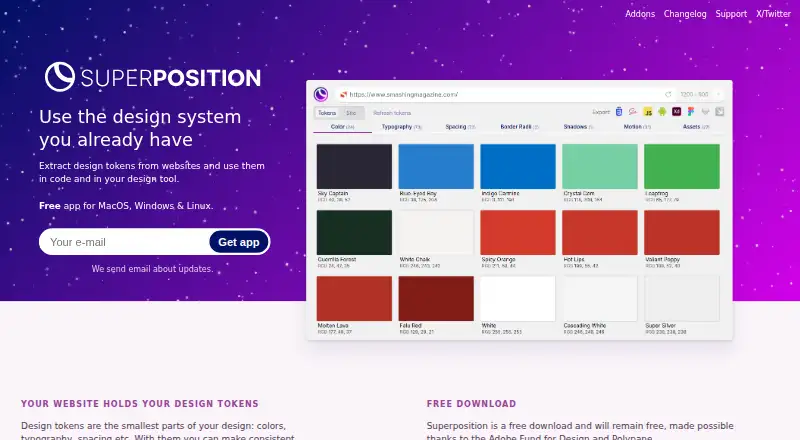
Superposition extracts design tokens from websites so they can be used in code and design tools. It identifies tokens such as colors, typography, and spacing, then exports them to CSS, Scss, JavaScript, Figma, and Adobe XD. Sketch, Swift, and Android exports are described as upcoming. The app filters out unused styling, helping keep extracted tokens tied to styling in use. In a token group overview, clicking a token copies its CSS value to the clipboard.
Its Figma and Adobe XD plugins show tokens applicable to a selected object, including colors and typography, and apply a token when clicked. Chrome and Firefox add-ons can open the current page in Superposition or send its link through a context menu. The desktop app is available for macOS, Windows, and Linux, with a browser extension also listed. Windows and Mac update automatically; Linux users receive update notifications and download and install updates themselves. Superposition is free and intended to remain free. A design system generator is planned as a paid extension; it is described as creating tokens and components, adding usage instructions, and exporting documented systems to share.
Who it suits
Superposition suits designers and developers who want to extract website styling as reusable tokens and bring those tokens into code or design tools. It may also suit teams interested in a documented design system, with a planned paid generator for that purpose.
What it does well
- Extracts colors, typography, and spacing from websites.
- Filters out unused styling.
- Exports to CSS, Scss, JavaScript, Figma, and Adobe XD.
- Figma and Adobe XD plugins apply tokens to selected objects.
- Available on macOS, Windows, and Linux.
- The desktop app is described as free and intended to stay free.
What to know first
- Sketch, Swift, and Android exports are described as upcoming.
- The design system generator is a paid extension with no stated price.
- Linux users download and install updates themselves.
- The maker says support capacity is limited and responses may take a while.
Limits
The free app exports to CSS, Scss, JavaScript, Figma, and Adobe XD; Sketch, Swift, and Android exports are described as upcoming. The design system generator is a paid extension, with no price stated.
Plans
| Plan | Billed and limits | Price |
|---|---|---|
| Superposition | Free desktop app; MacOS, Windows & Linux | Free |
| Design system generator | Paid extension; price not stated | On request |
As superposition.design lists them, read 7 Oct 2026. The maker's own page has the final word.
Getting started
- Visit https://superposition.design/.
- Choose the free desktop app for macOS, Windows, or Linux.
- Install the app on your supported desktop platform.
- Use the Chrome or Firefox add-on to open a current page in Superposition or send its link.
- For Figma or Adobe XD workflows, use the corresponding plugin to view and apply tokens.
Overview
Superposition extracts design tokens such as colors, typography, and spacing from websites, then exports them for use in code and design tools. It is a strong fit for designers and developers who need a free way to reuse a site’s visual rules; it is less suited to teams seeking a complete, documented design-system workflow.
The core app is free and intended to stay that way, with useful exports and design-tool integrations. A separate paid generator is planned for creating and sharing documented systems, but it is not part of the free app.
Key features
Filtering removes unused styling from the extraction, helping avoid cluttered token sets that include styles with no practical use. Users can also click a token in its group overview to copy its CSS value, a small but direct convenience when transferring individual values into code.
Current exports include CSS, SCSS, JavaScript, Figma, and Adobe XD. Sketch, Swift, and Android exports are described as forthcoming, so Superposition is not the right choice if those formats are required now.
The Figma plugin shows applicable tokens, including colors and typography, for a selected object and applies one when clicked. Adobe XD offers a similar selection-based panel. These integrations make the app more useful inside existing design workflows than a simple token extractor, though the stated integrations are limited to those two tools.
Chrome and Firefox add-ons can open the current page in Superposition or send it from the context menu. That makes collecting sites to inspect more convenient without changing the app’s central purpose: extracting and reusing their styling.
A planned generator would create tokens and components, add usage instructions, and export documented design systems for sharing. It could suit teams that want more structure, but it remains a paid extension with no stated price, and it should not be treated as a current capability.
Pricing
Superposition costs nothing and includes the free desktop app for macOS, Windows, and Linux. The maker intends to keep the app free. The described token management, exports, and design-tool sync make it a compelling option for individuals and teams whose needs stop at extraction and reuse; no seat or usage cap is stated.
Design system generator is a planned paid extension with custom pricing. Its intended scope—tokens, components, usage instructions, and shareable documentation—targets users who need a more complete system, but its eventual price and availability are not established.
Platforms
Superposition is available as a desktop app for macOS, Windows, and Linux, with Chrome and Firefox add-ons plus Figma and Adobe XD integrations. Windows and Mac update automatically; Linux users receive update notifications and must download and install updates themselves.
The maker warns that some operating systems or antivirus tools may flag the installer because it is not downloaded often. Windows users who see “Protected your PC” are advised to verify Firstversionist B.V. as the publisher. Support is limited and replies may take time; users can contact the maker by Twitter direct message or email.
Who it's for
Choose Superposition if you want to turn website styling into reusable tokens without paying for the core app, especially if CSS, JavaScript, Figma, or Adobe XD fits your workflow. Look elsewhere if you require Sketch, Swift, or Android export today, or if your priority is a mature process for documenting and sharing components rather than extracting tokens.
Pros and cons
- Pros: The core desktop app is free, with no stated seat or usage cap, making token extraction accessible without a recurring software charge.
- Pros: Filtering unused styling and copying individual CSS values help keep token work focused and make targeted reuse straightforward.
- Pros: Exports and plugins connect extracted tokens to code and two supported design tools, while browser add-ons simplify sending pages for inspection.
- Cons: Sketch, Swift, and Android exports are not described as available yet, limiting its fit for those workflows.
- Cons: The broader design-system generator is only planned, is paid, and has no stated price, so teams needing that workflow cannot yet evaluate its cost.
- Cons: Linux users must install updates manually, and support may be slow because the maker has limited capacity.
Alternatives
Design System Software is a useful place to compare options if your need extends beyond extracting a site’s tokens.
- Particles UI is worth considering if you want local token management and export through an MIT-licensed CLI that works without an account; it is freemium and supports Linux, macOS, web, and Windows.
- Zaklad may suit mobile-first users looking for an Android, iOS, and web option; its Hobbyist plan is free in EUR.
- Supernova is a freemium alternative with a free plan capped at five seats, 1,000 workspace credits per month, one design system, and other stated limits; consider it if those terms fit your needs.
- Terrazzo is a free, MIT-licensed open-source option if open tooling matters most; it supports iOS, macOS, and web.
- Bezel is a web-based alternative with a stated free plan, though it is not yet open for signup.
- Carbon Design System is a free, open-source web design system for anyone to use and contribute to, rather than a desktop token extraction app.
- Design Tokens may be a better fit if you need Figma variable sync, CSS/SASS export, W3C JSON import/export, and stated workspace and user limits on its free plan.
- Fenly is another free option available as an extension and on the web.
Verdict
Superposition is an easy recommendation for designers and developers who want to extract website tokens and reuse them in code or supported design tools at no charge. Its focused scope is also its main limitation: teams needing documented components or exports to formats not yet supported should look elsewhere, and the planned paid generator is worth considering only if its eventual capabilities and custom pricing fit.
Verdict
Choose Superposition if you want to extract website design tokens and use them in code or supported design tools at no charge. Consider the planned paid design system generator only if its stated capabilities fit your needs; its price is not given.
Questions
How much does Superposition cost?
The desktop app is listed as free. The maker describes the app as free and intended to remain free.
Is there a free plan?
Yes. The Superposition plan is listed as a free desktop app for MacOS, Windows, and Linux.
Which platforms does it support?
The desktop app supports macOS, Windows, and Linux. A browser extension is also listed, and Chrome and Firefox add-ons are described.
Which design tools can receive tokens?
Exports are available for Figma and Adobe XD, as well as CSS, Scss, and JavaScript. Sketch, Swift, and Android exports are described as on the way.
Does Superposition have a paid plan?
A design system generator is described as a paid extension, with no price stated.
What does the design system generator do?
It is planned to create tokens and components, add usage instructions, and export documented design systems for sharing.
Facts from Superposition's own pages
- Adobe XD integration
- The Adobe XD panel plugin shows applicable tokens for a selected object and applies them when clicked. · superposition.design, 7 Oct 2026
- Browser add-ons
- Chrome and Firefox add-ons can open the current page in Superposition or send a link to it from the context menu. · superposition.design, 7 Oct 2026
- Clipboard
- Users can click a token in its group overview to copy its CSS value to the clipboard. · superposition.design, 7 Oct 2026
- Design system generator
- The site describes a planned generator for creating tokens and components, adding usage instructions, and exporting documented design systems to share. · superposition.design, 7 Oct 2026
- Exports
- It exports tokens to CSS, Scss, JavaScript, Figma, and Adobe XD, with Sketch, Swift, and Android exports described as on the way. · superposition.design, 7 Oct 2026
- Figma integration
- The Figma plugin shows applicable tokens such as colors and typography for a selected object and applies them when clicked. · superposition.design, 7 Oct 2026
- Filtering
- The app filters out unused styling so users do not end up with incorrect design tokens. · superposition.design, 7 Oct 2026
- Installer note
- The maker warns that some operating systems or antivirus software may flag the installer because it is not downloaded often, and advises Windows users to verify Firstversionist B.V. as publisher if Protected your PC appears. · superposition.design, 7 Oct 2026
- Pricing
- The app is described as free and intended to remain free; the design system generator is described as a paid extension, without a listed price. · superposition.design, 7 Oct 2026
- Purpose
- Superposition extracts design tokens from websites for use in code and design tools. · superposition.design, 7 Oct 2026
- Support
- The maker says support capacity is limited and responses may take a while; users can contact them through Twitter direct messages or email. · superposition.design, 7 Oct 2026
- Token types
- The site describes design tokens such as colors, typography, and spacing. · superposition.design, 7 Oct 2026
- Updates
- The app automatically updates on Windows and Mac, while Linux users receive update notifications and can download and install updates. · superposition.design, 7 Oct 2026
Where Superposition stands on Freedom251
- Design System Software#7 of 22