Freedom251 › Songwriting Software

Suonote
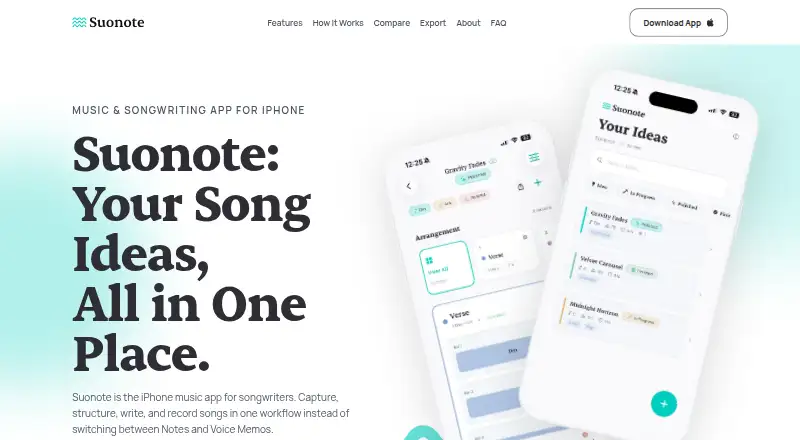
What Suonote is
Suonote is an iPhone songwriting app for organizing chords, lyrics, and recorded ideas into structured songs. Projects can include verses, choruses, and bridges, with chord timelines, lyrics, and recordings connected to each section. Its Studio arranges chords for drums, bass, keys, guitar, and strings, and lets users edit piano-roll and drum parts and apply effects to individual tracks. In-key chord suggestions cover major, minor, modal, harmonic-minor, and melodic-minor options.
Songwriters can record voice, guitar, or melody takes with a metronome and count-in, then link them to song sections. Studio mixes export as M4A or MIDI; other export options include PDF chord charts, lyric sheets, song notes, and portable .suonote project files. Optional iCloud sync, Home and Lock Screen widgets, and Siri and Shortcuts through App Intents support an iPhone-based workflow. Core songwriting and recording work offline. The maker says the app has no ads, third-party trackers, or external analytics SDKs, and that synced data stays in the user's private iCloud container. Built by independent developer Martin Poblet, Suonote is free, available in English and Spanish, and requires iOS 26 or later. It is intended for preparing songwriting drafts, rather than serving as a full DAW.
Who it suits
Suonote suits songwriters, topliners, indie artists, bands, co-writers, producers, and music students who want to keep song sections, lyrics, chords, and takes together on an iPhone. It is also a fit for people who want to shape structured drafts before production.
What it does well
- Organizes lyrics, chords, and recordings by song section.
- Arranges chords for five instrument groups in Studio.
- Records voice, guitar, and melody with metronome and count-in.
- Exports mixes, charts, lyrics, notes, and project files.
- Core songwriting and recording work offline.
- Free, with optional iCloud sync and iPhone widgets.
What to know first
- Requires an iPhone running iOS 26 or later.
- The maker says it is not a full DAW.
Plans
| Plan | Billed and limits | Price |
|---|---|---|
| Free | Free on the App Store; the listing does not state feature or usage limits | Free |
As suonote.com lists them, read 7 Oct 2026. The maker's own page has the final word.
Getting started
- Open the Suonote website or find the app on the App Store.
- Install it on an iPhone running iOS 26 or later.
- Create a project and organize it into song sections.
- Add lyrics, chords, and recordings, or arrange chords in Studio.
- Export a mix, chart, lyric sheet, notes, or project file as needed.
Verdict
Choose Suonote if you want a free iPhone app to organize song ideas and prepare structured drafts with chord-based arrangements and linked recordings. Look elsewhere if you need a full DAW or do not have an iPhone running iOS 26 or later.
Questions
How much does Suonote cost?
Suonote is free. Its Free plan is listed as free.
Which devices does Suonote support?
It is a native iPhone app that requires iOS 26 or later.
Can Suonote work offline?
Yes. Its core songwriting and recording flows work without an active internet connection.
What can Suonote export?
It exports Studio mixes as M4A and MIDI, plus PDF chord charts, lyric sheets, song notes, and portable .suonote project files.
Who makes Suonote?
The site says it is an independent app built by Martin Poblet.
Does Suonote sync with iCloud?
Optional iCloud sync is supported. The maker says synced data stays in the user's private iCloud container.
Facts from Suonote's own pages
- Audience
- The maker identifies songwriters, producers, topliners, indie artists, bands and co-writers, and music students as intended users. · suonote.com, 7 Oct 2026
- Chord tools
- The app offers in-key chord suggestions and supports major, minor, modal, harmonic-minor, and melodic-minor variants. · suonote.com, 7 Oct 2026
- Exports
- Suonote exports Studio mixes as M4A, MIDI, PDF chord charts, lyric sheets, song notes, and portable .suonote project files. · suonote.com, 7 Oct 2026
- Integrations
- The app supports optional iCloud sync, Home and Lock Screen widgets, and Siri and Shortcuts through App Intents. · suonote.com, 7 Oct 2026
- Languages
- The app is available in English and Spanish. · suonote.com, 7 Oct 2026
- Maker
- The site says Suonote is an independent app built by Martin Poblet, a creative developer with over 10 years of digital product design experience. · suonote.com, 7 Oct 2026
- Offline use
- Suonote is local-first and its core songwriting and recording flows work without an active internet connection. · suonote.com, 7 Oct 2026
- Privacy
- The maker says Suonote has no ads, third-party trackers, or external analytics SDKs, and that synced data stays in the user's private iCloud container. · suonote.com, 7 Oct 2026
- Product scope
- Suonote focuses on songwriting and preparing structured drafts before production; the maker says it is not a full DAW. · suonote.com, 7 Oct 2026
- Purpose
- Suonote is an iPhone songwriting app for keeping chords, lyrics, and recorded takes together and playing songs back with a band-style arrangement. · suonote.com, 7 Oct 2026
- Recording
- Users can record voice, guitar, or melody takes with a metronome and count-in, and link recordings to song sections. · suonote.com, 7 Oct 2026
- Song structure
- Projects can organize sections such as verses, choruses, and bridges with chord timelines, lyrics, and recordings linked to song sections. · suonote.com, 7 Oct 2026
- Studio
- Studio arranges chords for drums, bass, keys, guitar, and strings, with editable piano-roll and drum parts and per-track effects. · suonote.com, 7 Oct 2026
- Support contact
- The site lists [email protected] as its contact email. · suonote.com, 7 Oct 2026
- Supported device
- The maker describes Suonote as a native iPhone app requiring iOS 26 or later. · suonote.com, 7 Oct 2026
Where Suonote stands on Freedom251
- Songwriting Software#23 of 30