Freedom251 › Church Streaming Software
Stream24
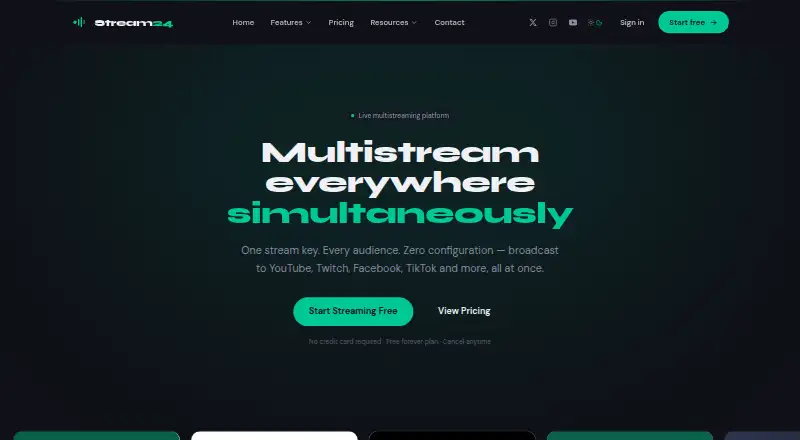
What Stream24 is
Stream24 distributes a single stream from an encoder, video file, or URL to multiple live platforms. Its web app accepts RTMP encoder streams and uploaded files, while Cloud Pull brings in remote URLs. Listed destinations include YouTube, Facebook, TikTok, Instagram, Twitch, LinkedIn, X, Kick, Rumble, Dailymotion, Vimeo, Trovo, and Custom RTMP. Stream24 Studio for Mac adds cameras, screens, media, overlays, audio, picture-in-picture, recording, and PDF slides. It can also provide a virtual camera for Zoom, Google Meet, Microsoft Teams, OBS, and FaceTime. The free plan costs nothing and allows three platforms at 720p, with a watermark, three Studio inputs, and 10 OmniDownload videos a day. Starter costs $19 a month; Pro costs $39 a month and includes Custom RTMP, Cloud Pull, scheduled broadcasts, an embeddable player, playlists, 16 Studio inputs, and 4K. Studio requires macOS 13 or later and a free account, and works offline for up to a day.
Who it suits
Stream24 suits creators, churches and ministries, event organizers, businesses, and educators who need to send a stream to multiple platforms. Mac users looking for production tools or a virtual camera can also use Studio.
What it does well
- Accepts encoder streams, video files, and remote URLs.
- Studio includes recording, overlays, and PDF slides.
- Virtual camera supports Zoom, Teams, OBS, and FaceTime.
- Free plan supports three platforms at 720p.
- Studio runs on Apple silicon and Intel Macs.
What to know first
- Free plan adds a Stream24 watermark.
- Free plan is limited to three platforms and 720p.
- Studio requires macOS 13 or later.
- Studio requires a free Stream24 account.
Limits
The free plan allows three platforms and 720p, adds a Stream24 watermark, includes three Studio inputs, and limits OmniDownload to 10 videos a day. Starter costs $19 a month and includes five platforms, 1080p, no watermark, six Studio inputs, and unlimited 1080p downloads. Pro costs $39 a month and includes 4K, 16 Studio inputs, and the listed Pro features.
Plans
| Plan | Billed and limits | Price |
|---|---|---|
| Free | Forever free · 3 platforms · 720p · Stream24 watermark · 3 Studio inputs · 10 OmniDownload videos a day | Free |
| Starter | billed monthly · cancel anytime · 5 platforms · 1080p · no watermark · local video streaming · 6 Studio inputs · unlimited 1080p downloads | $19 a month |
| Starter | Yearly simply means one payment instead of twelve. · 5 platforms · 1080p · no watermark · local video streaming · 6 Studio inputs · unlimited 1080p downloads | $228 a year |
| Pro | billed monthly · cancel anytime · All 13 platforms + Custom RTMP · Cloud Pull · scheduled broadcasts · embeddable player · playlists of 5 files · 16 Studio inputs · 4K | $39 a month |
| Pro | Yearly simply means one payment instead of twelve. · All 13 platforms + Custom RTMP · Cloud Pull · scheduled broadcasts · embeddable player · playlists of 5 files · 16 Studio inputs · 4K | $468 a year |
As stream24.io lists them, read 9 Oct 2026. The maker's own page has the final word.
Getting started
- Visit the Stream24 website and create a free account to use Studio.
- For Studio, use a Mac running macOS 13 or later; Apple silicon and Intel Macs are supported.
- Choose an input: an RTMP encoder stream, uploaded video file, or remote URL through Cloud Pull.
- Select the destinations for your broadcast within the plan’s platform allowance.
- For production features, open Stream24 Studio and configure cameras, screens, media, overlays, or audio as needed.
Stream24 is a multistreaming service with a web app for routing video and a Mac app for producing it. It suits creators, churches, educators and event teams that need both distribution and desktop production, though the Mac Studio and plan caps make it less suitable for Mac-free workflows or broad free distribution. Its strongest case is the combination of multiple source types and a built-in studio; the key trade-off is that higher destination counts and production limits require a paid plan.
Overview
Stream24 takes a feed from an RTMP encoder, an uploaded video or a remote URL and sends it to live platforms. Destinations include YouTube, Facebook, TikTok, Instagram, Twitch, LinkedIn, X, Kick, Rumble, Dailymotion, Vimeo, Trovo and, on Pro, Custom RTMP. This lets a small team route a single source to several audiences rather than prepare a separate distribution path for each platform.
Stream24 Studio adds a Mac production environment, while the browser app handles distribution. The split is useful if a Mac is part of the production setup, but the Studio app requires macOS 13 or later. Stream keys are encrypted with AES-256, and Stream24 says it usually replies to support requests within two hours.
Key features
Flexible input and multistreaming
Encoder feeds, video files and Cloud Pull remote URLs cover live production as well as prerecorded or remotely hosted material. The free plan sends to three platforms, Starter to five and Pro includes all 13 named destinations plus Custom RTMP. The listed simultaneous-destination figure is five, so teams should check that limit against their intended workflow rather than assume every plan can send to all destinations at once.
Mac production and virtual camera
Studio supports cameras, screens, media, overlays, audio, picture-in-picture, recording and PDF slides. That breadth makes it relevant to presentations, services and creator productions that need more than routing alone. It can also provide a virtual camera to Zoom, Google Meet, Microsoft Teams, OBS and FaceTime, extending its use to meetings and other desktop apps.
Studio needs a free Stream24 account and can continue working offline for up to a day. That offers some resilience during a connection interruption, but it is not a substitute for a fully offline workflow. Apple silicon and Intel Macs are supported, provided they run macOS 13 or later.
Pricing
Stream24 has a free plan and paid plans billed monthly, with cancellation anytime on the paid tiers. There is no free trial, so the free tier is the way to assess the service before paying.
- Free: free, billed Forever free. It allows three platforms at 720p, adds a Stream24 watermark, provides three Studio inputs and permits 10 OmniDownload videos a day. It fits a small, watermarked setup, but the resolution, input count and daily download quota constrain regular or polished production.
- Starter: $19 a month, billed monthly, cancel anytime. It raises distribution to five platforms and 1080p, removes the watermark, adds local video streaming and six Studio inputs, and includes unlimited 1080p downloads. This is the practical step up for creators who need clean output and higher resolution without Pro’s full destination set.
- Pro: $39 a month, billed monthly, cancel anytime. It adds all 13 platforms plus Custom RTMP, Cloud Pull, scheduled broadcasts, an embeddable player, playlists of five files, 16 Studio inputs and 4K. It is the fit for productions that need those routing and production capabilities; otherwise Starter costs less while retaining 1080p and five platforms.
The pricing summary says paid plans start at $10/mo, while the plan prices shown are $19.00 and $39.00 per month. Compare the plan terms to the actual requirements before choosing; the free option has no trial period, a watermark and explicit usage caps.
Platforms
The listed platforms are Android, iOS, macOS and web. Studio is specifically the Mac app, so the production features do not extend to Android, iOS or Windows in the stated platform lineup. The web app accepts encoder streams, uploaded files and remote URLs.
Who it's for
Stream24 is aimed at churches and ministries, creators and podcasters, events and conferences, businesses and educators. It makes most sense for teams that need to send one source to several platforms and want a Mac-based studio with it. A user who only needs one destination, or who cannot use a Mac for production, may find the combined offering less useful.
Pros and cons
- Pros: Three kinds of input—encoder, file and remote URL—support both live and prerecorded distribution.
- Pros: Studio combines cameras, screens, overlays, audio, recording and slides, with virtual-camera output to common meeting and production apps.
- Pros: Starter removes the watermark and lifts output to 1080p, while keeping the cost below Pro.
- Cons: Free is limited to three destinations, 720p and three Studio inputs, and adds a watermark.
- Cons: Studio requires macOS 13 or later, which excludes Mac users on older systems and leaves non-Mac users without the stated production app.
- Cons: Pro is needed for Custom RTMP, Cloud Pull and 4K, so those requirements make the free and Starter tiers unsuitable.
Alternatives
For a church-focused shortlist, see Church Streaming Software.
- Restream is worth considering if wider platform support matters: it lists Android, API, iOS, Linux, macOS, web and Windows, while its free plan allows two channels at once and includes branding.
- Castream may suit mobile streaming on a free tier, with Android, iOS and web support, but its free plan limits sessions to five minutes and includes a watermark.
- Church Online Platform is the alternative to consider for church services and congregation interaction, with a free plan that includes unlimited services, attenders, admins, hosts, chat and prayers.
- OneStream Live is another web-based multistream option; its free plan offers two destinations, 720p, one team seat, 1 GB storage and three scheduled events.
- Subsplash Church App is an alternative for organizations considering a church app and giving rather than Stream24’s multistreaming workflow.
- Vimeo is an alternative to consider for video hosting, with a free plan that includes one seat and 1 GB storage.
- BlizCast Radio & TV is another option for church and community broadcasting.
- Gotedo Streams is another option for web-based streaming.
Verdict
Choose Stream24 if your production starts with one source, needs distribution to several platforms and benefits from a Mac studio for creating and routing video. The free tier can cover a modest, watermarked setup; Starter is the more compelling choice for 1080p without branding, while Pro earns its higher price only when its extra destinations, Cloud Pull, scheduling or 4K matter. Look elsewhere if you need a production app outside macOS or a free plan without Stream24’s destination, resolution and input caps.
Verdict
Stream24 combines multistream distribution with a Mac studio app for creating and routing video. Check the plan limits and Studio requirements against your platform and production needs.
Questions
Does Stream24 have a free plan or free trial?
Stream24 has a free plan at no cost. It does not offer a free trial.
How much do the paid plans cost?
Starter costs $19 a month, and Pro costs $39 a month. Both are billed monthly and can be cancelled anytime.
Which platforms can Stream24 send a broadcast to?
Listed destinations are YouTube, Facebook, TikTok, Instagram, Twitch, LinkedIn, X, Kick, Rumble, Dailymotion, Vimeo, Trovo, and Custom RTMP. The free plan includes three platforms; Starter includes five, and Pro includes all 13 plus Custom RTMP.
What devices and operating systems does Stream24 Studio support?
Stream24 Studio supports Apple silicon and Intel Macs running macOS 13 or later. The app requires a free Stream24 account and can work offline for up to a day.
What inputs can Stream24 accept?
The web app accepts RTMP encoder streams, uploaded video files, and remote URLs through Cloud Pull.
Who makes Stream24?
The site footer identifies Stream24 as a product by Omnistream Media Solutions.
Facts from Stream24's own pages
- Company name
- The site footer identifies Stream24 as a product by Omnistream Media Solutions. · stream24.io, 9 Oct 2026
- Destinations
- The listed destinations are YouTube, Facebook, TikTok, Instagram, Twitch, LinkedIn, X, Kick, Rumble, Dailymotion, Vimeo, Trovo and Custom RTMP. · stream24.io, 9 Oct 2026
- Ingest
- The web app accepts RTMP encoder streams, uploaded video files and remote URLs through Cloud Pull. · stream24.io, 9 Oct 2026
- Integrations
- Studio can provide a virtual camera for Zoom, Google Meet, Microsoft Teams, OBS and FaceTime. · stream24.io, 9 Oct 2026
- Intended users
- The site presents Stream24 Studio for churches and ministries, creators and podcasters, events and conferences, businesses and educators. · stream24.io, 9 Oct 2026
- Mac support
- Stream24 Studio requires macOS 13 or later and supports Apple silicon and Intel Macs. · stream24.io, 9 Oct 2026
- Product
- Stream24 takes one stream from an encoder, a video file or a URL and distributes it to multiple live platforms. · stream24.io, 9 Oct 2026
- Security
- Stream24 says stream keys are encrypted with AES-256. · stream24.io, 9 Oct 2026
- Studio features
- Stream24 Studio for Mac supports cameras, screens, media, overlays, audio, picture-in-picture, recording and PDF slides. · stream24.io, 9 Oct 2026
- Studio offline limit
- The Mac Studio app requires a free Stream24 account and keeps working offline for up to a day. · stream24.io, 9 Oct 2026
- Support
- Stream24 lists [email protected] and says it usually replies within two hours. · stream24.io, 9 Oct 2026
Where Stream24 stands on Freedom251
- Church Streaming Software#7 of 37
- Multistreaming Software#13 of 43