Strawberry Browser
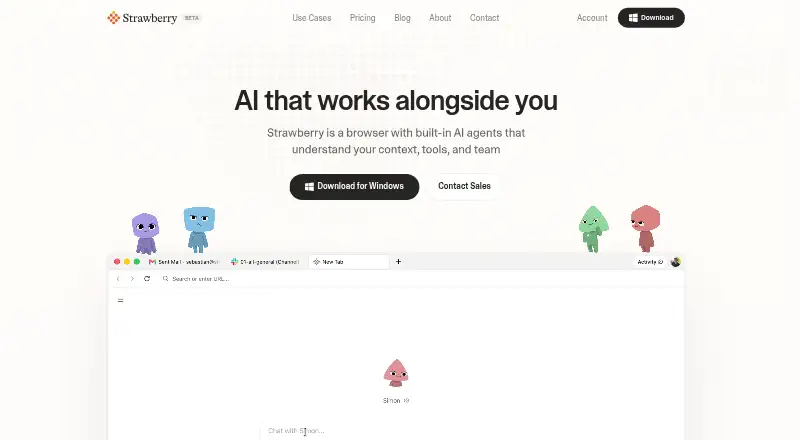
What Strawberry Browser is
Strawberry Browser is a browser for macOS and Windows with AI agents that use context, tools, and team information. Its personal assistant can follow users across websites and take actions on their behalf, and users can set up recurring browser tasks. Strawberry can transcribe meetings, take notes, and extract action items without adding a meeting bot. It can also create branded slide decks, posters, infographics, and dashboards from web sources, including pages behind login walls. The browser says it remembers details, habits, people, and projects for continuity. Its integrations page lists 1,975 apps, including Salesforce, HubSpot, Slack, Gmail, Ashby, Notion, and Google Sheets; changes wait for the user's click. Regular browsing uses no credits, while chatting with companions or having them act uses monthly credits. The free plan includes 500 credits per month; paid plans start at $20 per month. Strawberry says it is offered to businesses for business use, not personal or household use.
Who it suits
It suits business users who want browser-based task automation, meeting notes, or artifacts made from web sources. It is not offered for personal, family, or household use.
What it does well
- Works on macOS and Windows.
- Meeting notes do not require adding a bot.
- Integrations page lists 1,975 apps.
- Regular browsing does not use credits.
- Free plan includes 500 credits per month.
What to know first
- Offered for business use, not personal use.
- Agent chats and actions use monthly credits.
- Free plan has 500 credits per month.
Limits
The Free plan includes 500 credits per month, and chatting with companions or having them act uses credits. Intern costs $20 per month and includes 8,000 credits per month; extra credits cost $10 per 1,000.
Plans
| Plan | Billed and limits | Price |
|---|---|---|
| Part-time | $100 /per month · 30,000 credits per month · $10 per extra 1,000 credits · Priority support | $100 a month |
| Intern | $20 /per month · 8,000 credits per month · $10 per extra 1,000 credits · Priority support | $20 a month |
| Full-time | $250 /per month · 75,000 credits per month · $10 per extra 1,000 credits · Dedicated support | $250 a month |
| Free | $0 /per month · 500 credits per month · $10 per extra 1,000 credits · No credit card required | On request |
| Team | Custom · Mix Free, Intern, Part-time, and Full-time seats · Unified billing · Shared credit pools · Admin controls · Dedicated onboarding and support | On request |
As strawberrybrowser.com lists them, read 3 Oct 2026. The maker's own page has the final word.
Getting started
- Visit https://strawberrybrowser.com/.
- Choose macOS or Windows.
- Select the Free plan, which requires no credit card, or choose a paid plan.
- Use regular browsing without credits; companion chats and actions use monthly credits.
Strawberry Browser is a business browser built around AI companions that can navigate sites, run repeatable browser work, document meetings, and turn web material into branded deliverables. It is best suited to teams that want these jobs in one workspace rather than a consumer browser with occasional AI help. The trade-off is a business-only service whose agent activity is metered through credits.
Overview
Strawberry combines a conventional browser with assistants that understand a user’s context, tools, and team. The assistant can follow you across websites and use them on your behalf, while the service also covers recurring workflows, meeting documentation, research summaries, and content creation. Regular browsing does not consume credits, but conversations with companions and requests for them to act do, making the browser inexpensive for reading and potentially costlier for agent-heavy work.
Key features
Browser agents and workflows
The personal assistant can operate across websites instead of being confined to a chat panel. Strawberry says any work that can be done in a browser can be automated as a recurring task. That is a strong fit for repetitive operations work, sales administration, recruiting routines, and other browser-based processes; it is less compelling if you only need ordinary browsing or occasional questions.
Meetings and visual deliverables
Strawberry can transcribe meetings, take notes, and extract action items without adding a meeting bot. It can also make branded slide decks, posters, infographics, and dashboards from web sources, including sources behind login walls. Teams that regularly convert meetings and research into presentable material get a broader workflow than a browser assistant alone.
Memory, integrations, and controls
The service says it remembers details, habits, people, and projects so work can continue with context. Its integrations catalog lists 1,975 apps, including Salesforce, HubSpot, Slack, Gmail, Ashby, Notion, and Google Sheets. Changes wait for the user’s click, and companions ask before irreversible actions, which keeps automation more reviewable. Passwords are encrypted on-device, and the maker says the product meets SOC 2 requirements. Its privacy policy describes local and cloud storage, TLS 1.2 or higher in transit, encryption at rest, role-based access, multifactor authentication for administrative access, and no default use of user content to train Strawberry’s or third-party generative AI models. The policy identifies a SOC 2 Type 1 report dated 13 May 2026, available to business customers under NDA on request.
Pricing
Strawberry has a free tier and paid plans from $20 per month. The Free plan is billed at $0 per month, includes 500 credits monthly, charges $10 per extra 1,000 credits, and requires no credit card. It is useful for evaluating light agent use, but 500 credits can constrain regular companion activity.
Intern costs $20 per month for 8,000 credits and priority support. Part-time is $100 per month for 30,000 credits and priority support. Full-time is $250 per month for 75,000 credits and dedicated support. Each paid plan charges $10 per extra 1,000 credits, so sustained automation can raise the monthly bill beyond the headline price.
Team uses custom pricing and mixes Free, Intern, Part-time, and Full-time seats. It adds unified billing, shared credit pools, admin controls, and dedicated onboarding and support. That structure suits organizations allocating usage across staff; solo users do not get those administrative benefits.
Platforms
Strawberry runs on macOS and Windows. Its hybrid privacy model combines local and cloud storage, so it is aimed at organizations comfortable with that arrangement rather than users seeking an entirely local browser.
Who it's for
Strawberry is for businesses that want browser agents, recurring browser automation, meeting notes, and branded outputs connected to their existing tools. It is particularly suitable for teams with repeatable web operations and enough agent volume to benefit from shared pools or dedicated support. The privacy policy says the service is offered only to businesses for business use, not to consumers or personal, family, or household use, so it is not the right choice for a personal browser.
Pros and cons
Pros
- Broad task coverage: browser actions, recurring workflows, meeting notes, and visual assets sit in one product.
- Large integration catalog: 1,975 listed apps cover major CRM, communication, email, recruiting, notes, and spreadsheet tools.
- Reviewable automation: companions request approval before irreversible actions and integration changes wait for a click.
- Business safeguards: on-device password encryption, administrative multifactor authentication, and stated SOC 2 Type 1 reporting support business adoption.
Cons
- Business-only terms: individuals cannot use it for personal, family, or household work.
- Agent usage is metered: companion chats and actions consume monthly credits, with overages priced at $10 per 1,000.
- Platform coverage is limited: support is for macOS and Windows, with no mobile or Linux option stated.
- Team pricing is custom: organizations must request a quote rather than compare a published team rate.
Alternatives
Choose BrowserOS instead if you want a free, open-source browser with built-in AI agents that runs on macOS, Windows, and Linux.
Gemini is a better fit for a broader device mix, including web, Windows, macOS, iOS, and Android, with a free plan offering app access, image generation, Deep Research, Gemini Live, Canvas, and Gems.
Pick Claude in Chrome if you want a freemium assistant spanning web, desktop, and mobile chat with web search, file creation, code execution, memory, and app and tool connections.
Comet is the straightforward free alternative for users who want a downloadable browser on Android, iOS, macOS, or Windows.
Consider Genspark AI Browser for an on-device free tier with 169 open-weight models, no internet requirement, and no subscription or usage limits.
Muse suits users seeking a mobile-and-web workspace with a free tier and paid token-based plans rather than Strawberry’s browser-agent credit structure.
Choose UseAgent if self-hosting or Linux support matters and you want bots, routines, handoffs, and child sessions.
Bardeen is an alternative for extension and web-based automation with published Basic and Premium credit plans.
For broader discovery, see AI Browser Agents and AI Browsers.
Verdict
Strawberry Browser is a strong choice for businesses that want one browser to execute web tasks, retain working context, document meetings, and produce branded research outputs. Its main reason to choose it is the breadth of connected, approval-aware workflows; its main reason to look elsewhere is the business-only policy and credit-based cost of sustained agent use.
Verdict
Strawberry Browser combines web actions, recurring tasks, meeting notes, and content creation with a broad listed integrations catalog. Consider its business-only use and credit limits when deciding whether it fits your work.
Questions
Is Strawberry Browser free?
Yes. The Free plan is billed at $0 per month, includes 500 credits per month, and requires no credit card.
What do the paid plans cost?
Intern is $20 per month with 8,000 credits; Part-time is $100 per month with 30,000 credits; Full-time is $250 per month with 75,000 credits. Extra credits cost $10 per 1,000. Team pricing is custom.
Which platforms does it support?
Strawberry Browser supports macOS and Windows.
Does regular browsing use credits?
No. Regular browsing does not use credits; chatting with companions or asking them to act uses monthly credits.
What security and privacy controls are described?
Passwords are encrypted on-device, companions ask before irreversible actions, and the service describes TLS 1.2 or higher in transit, encryption at rest, role-based access, and multifactor authentication for administrative access. User content is not used by default to train Strawberry's or third-party generative AI models.
Who makes Strawberry Browser, and where is the team based?
Strawberry was born in Stockholm, Sweden, where its team is currently based.
Facts from Strawberry Browser's own pages
- AI training
- The privacy policy says user content is not used by default to train Strawberry's or third-party generative AI models. · strawberrybrowser.com, 3 Oct 2026
- Browser actions
- Its personal AI assistant can follow users around the web and use websites on their behalf. · strawberrybrowser.com, 3 Oct 2026
- Business audience
- The privacy policy says the service is offered only to businesses for business use, not to consumers or individuals for personal, family, or household use. · strawberrybrowser.com, 3 Oct 2026
- Credit limits
- Regular browsing does not use credits; chatting with companions or having them act uses monthly credits, and the free plan includes 500 credits per month. · strawberrybrowser.com, 3 Oct 2026
- Data handling
- The privacy policy describes local and cloud storage, TLS 1.2 or higher in transit, encryption at rest, role-based access, and multifactor authentication for administrative access. · strawberrybrowser.com, 3 Oct 2026
- Integrations
- The integrations page lists 1,975 apps, including Salesforce, HubSpot, Slack, Gmail, Ashby, Notion, and Google Sheets, and says changes wait for the user's click. · strawberrybrowser.com, 3 Oct 2026
- Maker and location
- The about page says Strawberry was born in Stockholm, Sweden, where the team is currently based. · strawberrybrowser.com, 3 Oct 2026
- Meeting notes
- Strawberry can transcribe meetings, take notes, extract action items, and work without adding a meeting bot. · strawberrybrowser.com, 3 Oct 2026
- Personalization
- Strawberry says it memorizes details, habits, people, and projects to provide continuity. · strawberrybrowser.com, 3 Oct 2026
- Platforms
- Strawberry is a desktop app available for macOS and Windows; downloading requires entering an email to receive a link. · strawberrybrowser.com, 3 Oct 2026
- Product
- Strawberry is a browser with built-in AI agents that understand user context, tools, and team. · strawberrybrowser.com, 3 Oct 2026
- Security controls
- The maker says companions ask before irreversible actions, passwords are encrypted on-device, and it meets SOC 2 requirements. · strawberrybrowser.com, 3 Oct 2026
- SOC 2
- The privacy policy states Strawberry has a SOC 2 Type 1 report dated 13 May 2026, available to business customers under NDA on request. · strawberrybrowser.com, 3 Oct 2026
- Visual artifacts
- It can create branded slide decks, posters, infographics, and dashboards from web sources, including sources behind login walls. · strawberrybrowser.com, 3 Oct 2026
- Workflows
- Users can set up recurring browser tasks, and the site says any work that can be done in a browser can be automated. · strawberrybrowser.com, 3 Oct 2026
Where Strawberry Browser stands on Freedom251
- AI Browsers#19 of 23
- AI Browser Agents#21 of 22