Freedom251 › Animated Presentation Software
StoryMotion
What StoryMotion is
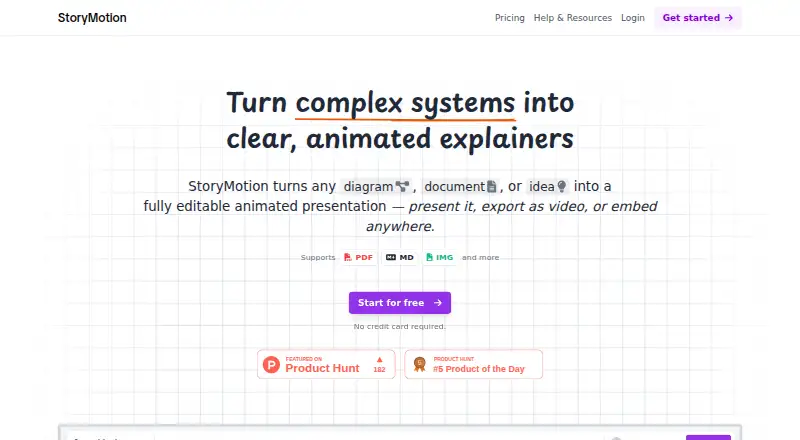
StoryMotion is a web app for turning diagrams, documents and ideas into editable animated presentations that users can present live, export as video or embed with an iframe. Its AI can generate brand-matching visuals from PDFs, documents, diagrams or ideas. Editing tools include arrows, shapes, hand-drawn diagrams, thousands of components and icons, plus controls for elements, effects and motion timing. The site lists support for PDF, MD, IMG and more. Video exports can reach 4K at 60 fps. Creator adds MP3 uploads to the timeline editor, transparent-background exports, .storymotion file exports and Google Fonts; exported video can also be edited in Canva, CapCut, After Effects or Premiere Pro. StoryMotion describes uses such as pitch decks, technical training, live talks, online courses, YouTube and social clips, documentation, blogs and internal wikis. The Free plan has 15 AI credits per month, PDF uploads up to 5 pages, watermarked video exports and 25 MB of cloud storage. Creator costs $29 a month; Pro costs $49 a month and adds 300 monthly AI credits and priority support to Creator. Users can start free without a credit card.
Who it suits
StoryMotion suits technical teams and others creating animated presentations for training, talks, courses, video, documentation or internal wikis. The Free plan may fit users who can work within its credit, upload, watermark and storage limits.
What it does well
- Supports live presentations, video exports and iframe embeds.
- Video exports reach up to 4K at 60 fps.
- Editing includes thousands of components and icons.
- Free plan can be started without a credit card.
- Creator includes transparent-background and project-file exports.
What to know first
- Free plan limits AI use to 15 credits monthly.
- Free PDF uploads are limited to five pages.
- Free video exports have a watermark.
- Free cloud storage is 25 MB.
Limits
The Free plan has 15 AI credits per month, accepts PDF uploads up to five pages, and includes 25 MB of storage. Its video exports are watermarked; Creator at $29 a month includes 100 AI credits monthly, PDF uploads up to 50 pages, unwatermarked exports, and 5 GB of storage.
Plans
| Plan | Billed and limits | Price |
|---|---|---|
| Creator | 100 AI credits/month · AI PDF uploads up to 50 pages · unlimited video exports without watermark · up to 4K at 60 FPS · 5 GB cloud storage | $29 a month |
| Pro | Everything in Creator · 300 AI credits/month · priority support | $49 a month |
| Free | 15 AI credits/month · AI PDF uploads up to 5 pages · unlimited video exports with watermark · 25 MB cloud storage · presentation mode and iframe embed | On request |
As storymotion.video lists them, read 7 Oct 2026. The maker's own page has the final word.
Getting started
- Visit https://storymotion.video/.
- Start with the Free plan without a credit card.
- Upload a PDF, document, diagram, image, or provide an idea.
- Create and edit visuals, motion, and timing.
- Present live, export a video, or embed the result with an iframe.
- Choose Creator or Pro for paid-plan features.
Verdict
StoryMotion combines AI-assisted visuals with editing, presentation and export options for animated content. The Free plan has defined limits, while Creator starts at $29 a month.
Questions
How much does StoryMotion cost?
The Free plan has no listed price. Creator costs $29 a month, and Pro costs $49 a month.
What is included in the Free plan?
It includes 15 AI credits per month, PDF uploads up to five pages, watermarked video exports, 25 MB cloud storage, presentation mode, and iframe embedding.
Which platforms does StoryMotion support?
StoryMotion is a web app.
What does Creator add?
Creator includes 100 AI credits per month, AI PDF uploads up to 50 pages, unlimited unwatermarked video exports up to 4K at 60 fps, and 5 GB of storage. It also includes MP3 uploads, transparent-background export, .storymotion file export, and Google Fonts.
What does Pro include?
Pro costs $49 a month and adds 300 AI credits per month and priority support to Creator.
Can StoryMotion work with other creative tools?
The site says exported videos can be further edited in Canva, CapCut, After Effects, or Premiere Pro.
Facts from StoryMotion's own pages
- AI generation
- The product says AI can generate visuals matching a user's brand from PDFs, documents, diagrams, or ideas. · storymotion.video, 7 Oct 2026
- Audio and export options
- The Creator plan includes MP3 uploads to the timeline editor, transparent-background export, and .storymotion file export. · storymotion.video, 7 Oct 2026
- Custom services
- The site offers tailored business solutions that may include a dedicated editor, custom motion effects, workflow customization, API integration, team collaboration features, custom brand assets, and dedicated support. · storymotion.video, 7 Oct 2026
- Editing
- Users can sketch with arrows, shapes, and hand-drawn diagrams, use thousands of components and icons, and edit elements, effects, and motion timing. · storymotion.video, 7 Oct 2026
- File support
- The site says StoryMotion supports PDF, MD, IMG, and more. · storymotion.video, 7 Oct 2026
- Fonts
- Creator plan subscribers can use fonts from Google Fonts. · storymotion.video, 7 Oct 2026
- Free tier limits
- The Free plan includes 15 AI credits per month, PDF uploads up to 5 pages, watermarked video exports, and 25 MB of cloud storage. · storymotion.video, 7 Oct 2026
- Integrations and workflow
- The site describes iframe embedding and says exported video can be further edited in Canva, CapCut, After Effects, or Premiere Pro. · storymotion.video, 7 Oct 2026
- Payment signup
- The site says users can start for free without a credit card. · storymotion.video, 7 Oct 2026
- Presentation and export
- StoryMotion supports live presentation mode, video export up to 4K at 60 fps, and iframe embeds. · storymotion.video, 7 Oct 2026
- Purpose
- StoryMotion turns diagrams, documents, or ideas into editable animated presentations that users can present, export as video, or embed. · storymotion.video, 7 Oct 2026
- Support
- The Pro plan includes priority support, and the site lists [email protected] for questions and business inquiries. · storymotion.video, 7 Oct 2026
- Who it is for
- The site positions StoryMotion for technical teams and mentions pitch decks, technical training, live talks, online courses, YouTube, social clips, documentation, blogs, and internal wikis. · storymotion.video, 7 Oct 2026
Where StoryMotion stands on Freedom251
- Animated Presentation Software#20 of 25