Freedom251 › AI Storyboard Generators

StoryBirdie
What StoryBirdie is
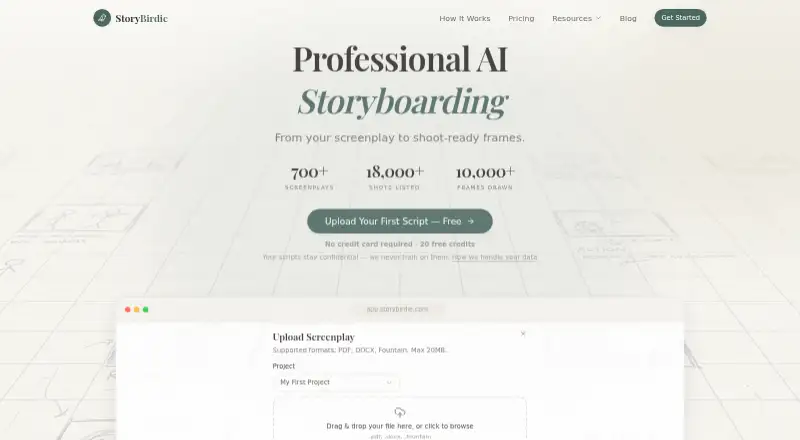
StoryBirdie is a web app for turning screenplays and other pre-production documents into analysis, shot lists, storyboard frames and timed animatics. It accepts PDF, DOCX and Fountain uploads up to 20MB, and also works with treatments, creative briefs and concept documents. Its script analysis checks for continuity errors. Shot lists can include camera angles, blocking and props, and users can export them as XLSX, CSV or Markdown. Storyboards can be exported as print-ready PDFs.
For each screenplay, users choose either landscape 16:9 or portrait 9:16; that choice stays fixed. StoryBirdie states that analysis takes under a minute, shot-list generation takes 1–2 minutes, and each storyboard frame takes about 30 seconds. Analysis uses one credit, shot-list generation uses two, and each storyboard frame uses three. Credits do not expire, and unused subscription credits roll over.
The Free plan includes 20 credits, one project and two screenplays, with AI script analysis and PDF, XLSX and CSV export. Paid options include monthly Starter, Pro and Studio plans, plus a one-time credit pack. StoryBirdie says uploads are encrypted in transit and at rest, access is restricted to the authenticated account, and users retain ownership of their materials. After account deletion, it says it removes user data within 30 days except where legally required to retain it.
Who it suits
StoryBirdie suits directors, DPs, ADs and filmmakers organizing pre-production around screenplays or other planning documents. It may also fit users who need continuity analysis, shot planning, storyboard frames and exports in one web workflow.
What it does well
- Accepts PDF, DOCX and Fountain uploads up to 20MB.
- Checks scripts for continuity errors.
- Shot lists can include angles, blocking and props.
- Exports storyboards as print-ready PDFs.
- Credits do not expire; unused subscription credits roll over.
- Users retain ownership of their uploaded materials.
What to know first
- The Free plan is limited to one project and two screenplays.
- The selected aspect ratio is locked for each screenplay.
- Storyboard frame generation uses three credits per frame.
Limits
The Free plan includes 20 credits, one project and two screenplays. Analysis costs one credit, shot-list generation costs two, and each storyboard frame costs three.
Plans
| Plan | Billed and limits | Price |
|---|---|---|
| Free | $0 · 20 credits · 1 project · 2 screenplays · PDF, XLSX & CSV export · AI script analysis | Free |
| Starter | $19/mo · ~30 full scenes/month · 1,000 credits/month · 5 projects · unlimited screenplays · priority support | $19 a month |
| Pro | $49/mo · ~96 full scenes/month · 3,200 credits/month · unlimited projects · unlimited screenplays · priority support | $49 a month |
| Pay As You Go | $50 · 3,000 credits · no expiry | $50, paid once |
| Studio | $99/mo · ~181 full scenes/month · 6,000 credits/month · unlimited projects · unlimited screenplays · priority support | $99 a month |
As storybirdie.com lists them, read 1 Oct 2026. The maker's own page has the final word.
Getting started
- Visit https://storybirdie.com/.
- Use the web app and choose the Free plan or a paid option.
- Upload a PDF, DOCX or Fountain file up to 20MB, or provide a treatment, creative brief or concept document.
- Choose landscape 16:9 or portrait 9:16 for the screenplay.
- Run script analysis, generate a shot list or create storyboard frames using the available credits.
- Export storyboards as PDFs or shot lists as XLSX, CSV or Markdown.
Verdict
Choose StoryBirdie if you want a web workflow that carries pre-production documents from script analysis through shot lists and storyboard frames. The Free plan offers 20 credits for a small project; users who need more capacity can consider monthly plans or the one-time credit pack.
Questions
Is StoryBirdie free?
Yes. Its Free plan costs $0 and includes 20 credits, one project and two screenplays.
What do the paid plans cost?
Starter is $19 per month, Pro is $49 per month, and Studio is $99 per month. Pay As You Go costs $50 once.
Which platforms does StoryBirdie support?
StoryBirdie is available on the web.
What file types can I upload?
It accepts PDF, DOCX and Fountain files up to 20MB. It also works with treatments, creative briefs and concept documents.
What can I export?
Storyboards export as print-ready PDFs. Shot lists export as XLSX, CSV or Markdown.
Do StoryBirdie credits expire?
No. Credits never expire, and unused subscription credits roll over.
Facts from StoryBirdie's own pages
- Aspect ratios
- Users choose landscape 16:9 for film and YouTube or portrait 9:16 for Reels, TikTok and Shorts, and the choice is locked for the screenplay. · storybirdie.com, 1 Oct 2026
- Continuity analysis
- StoryBirdie analyzes scripts for continuity errors and generates shot lists with camera angles, blocking and props. · storybirdie.com, 1 Oct 2026
- Core workflow
- StoryBirdie turns a screenplay into screenplay analysis, a shot list, storyboard frames, a timed animatic and exports. · storybirdie.com, 1 Oct 2026
- Credit expiry
- StoryBirdie says credits never expire and unused subscription credits roll over. · storybirdie.com, 1 Oct 2026
- Credit usage
- The site states that one credit covers script analysis, two credits cover shot-list generation and three credits cover a storyboard frame. · storybirdie.com, 1 Oct 2026
- Data deletion
- If an account is deleted, StoryBirdie says it will delete the user's data within 30 days, except where legally required to retain it. · storybirdie.com, 1 Oct 2026
- Data ownership
- Users retain full ownership of uploaded screenplays, shot lists and storyboard frames, and StoryBirdie does not claim ownership. · storybirdie.com, 1 Oct 2026
- Generation speed
- The site says script analysis takes under a minute, shot-list generation 1–2 minutes, and frame generation about 30 seconds per frame. · storybirdie.com, 1 Oct 2026
- Input types
- StoryBirdie says it also works with treatments, creative briefs and concept documents. · storybirdie.com, 1 Oct 2026
- Intended users
- StoryBirdie describes itself as built for directors and says it is for directors, DPs, ADs and filmmakers managing pre-production. · storybirdie.com, 1 Oct 2026
- Output exports
- Users can export storyboards as print-ready PDFs and shot lists as XLSX, CSV or Markdown. · storybirdie.com, 1 Oct 2026
- Security
- Uploaded data is encrypted in transit with TLS and at rest, and content access is restricted to the authenticated account. · storybirdie.com, 1 Oct 2026
- Service providers
- The privacy policy lists Supabase for authentication, Microsoft Azure for hosting and storage, OpenAI for AI processing, and Google Analytics/Microsoft Clarity for analytics. · storybirdie.com, 1 Oct 2026
- Supported uploads
- The product accepts PDF, DOCX and Fountain files, with a maximum upload size of 20MB. · storybirdie.com, 1 Oct 2026
Where StoryBirdie stands on Freedom251
- AI Storyboard Generators#15 of 26