stodo
What stodo is
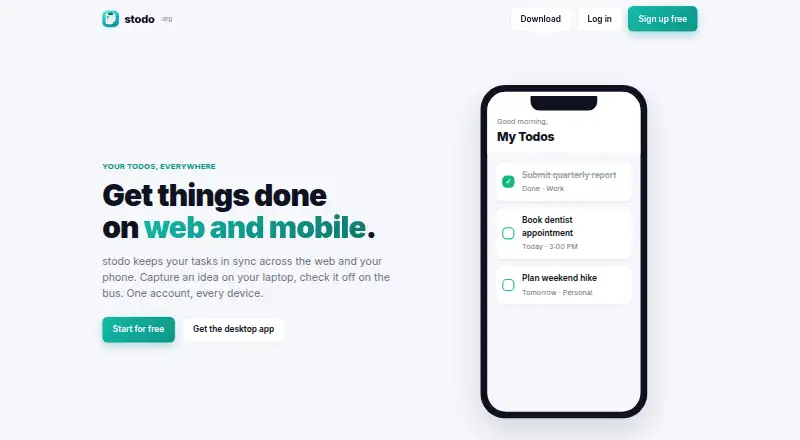
stodo is a free to-do app that keeps tasks synchronized across web, phone, and desktop through one account. Changes made in the browser appear on the phone in seconds, and edits on the phone sync back to the web. Users can organize tasks into groups, flag priorities, and set due dates. The desktop app shows the same todos as the web and mobile versions in a native window after sign-in. stodo supports web, Windows, macOS, Linux, and Android. Linux downloads are available for x86_64/amd64 and arm64/aarch64 systems in AppImage, .deb, and tar.gz formats. The macOS app supports Apple Silicon and Intel on macOS 10.15 Catalina or newer. Android APKs support arm64/aarch64 and older armeabi-v7a devices and update themselves after installation. Windows has a 64-bit installer for Windows 10 and 11, including Windows on ARM. The maker says macOS is not yet signed with an Apple developer certificate and provides a one-time quarantine-removal step for first launch. Signup is free, with the Free plan listed as free.
Who it suits
stodo suits anyone wanting synchronized task lists across browser, desktop, and phone. It is especially relevant to users needing Linux, macOS, Windows, or Android support.
What it does well
- Syncs changes across devices within seconds
- Groups, priorities, and due dates
- Native desktop application
- Broad desktop and mobile platform support
- Free signup and plan
What to know first
- macOS app is not Apple-signed
- macOS first launch needs quarantine removal
- No paid price or feature limits listed
- Tasks require signing in for desktop sync
Plans
| Plan | Billed and limits | Price |
|---|---|---|
| Free | Account signup is free; the page gives no plan limits | Free |
As stodo.org lists them, read 12 Oct 2026. The maker's own page has the final word.
Verdict
stodo provides cross-platform task synchronization with basic organization tools and no listed cost. Users on macOS should account for the unsigned-app launch step.
Facts from stodo's own pages
- Android support
- Android APKs are available for arm64/aarch64 and older armeabi-v7a devices, and the page says the app updates itself after installation. · stodo.org, 12 Oct 2026
- Desktop app
- The desktop app provides the same todos as the web and mobile apps in a native window and syncs after signing in. · stodo.org, 12 Oct 2026
- Free plan
- Yes · stodo.org, 22 Sept 2026
- Linux support
- Linux downloads are offered for x86_64/amd64 and arm64/aarch64, including AppImage, .deb, and tar.gz packages. · stodo.org, 12 Oct 2026
- macOS signing
- The maker says the app is not yet signed with an Apple developer certificate and provides a one-time quarantine removal step for first launch. · stodo.org, 12 Oct 2026
- macOS support
- The macOS app supports Apple Silicon and Intel on macOS 10.15 Catalina and newer. · stodo.org, 12 Oct 2026
- Pricing details
- The homepage offers free signup but does not state a paid price, billing term, or feature limit. · stodo.org, 12 Oct 2026
- Product
- stodo is a to-do app that syncs tasks across the web and phone with one account. · stodo.org, 12 Oct 2026
- Supported platforms
- web,windows,macos,linux,android · stodo.org, 22 Sept 2026
- Sync
- Changes made on the web show up on the phone in seconds, and vice versa. · stodo.org, 12 Oct 2026
- Task organization
- Users can sort tasks into groups, flag priorities, and set due dates. · stodo.org, 12 Oct 2026
- Windows support
- A 64-bit Windows installer is offered for Windows 10 and 11, including Windows on ARM. · stodo.org, 12 Oct 2026
Where stodo stands on Freedom251
- To-do list apps#80 of 150