StarkIDE
What StarkIDE is
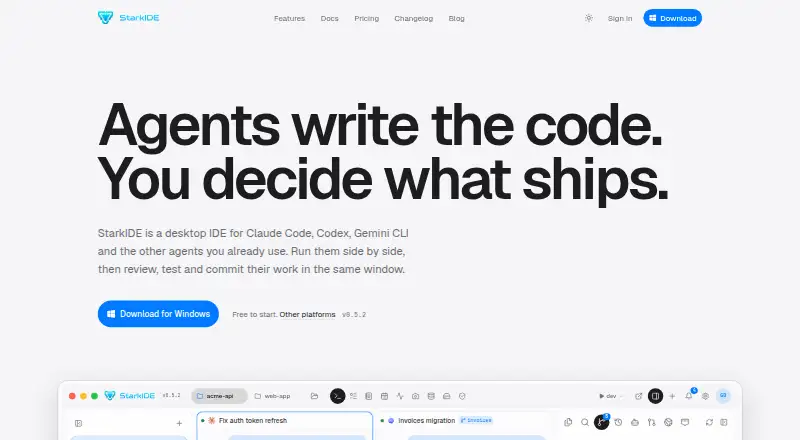
StarkIDE is a desktop IDE that combines coding-agent sessions with project tools in a single workspace. It runs on Windows x64, macOS Apple Silicon, and Linux x86_64. Launchers are provided for Claude Code, Codex, Cursor agent, Gemini CLI, and OpenCode, and the IDE also supports other CLI tools that run in a shell. Agents run locally using your own accounts and API keys; provider pricing and data handling remain between you and each provider.
You can run multiple agent sessions side by side in separate resizable terminal panes scoped to a project. The workspace pairs the Monaco editor with git tools for reviewing diffs, staging changes, and committing approved work. It also supports PostgreSQL connections, SQL queries, and visual schema inspection, alongside S3-compatible storage connections for Amazon S3, Cloudflare R2, MinIO, Backblaze B2, DigitalOcean Spaces, and Supabase Storage. The maker says opening a project uploads nothing and that source code and agent sessions stay on your machine. Optional sync carries project records, tasks, and notes, not code. StarkIDE has a free plan; Pro costs $19 a month or $15 a month when billed annually, and Power User costs $39 a month. Paid plans raise project and agent-terminal limits and add Stark Capture and Planner. Stark Capture is unavailable on Linux.
Who it suits
StarkIDE suits developers who want to run multiple coding agents locally alongside editing, git, database, and storage tools. It is a fit for people bringing their own agent accounts or API keys; Linux users should note Stark Capture is not available on their platform.
What it does well
- Supports Claude Code, Codex, Cursor agent, Gemini CLI, OpenCode, and other shell CLIs.
- Runs multiple agent sessions side by side in resizable project-scoped panes.
- Combines Monaco editing with git review, staging, and commit tools.
- Supports PostgreSQL queries and visual schema inspection.
- Connects to six listed S3-compatible storage services.
- Source code and agent sessions stay on the user's machine, according to the maker.
What to know first
- No AI usage is included; users pay providers directly.
- Stark Capture is not available on Linux.
- Paid plans are required to raise project and agent-terminal limits and add Capture and Planner.
Limits
The Free (Hacker) plan is listed as free; its plan-specific limits are not displayed. Paid plans raise project and agent-terminal limits and add Stark Capture and Planner; Stark Capture is not available on Linux. AI usage is not included, so users pay providers directly.
Plans
| Plan | Billed and limits | Price |
|---|---|---|
| Free (Hacker) | forever · free workspace · limits on projects, agent terminals and workspaces | Free |
| Pro (annual billing) | Billed upfront for twelve months at the annual rate shown at checkout · Paid plans raise project and agent-terminal limits; add Stark Capture and Planner | $15 a year |
| Pro annual | $15 per month billed annually · higher project and agent-terminal limits · Stark Capture · Planner | $15 a month |
| Pro | monthly · higher project and agent-terminal limits · Stark Capture · Planner | $19 a month |
| Power User | monthly · everything in Pro · intended for agents across several products | $39 a month |
As starkide.com lists them, read 21 Oct 2026. The maker's own page has the final word.
Getting started
- Visit the StarkIDE website.
- Choose the free plan or a paid plan.
- Install the version for Windows x64, macOS Apple Silicon, or Linux x86_64.
- Connect your own agent account or API key and launch a supported agent or shell CLI.
- Use the project workspace to edit, review git changes, or connect to PostgreSQL or S3-compatible storage.
Verdict
Choose StarkIDE if you want a local desktop workspace for coding agents, project editing, git, and database or storage tools. Look elsewhere if you want included AI usage or need Stark Capture on Linux.
Questions
How much does StarkIDE cost?
The Free (Hacker) plan costs nothing. Pro is $19 a month, or $15 a month when billed annually; Power User is $39 a month.
Does StarkIDE include AI usage?
No. Users bring their own agent accounts or API keys and pay providers directly.
Which operating systems does StarkIDE support?
StarkIDE is available for Windows x64, macOS Apple Silicon, and Linux x86_64. Stark Capture is not yet available on Linux.
Which coding agents does it support?
It includes launchers for Claude Code, Codex, Cursor agent, Gemini CLI, and OpenCode, and supports other CLI tools that run in a shell.
What do the paid plans add?
Paid plans raise project and agent-terminal limits and add Stark Capture and Planner. Power User includes everything in Pro.
Who makes StarkIDE?
The about page identifies Gabriel Lozano as the founder and says he develops the product with an agent-driven workflow.
Facts from StarkIDE's own pages
- Agent billing
- StarkIDE does not include model usage; users pay each agent provider under their own subscription or API key. · starkide.com, 21 Oct 2026
- Agent support
- It includes launchers for Claude Code, Codex, Cursor agent, Gemini CLI, and OpenCode, and supports other CLI tools that run in a shell. · starkide.com, 8 Oct 2026
- Agent terminals
- It runs multiple Claude Code, Codex, Cursor agent, Gemini CLI or OpenCode sessions in resizable project-scoped terminal panes. · starkide.com, 21 Oct 2026
- Automatic updates
- The desktop app uses signed updater manifests for release updates. · starkide.com, 21 Oct 2026
- Billing and cancellation
- Paddle processes payments as merchant of record, and subscriptions can be cancelled or changed through the billing page, with cancellation effective at period end. · starkide.com, 8 Oct 2026
- Capture
- Stark Capture supports region, window or display capture with annotation and redaction tools. · starkide.com, 21 Oct 2026
- Capture feature
- Stark Capture can capture regions, windows, or displays, annotate and redact images, and stores captures locally without uploading them to StarkIDE servers. · starkide.com, 8 Oct 2026
- Code editor
- The built-in editor uses Monaco, the open-source editor component also used by VS Code. · starkide.com, 21 Oct 2026
- Credential storage
- The maker says database passwords are stored in the operating system's credential store. · starkide.com, 8 Oct 2026
- Database
- The database workspace supports PostgreSQL connections, SQL queries, and visual schema inspection. · starkide.com, 8 Oct 2026
- Database workspace
- The database workspace currently supports PostgreSQL connections, schema browsing, SQL and a visual database manager. · starkide.com, 21 Oct 2026
- Documentation depth
- Documentation covers installation, quickstart, shortcuts, projects, terminals, editor, explorer, search, agents, Git, database, storage, browser, tasks, notes, settings and troubleshooting. · starkide.com, 21 Oct 2026
- Editor and review
- The workspace includes the Monaco editor and git tools for reviewing diffs, staging changes, and committing approved work. · starkide.com, 8 Oct 2026
- Embedded browser
- An embedded browser pane previews local development servers beside terminals and code. · starkide.com, 21 Oct 2026
- File explorer
- The explorer tracks the project tree live as agents create, modify or delete files. · starkide.com, 21 Oct 2026
- Git client
- Its Git view shows working-tree changes, file diffs, staging and commits for reviewing agent output. · starkide.com, 21 Oct 2026
- Independent status
- LambdaBase describes StarkIDE as a public-beta native desktop IDE offered free during that beta. · lambdabase.com, 21 Oct 2026
- Licence
- The opened official pages do not state an open-source licence for StarkIDE. · starkide.com, 21 Oct 2026
- Limit: agent setup
- LambdaBase says users must manually install and configure the agent CLIs. · lambdabase.com, 21 Oct 2026
- Limit: backup responsibility
- The terms say StarkIDE is not a source-control host, backup service or deployment platform, leaving users responsible for backups. · starkide.com, 21 Oct 2026
- Limit: early beta
- LambdaBase warns that the early public-beta stage may bring bugs and limited features. · lambdabase.com, 21 Oct 2026
- Limit: extension ecosystem
- LambdaBase says Monaco does not provide the full VS Code extension ecosystem. · lambdabase.com, 21 Oct 2026
- Limit: no uptime guarantee
- The terms disclaim guarantees of uninterrupted service, error-free software, compatibility with every local tool or specific AI results. · starkide.com, 21 Oct 2026
- Limit: provider costs
- Because model access is external, users pay agent providers separately from StarkIDE subscriptions. · starkide.com, 21 Oct 2026
Where StarkIDE stands on Freedom251
- Agentic Ides#12 of 21
- AI Code Editors#18 of 26