Freedom251 › Project management tools
Stacks
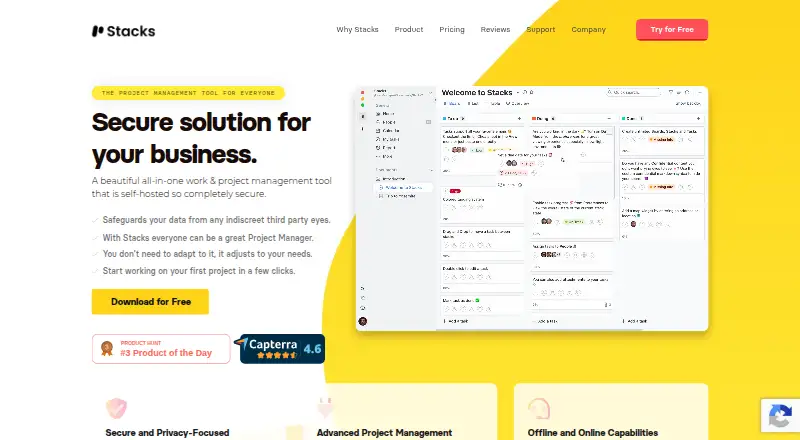
What Stacks is
Stacks is an all-in-one work and project management tool for projects, tasks, and communication. It lets teams view projects as boards, lists, tables, or calendars. Tasks can contain subtasks, assignees, due dates, attachments, and automation rules. Notepads organize notes, while contacts can be filtered, sorted, and grouped by company. Workspaces can sync through iCloud Drive, Dropbox, Google Drive, or another service. Stacks describes itself as offline-first, with data stored locally or on a self-hosted private server. The free Basic plan includes three projects, 10 contacts, three notepads, and one offline workspace, plus all project views and advanced filtering. Unlimited forever is listed at $49 a month as a one-time payment, limited to two devices. Stacks for Team costs $5 per user per month and adds real-time sync, access controls, time tracking, approvals, and advanced reporting.
Who it suits
Stacks suits freelancers, small teams, agencies, students, and organizations handling sensitive data. Its local or self-hosted storage also fits users who want offline-first workspaces.
What it does well
- Boards, lists, tables, and calendar project views
- Tasks support subtasks, due dates, and automations
- Local or self-hosted data storage
- Free Basic plan available
- Team plan includes time tracking and reporting
What to know first
- Basic limits projects, contacts, notepads, and workspace
- Unlimited forever license is limited to two devices
- Major upgrades may cost extra
- Team features require paid per-user plan
Limits
Basic includes 3 projects, 10 contacts, 3 notepads, and 1 offline workspace. Unlimited forever is limited to two devices, and major upgrades may have an additional upgrade cost.
Plans
| Plan | Billed and limits | Price |
|---|---|---|
| Basic | Free · 3 projects · 10 contacts · 3 notepads · 1 offline workspace · People · all project views · advanced filtering | Free |
| Unlimited forever | $ 49 /One time payment · Unlimited projects · unlimited notepads · unlimited people · reports · unlimited workspaces · offline workspaces · automations · 2 devices | $49, paid once |
| Stacks for Team | $ 5 /per user per month · Everything from Unlimited forever · visibility and privacy options · time tracking · time approvals · advanced reporting | $5 a month |
As getstacksapp.com lists them, read 11 Oct 2026. The maker's own page has the final word.
Getting started
- Open https://getstacksapp.com/
- Choose the free Basic plan or a paid plan
- Install on Linux, macOS, or Windows, or use a self-hosted setup
- Create projects and choose board, list, table, or calendar views
- Add tasks, contacts, and notepads
- Connect workspace sync through iCloud Drive, Dropbox, Google Drive, or another service
Verdict
Stacks combines project planning, contacts, notes, communication, and privacy-focused storage in one application. Its free limits are clear, while paid plans add collaboration and reporting capabilities.
Questions
Is Stacks free?
Yes. The Basic plan is free and includes 3 projects, 10 contacts, 3 notepads, and 1 offline workspace.
What platforms does Stacks support?
Stacks lists Linux, macOS, Windows, and self-hosted deployments.
How much do paid plans cost?
Unlimited forever is listed at $49 a month as a one-time payment. Stacks for Team is $5 a month per user, billed monthly.
Does Stacks support offline or private storage?
Stacks describes itself as offline-first. Data can be stored locally or on a self-hosted private server.
What does the Team plan add?
Team adds real-time sync, visibility and privacy options, time tracking, time approvals, and advanced reporting.
Facts from Stacks's own pages
- Automation rules
- Yes · getstacksapp.com, 23 Sept 2026
- Free plan
- Yes · getstacksapp.com, 23 Sept 2026
- Intended users
- The maker identifies freelancers, small teams, agencies, law firms, medical practices, students, and organizations handling sensitive data as intended users. · getstacksapp.com, 11 Oct 2026
- License limits
- The pricing page says major upgrades may cost extra, minor updates are free, and the Unlimited forever license has a two-device limit. · getstacksapp.com, 11 Oct 2026
- Notes and contacts
- Stacks includes notepads for organizing notes and contacts that can be filtered, sorted, and grouped by company. · getstacksapp.com, 11 Oct 2026
- Privacy
- Stacks says data can be stored locally or on a self-hosted private server, and describes the app as offline-first. · getstacksapp.com, 11 Oct 2026
- Product
- Stacks describes itself as an all-in-one work and project management tool for managing projects, tasks, and communication. · getstacksapp.com, 11 Oct 2026
- Project views
- Projects can be viewed as boards, lists, tables, or calendars. · getstacksapp.com, 11 Oct 2026
- Refund policy
- The pricing page advertises a 30-day full refund if the purchaser is unhappy with the product. · getstacksapp.com, 11 Oct 2026
- Security controls
- Managers and admins can control who views or edits projects, columns, and tasks, and assign users different access levels. · getstacksapp.com, 11 Oct 2026
- Paid from
- 5 · getstacksapp.com, 23 Sept 2026
- Support
- The maker offers documentation, FAQs, a contact form, a Discord community, and GitHub discussions for support. · getstacksapp.com, 11 Oct 2026
- Sync integrations
- Workspaces can be synced through iCloud Drive, Dropbox, Google Drive, or another service of the user's choice. · getstacksapp.com, 11 Oct 2026
- Task management
- Tasks support subtasks, assignees, due dates, attachments, and automations. · getstacksapp.com, 11 Oct 2026
- Team collaboration
- The Team plan offers real-time sync, visibility and privacy options, time tracking, time approvals, and advanced reporting. · getstacksapp.com, 11 Oct 2026
- Time tracking
- Yes · getstacksapp.com, 23 Sept 2026
Where Stacks stands on Freedom251
- Project management tools#70 of 196
- Task Management Software#24 of 59
- Project Management Software#78 of 188