Freedom251 › Database Vulnerability Scanners
SQLTriage
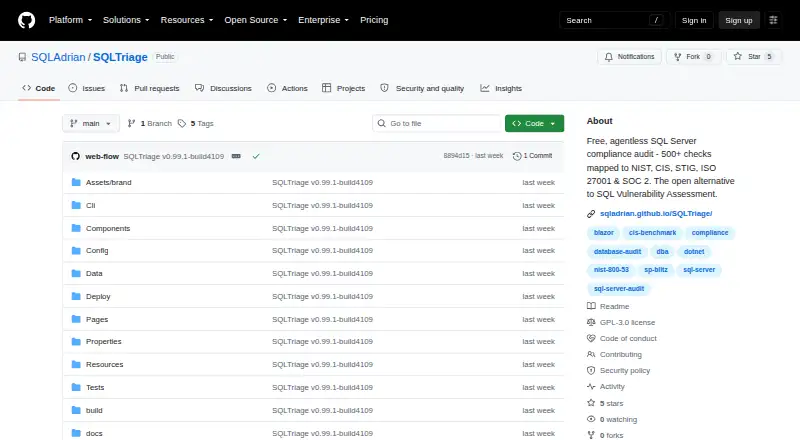
What SQLTriage is
SQLTriage audits SQL Server and maps findings to compliance controls, with cited evidence and a PDF for board-level review. It describes more than 576 checks across security, performance, configuration, high availability, backup, and recovery. Mappings cover NIST 800-53, CIS Benchmarks, DISA STIG, ISO 27001, SOC 2, PCI-DSS, and HIPAA. The read-only assessment queries SQL Server DMVs without installing an agent or changing the schema; separate opt-in deployment and remediation pages can write changes. Companion monitoring views cover live sessions, blocking chains, query plans, wait stats, dashboards, and alerts. The app is local-only by default, with no telemetry, phone-home, or cloud dependency; optional Azure Blob export is available. SQL passwords are encrypted at rest with AES-256-GCM and DPAPI. Connections can use Windows authentication, SQL authentication, or Azure AD. SQL Server is the supported database; Azure SQL Managed Instance is fully supported, while Azure SQL Database has partial support and skips checks requiring server-level DMV access. SQLTriage is free under GNU GPL v3, which allows commercial use and requires modifications to remain open.
Who it suits
SQLTriage is aimed at senior DBAs, database consultants, InfoSec and compliance teams, and CIOs. It suits organizations auditing SQL Server and mapping findings to compliance controls.
What it does well
- Describes more than 576 checks.
- Maps findings to seven listed frameworks.
- Read-only assessment needs no agent installation.
- Local-only by default, without telemetry.
- Free commercial use under GNU GPL v3.
What to know first
- SQL Server is the supported database.
- Azure SQL Database has partial support.
- Hosted SaaS dashboards are not offered.
- Modifications must remain open under the license.
Limits
The free plan includes all features without per-server fees, subscription, or feature tiers. Azure SQL Database support is partial; checks requiring server-level DMV access are skipped automatically.
Plans
| Plan | Billed and limits | Price |
|---|---|---|
| Free | All features · no per-server fees · no subscription · no feature tiers | Free |
As github.com lists them, read 5 Oct 2026. The maker's own page has the final word.
Getting started
- Visit the SQLTriage GitHub project.
- Choose the Windows desktop app or Windows Service mode.
- Connect using Windows Auth, SQL Auth, or Azure AD.
- Run the read-only assessment against SQL Server.
- Open service dashboards in a browser using Kestrel HTTPS, if using Windows Service mode.
Overview
SQLTriage is a locally run SQL Server auditing and monitoring tool for senior DBAs, consultants, and security or compliance teams. Its strongest case is turning database checks into evidence-backed compliance reporting alongside operational views. Look elsewhere if you need hosted dashboards or broad database-platform coverage.
Key features
SQLTriage describes more than 576 checks spanning security, performance, configuration, high availability, backup, and recovery. Findings map to NIST 800-53, CIS Benchmarks, DISA STIG, ISO 27001, SOC 2, PCI-DSS, and HIPAA, with cited evidence and a board-ready PDF. The breadth of mappings is useful when database findings must be tied to control frameworks and presented beyond the DBA team.
Assessment checks query SQL Server DMVs without installing an agent or changing the database schema. That makes it a lower-impact option for assessment, but the read-only boundary applies to those checks: separate opt-in deployment and remediation pages can write changes. Connections support Windows Authentication, SQL Authentication, and Azure AD.
Companion views cover live sessions, blocking chains, query plans, wait stats, dashboards, and alerting. SQLWATCH can be used for long-term historical dashboards, complementing these monitoring views. The repository describes the app as local-only by default, without telemetry, phone-home, or cloud dependency, with optional Azure Blob export. SQL passwords are encrypted at rest using AES-256-GCM and DPAPI.
Pricing
SQLTriage is free: the Free plan costs nothing and includes all features, with no per-server fees, subscription, or feature tiers. There is no free trial because the tool is free. That removes server-count pricing and tier selection from the decision, while the GNU GPL v3 license permits commercial use but requires modifications to remain open.
Platforms
SQLTriage is offered as a Windows desktop app and in Windows Service mode; service dashboards are accessible from a browser via Kestrel HTTPS. It is self-hosted rather than a hosted SaaS dashboard product. SQL Server is its supported database; Azure SQL Managed Instance is fully supported, while Azure SQL Database support is partial and checks requiring server-level DMV access are skipped automatically.
Who it's for
Senior DBAs and database consultants get a combination of broad checks and operational views, while InfoSec and compliance teams can use framework mappings and cited findings for control-focused reporting. CIOs may value the board-ready PDF. It is less suitable for teams that need one hosted dashboard service or a tool spanning multiple database platforms.
Pros and cons
- Pros: More than 576 described checks, framework mappings, cited evidence, and PDF reporting give compliance work a clearer path from database condition to control-oriented communication.
- Pros: Agentless, schema-preserving assessment checks and local-only operation by default suit teams seeking a non-invasive, self-hosted assessment workflow.
- Pros: All features are free with no per-server fees or subscription, and the license allows commercial use.
- Cons: SQL Server focus rules it out as a general-purpose database auditing platform; Azure SQL Database coverage is partial.
- Cons: No hosted SaaS dashboards are offered, and SQLTriage's support route is GitHub Issues for bugs and feature requests or GitHub Discussions for community questions.
- Cons: GPL v3 requires modifications to remain open, which may not suit teams seeking to keep derivative changes closed.
Alternatives
For a narrower free SQL Server benchmark, consider the Free SQL Server Compliance Benchmark Tool, which offers over 80 checks and PDF benchmark output. Choose it when benchmark output is sufficient and SQLTriage's broader monitoring and framework-mapping scope is unnecessary.
Defensia Database Security is another option if Linux support or a freemium model matters; its free plan is limited to one server, 2,000 events per month, three days of log retention, and monitor mode. For cloud posture coverage, Onam Database Security offers a free plan for one cloud account and up to 500 resources, with core CSPM rules and CIS benchmark coverage.
Choose DBX when unlimited schema introspection, database topology, and local analysis are the priority rather than SQL Server compliance assessment. Oracle Cloud Infrastructure Secret Management is a separate option for managing secrets. Qualys External Attack Surface Management offers a 30-day no-cost CSAM with EASM plan for external attack surface management. Omega DB Scanner Standalone is a free Windows scanner for Oracle databases. For enterprise DLP across endpoints, email, web, networks, and storage, consider Trellix Data Loss Prevention, with on-premises or SaaS management. Browse more options in Database Vulnerability Scanners.
Verdict
SQLTriage is a strong fit for teams responsible for SQL Server that need no-cost, agentless assessments with compliance mappings and cited reporting, plus monitoring views. Its breadth within SQL Server and unrestricted free feature set are the main reasons to choose it; its database focus and lack of hosted SaaS dashboards are the main reasons to look elsewhere.
Verdict
SQLTriage combines SQL Server auditing, compliance mappings, monitoring views, and cited findings in a free tool. Its database coverage is centered on SQL Server, with partial support for Azure SQL Database and no hosted SaaS dashboards.
Questions
How much does SQLTriage cost?
The Free plan costs nothing. It has no per-server fees, subscription, or feature tiers.
Is there a free plan or trial?
Yes. The Free plan includes all features. There is no free trial.
Which platforms are available?
SQLTriage is self-hosted and available for Windows as a desktop app or Windows Service. Service dashboards are available in a browser via Kestrel HTTPS.
Which databases does it support?
SQL Server is the supported database. Azure SQL Managed Instance is fully supported; Azure SQL Database has partial support, and checks requiring server-level DMV access are skipped.
Is SQLTriage open source?
It is offered under GNU GPL v3. Commercial use is free, and modifications must remain open.
How does it connect to SQL Server?
Connections can use Windows Auth, SQL Auth, or Azure AD. SQLWATCH is useful for long-term historical dashboards.
Facts from SQLTriage's own pages
- Azure SQL support
- Azure SQL Managed Instance is fully supported; Azure SQL Database has partial support, with checks requiring server-level DMV access skipped automatically. · sqladrian.github.io, 5 Oct 2026
- Checks
- The site describes 576+ checks covering security, performance, configuration, and high availability, backup, and recovery. · sqladrian.github.io, 5 Oct 2026
- Credentials
- The repository says SQL passwords are encrypted at rest with AES-256-GCM and DPAPI. · github.com, 5 Oct 2026
- Deployment
- The site offers a Windows desktop app and Windows Service mode, with service dashboards available from a browser via Kestrel HTTPS. · sqladrian.github.io, 5 Oct 2026
- Frameworks
- The site lists mappings for NIST 800-53, CIS Benchmarks, DISA STIG, ISO 27001, SOC 2, PCI-DSS, and HIPAA. · sqladrian.github.io, 5 Oct 2026
- Integrations
- The site says users can connect with Windows Auth, SQL Auth, or Azure AD, and that SQLWATCH is useful for long-term historical dashboards. · sqladrian.github.io, 5 Oct 2026
- Intended users
- The site names senior DBAs, database consultants, InfoSec and compliance teams, and CIOs as intended users. · sqladrian.github.io, 5 Oct 2026
- License
- SQLTriage is offered under GNU GPL v3, with free commercial use and modifications required to remain open. · github.com, 5 Oct 2026
- Limits
- The repository describes SQL Server as the supported database and says hosted SaaS dashboards are not offered. · github.com, 5 Oct 2026
- Monitoring
- Companion views include live sessions, blocking chains, query plans, wait stats, dashboards, and alerting. · sqladrian.github.io, 5 Oct 2026
- Purpose
- SQLTriage audits SQL Server and maps findings to compliance controls with cited evidence and a board-ready PDF. · sqladrian.github.io, 5 Oct 2026
- Read-only assessment
- Assessment checks query DMVs without installing an agent or changing SQL Server schema; separate opt-in deployment and remediation pages can write changes. · sqladrian.github.io, 5 Oct 2026
- Security
- The repository says the app is local-only by default with no telemetry, phone-home, or cloud dependency, and supports optional Azure Blob export. · github.com, 5 Oct 2026
- Support
- The repository directs bug reports and feature requests to GitHub Issues and community questions to GitHub Discussions. · github.com, 5 Oct 2026
Where SQLTriage stands on Freedom251
- Database Vulnerability Scanners#7 of 27