Freedom251 › A/B Testing Tools
SplitPea
What SplitPea is
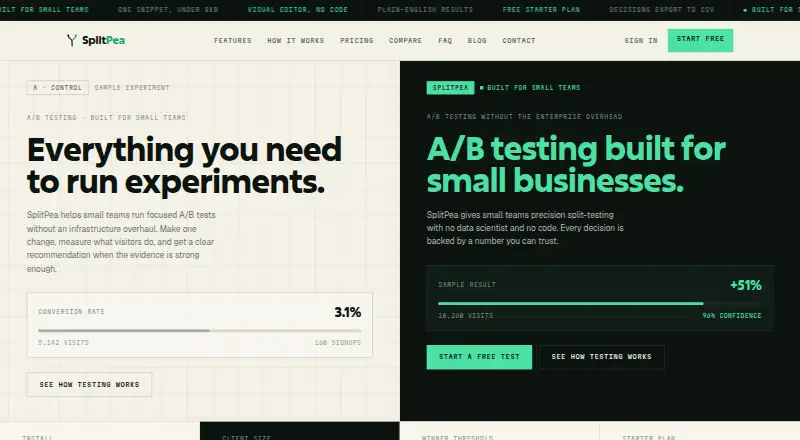
SplitPea is a web-based A/B testing tool for small teams comparing website versions. Its visual editor lets users change headlines, buttons, copy, and images without code. The service divides visitors between an original page and a variant, with returning visitors continuing to see the same version. Teams can track goals such as signups, clicks, form submissions, and page visits. Results include visitor and conversion counts, conversion rate, lift, and Bayesian confidence explained in plain language. A decision log records whether a team chose version A, chose version B, or found a test inconclusive, along with who decided and why. Experiments, variants, results, and decisions can be exported as CSV. Installation uses a JavaScript snippet under 8KB, and it works with static HTML, WordPress, Webflow, Squarespace, Shopify, and other sites that accept a script tag. The free Starter plan covers one website, one active experiment, and 500 visitors per month. Grow costs $29 per month and Agency costs $49 per month; email support is included with all plans. When a plan’s visitor limit is exceeded, experiments keep running but additional visitors are not counted for that billing cycle.
Who it suits
SplitPea suits small teams, freelancers, small businesses, and agencies testing websites. It may fit teams seeking visual editing and basic experiment results without code changes.
What it does well
- Visual editor changes page elements without code.
- Tracks signups, clicks, forms, and page visits.
- Decision log records outcomes and rationale.
- Exports experiments and results as CSV.
- Email support is included with every plan.
What to know first
- Starter limits users to one website and experiment.
- Starter includes 500 visitors per month.
- No server-side testing or mobile SDK.
- Over-limit visitors stop counting for that billing cycle.
Limits
Starter covers one website, one active experiment, and 500 visitors per month. Grow allows three websites, five active experiments, and 5,000 visitors monthly; Agency allows unlimited websites and experiments with 50,000 visitors monthly. When a visitor limit is exceeded, experiments continue but new visitors stop counting for that billing cycle.
Plans
| Plan | Billed and limits | Price |
|---|---|---|
| Starter | 1 website · 1 active experiment · 500 visitors per month | Free |
| Grow | $29 /mo · 3 websites · 5 active experiments · 5,000 visitors per month | $29 a month |
| Agency | $49 /mo · Unlimited websites · unlimited active experiments · 50,000 visitors per month | $49 a month |
As splitpea.co lists them, read 9 Oct 2026. The maker's own page has the final word.
Getting started
- Open https://splitpea.co/
- Choose the free Starter plan or a paid plan
- Install the JavaScript snippet under 8KB
- Add the snippet to a compatible website
- Create an A/B test in the visual editor
- Set goals and review the results
Verdict
SplitPea focuses on website A/B tests, with visual editing, goal tracking, and a decision log. The free Starter plan has tight site, experiment, and visitor limits; paid plans start at $29 per month.
Questions
Is SplitPea free?
Yes. Starter is free and includes one website, one active experiment, and 500 visitors per month.
What do paid plans cost?
Grow costs $29 per month. Agency costs $49 per month.
Which platforms does SplitPea support?
It runs on the web and installs on static HTML, WordPress, Webflow, Squarespace, Shopify, and other sites accepting script tags.
Does SplitPea offer server-side or mobile testing?
No server-side testing and no mobile SDK are listed.
Can results be exported?
Yes. Experiments, variants, results, and decisions can be exported as CSV.
Facts from SplitPea's own pages
- Decision log
- The decision log records whether an experiment shipped version A, shipped version B, or was inconclusive, along with who decided and why. · splitpea.co, 9 Oct 2026
- Export
- Experiments, variants, results, and decisions can be exported as CSV. · splitpea.co, 9 Oct 2026
- Goal tracking
- Users can track goals such as signups, clicks, form submissions, or page visits. · splitpea.co, 9 Oct 2026
- Installation and compatibility
- SplitPea installs with a JavaScript snippet under 8KB and works with static HTML, WordPress, Webflow, Squarespace, Shopify, and other sites that accept a script tag. · splitpea.co, 9 Oct 2026
- Integrations
- The maker says SplitPea has no integrations page with many logos and describes the product as focused on website experiments. · splitpea.co, 9 Oct 2026
- Maker
- The product footer says SplitPea was built by Joseph Saba. · splitpea.co, 9 Oct 2026
- Purpose
- SplitPea helps small teams run website A/B tests and get recommendations from experiment results. · splitpea.co, 9 Oct 2026
- Results
- Experiment results include visitors, conversions, conversion rate, lift, and Bayesian confidence in plain language. · splitpea.co, 9 Oct 2026
- Support
- Email support is included with all three plans. · splitpea.co, 9 Oct 2026
- Traffic splitting
- SplitPea divides visitors between the original and variant, and returning visitors keep seeing the same version. · splitpea.co, 9 Oct 2026
- Visitor limit
- When a plan's visitor limit is exceeded, experiments continue running but new experiment visitors stop being counted for that billing cycle. · splitpea.co, 9 Oct 2026
- Visual editor
- Users can change page elements such as headlines, buttons, copy, and images through a visual editor without code. · splitpea.co, 9 Oct 2026
- Who it is for
- SplitPea describes itself as built for small teams, freelancers, small businesses, and agencies testing websites. · splitpea.co, 9 Oct 2026
Where SplitPea stands on Freedom251
- A/B Testing Tools#27 of 52