Freedom251 › 360 Video Software
Spatial Media Metadata Injector
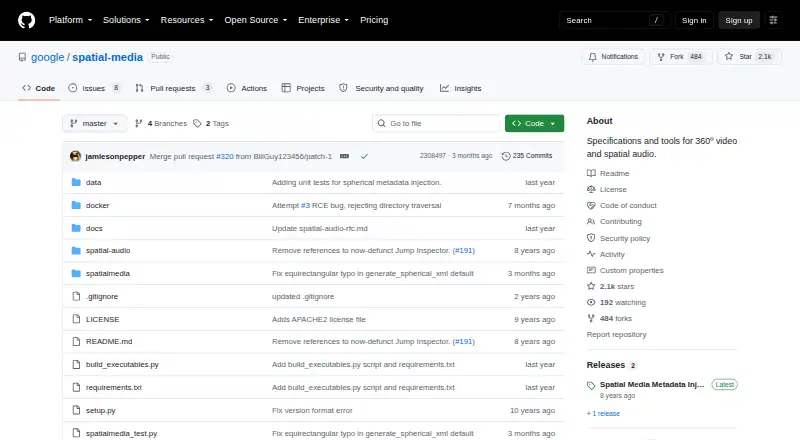
What Spatial Media Metadata Injector is
Spatial Media Metadata Injector is a free, open-source tool for adding or checking spatial media metadata in MP4 and MOV files. It works with spherical video and spatial audio: its examine command prints metadata found in specified files, while its inject command writes a metadata-bearing version to a separate output file. For stereo video, the layout option supports mono, top-bottom, and left-right arrangements. Spatial audio injection requires a four-channel first-order ambisonics track with ACN channel ordering and SN3D normalization, so the input audio must meet those requirements. The documented command-line tool must be run with Python 2.7. The project also documents a way to build a standalone graphical application using PyInstaller. Alongside the tools, its public GitHub repository includes specifications for spatial audio, spherical video, spherical video V2, and VR180 video formats. The project is available for Windows, macOS, and Linux. Its Free plan costs nothing and covers metadata injection and validation for MP4 and MOV files. GitHub Issues are available for project questions and issue reports.
Who it suits
It suits people working with 360-degree video or spatial audio who need to inspect or add metadata to MP4 and MOV files. It can also serve people consulting the included format specifications or building the documented standalone GUI.
What it does well
- Examines metadata in specified files.
- Writes injected metadata to a separate output file.
- Supports mono, top-bottom, and left-right stereo layouts.
- Includes specifications for four spatial media formats.
- Available for Windows, macOS, and Linux.
What to know first
- The documented command-line tool requires Python 2.7.
- Spatial audio injection requires a specific four-channel ambisonics track.
Limits
The Free plan covers metadata injection and validation for MP4 and MOV files. The documented command-line tool requires Python 2.7, and spatial audio injection requires a four-channel first-order ambisonics track using ACN ordering and SN3D normalization.
Plans
| Plan | Billed and limits | Price |
|---|---|---|
| Free | Metadata injection and validation for MP4 and MOV files · Python 2.7 required by documented command-line tool | Free |
As github.com lists them, read 4 Oct 2026. The maker's own page has the final word.
Getting started
- Open the project website on GitHub.
- Choose the command-line tool or follow the documented PyInstaller route to build a standalone GUI.
- For command-line use, run the tool with Python 2.7.
- Use examine to print metadata from a specified file, or inject to create a separate output file.
- For stereo video, select the mono, top-bottom, or left-right layout as needed.
Verdict
Choose Spatial Media Metadata Injector if you need a free tool to inspect or inject spatial metadata in MP4 or MOV files. It is especially relevant when working with spherical video or spatial audio. The Python 2.7 requirement and the input requirements for spatial audio injection should guide your choice of workflow.
Questions
How much does Spatial Media Metadata Injector cost?
Its Free plan costs nothing.
Is Spatial Media Metadata Injector open source?
Yes. It is published as a public GitHub repository with a license file.
Which platforms does it support?
It is available for Windows, macOS, and Linux.
Which files can it work with?
It manipulates spherical video and spatial audio metadata in MP4 and MOV files.
What does the tool do?
Its examine command prints spatial metadata in specified files, and its inject command saves a metadata-injected version as a separate output file.
What input is required for spatial audio injection?
The audio must be a four-channel first-order ambisonics track with ACN channel ordering and SN3D normalization.
Facts from Spatial Media Metadata Injector's own pages
- Command line
- The documented command-line tool must be run with Python 2.7. · github.com, 4 Oct 2026
- GUI build
- The project documents building a standalone GUI application with PyInstaller. · github.com, 4 Oct 2026
- Inject metadata
- Its inject command saves a metadata-injected version of an input file to a separate output file. · github.com, 4 Oct 2026
- Inspect files
- Its examine command prints the spatial media metadata contained in each specified file. · github.com, 4 Oct 2026
- Media types
- It manipulates spherical video and spatial audio metadata in MP4 and MOV files. · github.com, 4 Oct 2026
- Open source
- The maker publishes the project as a public GitHub repository with a license file. · github.com, 4 Oct 2026
- Purpose
- The tool injects spatial media metadata into files or validates metadata already present in them. · github.com, 4 Oct 2026
- Security information
- The repository provides a security policy entry, but the opened page does not state specific security certifications or compliance claims. · github.com, 4 Oct 2026
- Spatial audio requirement
- Spatial audio injection requires a four-channel first-order ambisonics track using ACN channel ordering and SN3D normalization. · github.com, 4 Oct 2026
- Specifications
- The repository includes spatial audio, spherical video, spherical video V2, and VR180 video format specifications alongside the tools. · github.com, 4 Oct 2026
- Stereo layouts
- The stereo option supports mono, top-bottom, and left-right frame layouts. · github.com, 4 Oct 2026
- Support
- The repository exposes GitHub Issues for project questions and issue reports. · github.com, 4 Oct 2026
- Who it serves
- The project describes itself as tools and specifications for 360-degree video and spatial audio, aimed at people working with those media formats. · github.com, 4 Oct 2026
Where Spatial Media Metadata Injector stands on Freedom251
- 360 Video Software#13 of 30