Freedom251 › Audio Equalizer Software
Sound Control
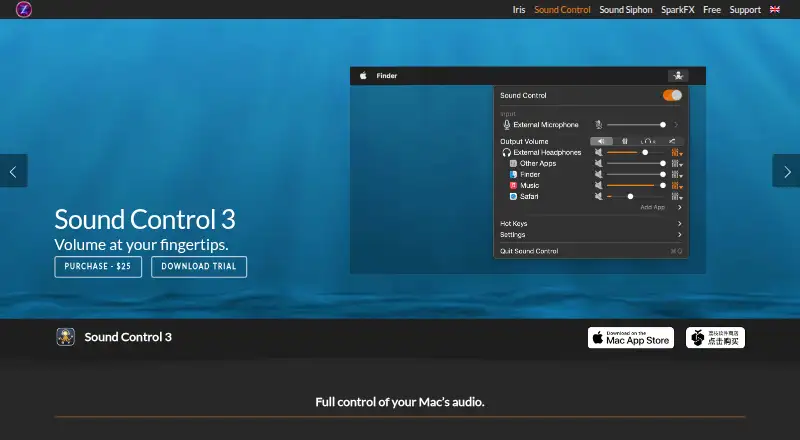
What Sound Control is
Sound Control is a macOS utility for managing volume, effects, and routing for individual apps and output devices. Users can adjust or mute an app, reroute its audio, change left-right balance, or downmix to mono. Effects can be set separately for apps and devices, including 10-band or 31-band graphic EQ; the app also supports Audio Units that allow in-process loading. Thousands of searchable AutoEQ headphone calibrations can be loaded into AUNBandEQ for adjustment. Hot keys control volume, mute, and EQ for the foreground app, while MIDI can control hot keys and app or device volume. Other tools include priority-based selection of default audio devices, Virtual Volume for keyboard control of certain displays and TVs, Prevent Sleep, and Do Not Disturb, which mutes background apps when a selected app is in front. Sound Control has a 14-day trial and no free plan. It is offered as a Mac App Store subscription or direct purchase, and those purchase types are not interchangeable. Listed system requirements include macOS 11.4–27.x.
Who it suits
It suits Mac users who want per-app audio control, routing, EQ, or device-specific settings. The separate Mac App Store and direct purchase routes matter to buyers, since they are not interchangeable.
What it does well
- Adjusts or mutes individual apps
- Offers 10-band and 31-band graphic EQ
- Can route app audio to any output device
- Includes thousands of searchable AutoEQ calibrations
What to know first
- No free plan
- Available only for macOS
- Mac App Store and direct purchases are not interchangeable
Limits
Sound Control has no free plan; access starts with a 14-day trial. The Mac App Store subscription and direct-purchase versions cannot be exchanged.
Plans
| Plan | Billed and limits | Price |
|---|---|---|
| Sound Control (Mac App Store) | Subscription; not interchangeable with direct purchases | On request |
| Sound Control 3 (direct purchase) | Direct purchase; not interchangeable with Mac App Store purchases | On request |
As staticz.com lists them, read 7 Oct 2026. The maker's own page has the final word.
Getting started
- Open the Sound Control website on a compatible Mac
- Use the 14-day trial
- Choose a Mac App Store subscription or direct purchase
- Install and run Sound Control on macOS 11.4 or later
- Configure app volumes, outputs, effects, and hot keys
Verdict
Sound Control offers detailed per-app audio controls and device-level settings for macOS. Review the purchase route and system requirements before choosing between the trial and a paid option.
Questions
What does Sound Control cost?
The product has a 14-day trial, but the listed plan entries do not provide prices. It is offered as a Mac App Store subscription or a direct purchase.
Which Macs can run it?
Sound Control supports macOS 11.4 or later. Version 3.4.1 release notes list macOS 11.4–27.x as requirements.
Can it route each app separately?
Yes. An app’s audio can be sent to any audio output device, with independent volume, balance, effects, and EQ settings.
Does it support MIDI and Audio Units?
Yes. MIDI can control hot keys and app or device volume, and Audio Units with in-process loading are supported.
Who makes Sound Control?
Static Z Software makes it. The company is located in Rochester, New York, and was founded in 2013 by Dominic Feira.
Facts from Sound Control's own pages
- Additional controls
- Virtual Volume adds keyboard volume control for devices such as DisplayPort monitors and HDMI TVs or receivers; Prevent Sleep keeps the system default audio device awake. · staticz.com, 7 Oct 2026
- Audio Unit support
- Sound Control supports Audio Units that support in-process loading. · staticz.com, 7 Oct 2026
- AutoEQ
- The app includes thousands of searchable AutoEQ headphone calibrations that load into AUNBandEQ for further adjustment. · staticz.com, 7 Oct 2026
- Balance
- Users can adjust left-right balance independently for each app and output device, and can downmix to mono. · staticz.com, 7 Oct 2026
- Compatibility
- The product page says Sound Control supports macOS 11.4 or later, including macOS 26 Tahoe. · staticz.com, 7 Oct 2026
- Do Not Disturb
- When a selected app is in front, Do Not Disturb mutes all background apps. · staticz.com, 7 Oct 2026
- Effects and EQ
- Each app and output device can have separate effects settings, including 10-band or 31-band graphic EQ. · staticz.com, 7 Oct 2026
- Hot keys and MIDI
- Hot keys control volume, mute, and EQ for the foreground app; MIDI can control hot keys and app or device volume. · staticz.com, 7 Oct 2026
- Latest listed requirements
- Sound Control 3.4.1 release notes list macOS 11.4–27.x as requirements. · staticz.com, 7 Oct 2026
- Maker
- Static Z Software is located in Rochester, NY, and was founded in 2013 by Dominic Feira. · staticz.com, 7 Oct 2026
- Per-app volume
- Users can adjust or mute individual apps. · staticz.com, 7 Oct 2026
- Priority devices
- Sound Control can automatically select default input and output devices according to a priority list when a device is plugged in. · staticz.com, 7 Oct 2026
- Purpose
- Sound Control provides per-app audio volume control, effects, and routing for Mac. · staticz.com, 7 Oct 2026
- Routing
- Users can reroute an app’s audio to any audio output device. · staticz.com, 7 Oct 2026
- Support
- The support request form asks for the product, version, operating system, and Mac model, and says support staff will respond as soon as possible. · staticz.zendesk.com, 7 Oct 2026
Where Sound Control stands on Freedom251
- Audio Equalizer Software#21 of 22