SoundSource
What SoundSource is
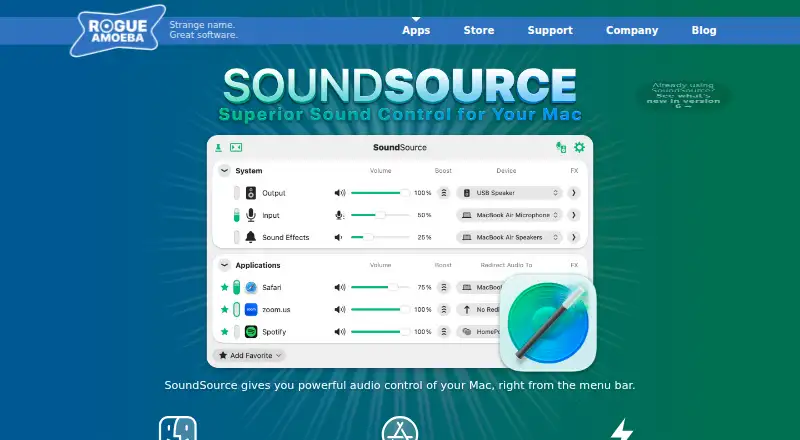
SoundSource puts controls for your Mac’s audio in the menu bar. Set the volume for individual apps, send their audio to another output device, or adjust system-wide output and input settings such as volume, input levels, balance, and sample rate. A built-in 10-band equalizer and Audio Unit effects work per app or across the system. You can stream audio from an app or the whole Mac to one or more AirPlay devices, including HomePods, Apple TVs, and Sonos hardware. Shortcuts workflows can trigger audio adjustments. SoundSource is for macOS; its listed release, version 6.1.5, supports macOS 15 to 27. There is no free plan, but the trial includes all features. After 20 minutes, noise overlays audio being adjusted until you quit and reopen the app. The SoundSource License Key costs $49, paid once, billed one-time. Owners of a SoundSource 5 or 4 license can buy the SoundSource 6 Upgrade for $25, paid once, billed one-time; local taxes may apply.
Who it suits
SoundSource suits Mac users who want to adjust app-by-app audio, apply effects, or route sound to other devices. Its Shortcuts support may also suit users who want audio adjustments triggered by workflows.
What it does well
- Adjust volume and output routing for each app.
- Includes a built-in 10-band equalizer.
- Supports Audio Unit effects per app or system-wide.
- Streams app or system audio to AirPlay devices.
- Shortcuts workflows can trigger audio adjustments.
What to know first
- Available only for macOS.
- There is no free plan.
- Trial overlays noise after 20 minutes until relaunched.
- Shared-use machines each need a license.
Limits
There is no free plan. The trial includes all features, but after 20 minutes it overlays noise on adjusted audio until you quit and relaunch the app.
Plans
| Plan | Billed and limits | Price |
|---|---|---|
| SoundSource 6 Upgrade | one-time · for owners of a SoundSource 5 or 4 license · local taxes may apply | $25, paid once |
| SoundSource License Key | one-time · single user · one or more personally owned Macs | $49, paid once |
As rogueamoeba.com lists them, read 7 Oct 2026. The maker's own page has the final word.
Getting started
- Open the SoundSource website
- Download the macOS app
- Start the free trial or purchase a license
- Launch SoundSource from the Mac menu bar
- Adjust app, system, or AirPlay audio settings
Verdict
SoundSource offers detailed Mac audio controls, per-app routing, effects, and AirPlay streaming. Consider the 20-minute trial limit and license terms before choosing it.
Questions
What does SoundSource cost?
A SoundSource License Key costs $49, paid once. The SoundSource 6 Upgrade costs $25, paid once for owners of a SoundSource 5 or 4 license; local taxes may apply.
Which platforms does it support?
SoundSource supports macOS. Release 6.1.5 supports macOS 15 to 27.
Is there a free plan?
No. A free trial is available with all features, subject to the 20-minute noise-overlay limit.
What does the license cover?
A single-user license covers one user on one or more personally owned Macs. Each shared-use machine needs its own license.
Can it route audio to AirPlay devices?
Yes. It can stream audio from individual apps or the whole Mac to one or more AirPlay devices, including HomePods, Apple TVs, and Sonos hardware.
Does it include an equalizer?
Yes. SoundSource includes a 10-band equalizer and supports Audio Unit effects, both per app and system-wide.
Facts from SoundSource's own pages
- AirPlay
- SoundSource can stream audio from individual apps or the whole Mac to one or more AirPlay devices, including HomePods, Apple TVs, and Sonos hardware. · rogueamoeba.com, 7 Oct 2026
- Audio effects
- SoundSource offers a built-in 10-band equalizer and support for Audio Unit effects, both per app and system-wide. · rogueamoeba.com, 7 Oct 2026
- Automation
- SoundSource supports workflows that trigger audio adjustments through the Shortcuts app. · rogueamoeba.com, 7 Oct 2026
- Device settings
- The app can adjust system output, input, and sound effects settings, including volume, input levels, balance, and sample rate. · rogueamoeba.com, 7 Oct 2026
- Founded
- 2002 · rogueamoeba.com, 28 Sept 2026
- Headquarters
- Boston, Massachusetts, USA · rogueamoeba.com, 28 Sept 2026
- License terms
- A single-user license covers one user on one or more personally owned machines; shared-use machines each need a license. · rogueamoeba.com, 7 Oct 2026
- macOS compatibility
- The listed current release, SoundSource 6.1.5, supports macOS 15 to 27. · rogueamoeba.com, 7 Oct 2026
- Per-app control
- Users can adjust each app’s volume and route its audio to a different output device. · rogueamoeba.com, 7 Oct 2026
- Privacy
- The maker says it does not sell or rent user data and collects only the minimum data it reasonably needs. · rogueamoeba.com, 7 Oct 2026
- Purpose
- SoundSource gives users audio control of their Mac from the menu bar. · rogueamoeba.com, 7 Oct 2026
- Support
- The maker offers email support and says it strives to reply within 24 hours. · rogueamoeba.com, 7 Oct 2026
- Trial limit
- The trial includes all features, but after 20 minutes it overlays noise on audio being adjusted until the app is quit and relaunched. · rogueamoeba.com, 7 Oct 2026
- Version checking
- When version checking is enabled, the app sends its name, current version, and operating system version; the setting can be disabled. · rogueamoeba.com, 7 Oct 2026
Where SoundSource stands on Freedom251
- Menu Bar Apps#19 of 23
- Audio Enhancement Software#30 of 30
- Audio Equalizer Software#22 of 22