Freedom251 › Audio Analysis Software
Sonic Visualiser
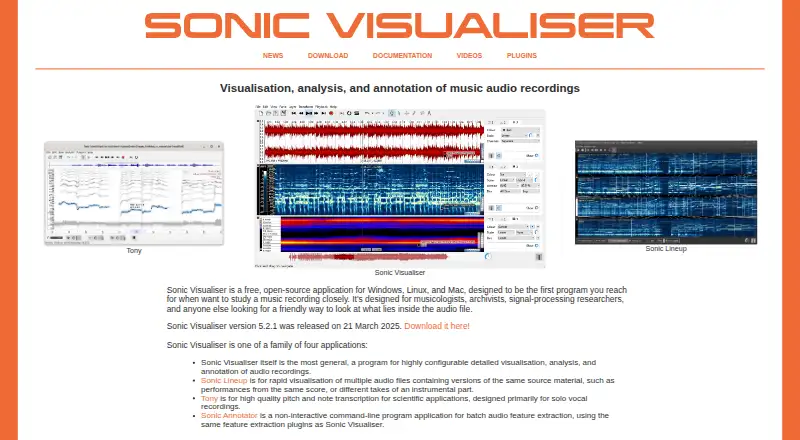
What Sonic Visualiser is
Sonic Visualiser is a free, open-source application for examining music recordings through audio views, analysis tools, and annotations. It displays waveforms, spectra, and spectrograms, with controls for adjusting spectrogram display parameters. You can mark time points, segments, point values, and curves, then place annotation layers over audio views or over other annotations. Feature-extraction plugins can support analysis tasks such as beat tracking and pitch detection.
The application works with Vamp analysis plugins and LADSPA and DSSI effects plugins; plugins are not bundled. It can import annotation layers from text files and MIDI note data, and export audio regions and annotation layers. Offline file analysis is supported. Official builds handle MP3, WAV, AIFF, Ogg/Vorbis, and Opus on all platforms, with MP4/AAC on Mac and Windows and WMA on Windows. Version 5.2.1 is listed as the current release, with downloads for 64-bit Windows, Linux AppImage, Ubuntu .deb, and Intel or ARM macOS. Documentation includes a reference manual, tutorials, and tutorial and demo videos. The project began at Queen Mary University of London's Centre for Digital Music.
Who it suits
Sonic Visualiser suits musicologists, archivists, signal-processing researchers, and others who need to inspect audio files. It is also a fit for people who want to annotate recordings or run plugin-based analysis offline.
What it does well
- Free, open-source application under GNU GPL v2 or later.
- Displays waveforms, spectra, and spectrograms.
- Supports labelled points, segments, values, and curves.
- Can import text annotations and MIDI note data.
- Exports audio regions and annotation layers.
What to know first
- No plugins are included with the application.
- VST, AudioUnit, and LV2 plugin formats are unsupported.
- MP4/AAC and WMA support varies by platform.
Limits
The application is free, with no free-trial period. No plugins are bundled, and VST, AudioUnit, and LV2 formats are not currently supported.
Plans
| Plan | Billed and limits | Price |
|---|---|---|
| Sonic Visualiser | Free, open-source application · GNU GPL v2 or later | Free |
As sonicvisualiser.org lists them, read 11 Oct 2026. The maker's own page has the final word.
Getting started
- Visit https://sonicvisualiser.org/.
- Choose a download for Windows, Linux, Ubuntu, or Intel or ARM macOS.
- Install or launch the build for your platform.
- Open an audio recording and inspect it in waveform, spectrum, or spectrogram views.
- Add annotations or use compatible analysis plugins as needed.
Verdict
Choose Sonic Visualiser for free offline inspection and annotation of music recordings, especially when its waveform, spectrum, and spectrogram views suit the work. Look elsewhere if you need bundled plugins or support for VST, AudioUnit, or LV2.
Questions
How much does Sonic Visualiser cost?
The listed plan is free. It is an open-source application under GNU GPL v2 or later.
Which platforms are supported?
The listed platforms are Linux, macOS, and Windows. Downloads include 64-bit Windows, Linux AppImage, Ubuntu .deb, and Intel or ARM macOS builds.
Can it analyze audio without an internet connection?
Yes. Offline file analysis is supported.
What audio formats can it open?
Official builds support MP3, WAV, AIFF, Ogg/Vorbis, and Opus on all platforms. MP4/AAC is supported on Mac and Windows, and WMA on Windows.
Which plugins does it support?
It can use Vamp analysis plugins and LADSPA and DSSI effects plugins, but none are included. VST, AudioUnit, and LV2 formats are not currently supported.
What documentation is available?
The project provides a reference manual, tutorials, and tutorial and demo videos.
Facts from Sonic Visualiser's own pages
- Annotations
- Users can add labelled time points, segments, point values, and curves, and overlay annotations on audio views or other annotations. · sonicvisualiser.org, 11 Oct 2026
- Audience
- The project describes it as designed for musicologists, archivists, signal-processing researchers, and others who want to inspect audio files. · sonicvisualiser.org, 11 Oct 2026
- Automated analysis
- It can run feature-extraction plugins for analyses such as beat tracking and pitch detection. · sonicvisualiser.org, 11 Oct 2026
- Current release
- The download page lists version 5.2.1 as the current release. · sonicvisualiser.org, 11 Oct 2026
- Development origin
- The project says it was initiated and developed in the Centre for Digital Music at Queen Mary University of London. · sonicvisualiser.org, 11 Oct 2026
- Documentation
- The project provides a reference manual, tutorials, and tutorial and demo videos. · sonicvisualiser.org, 11 Oct 2026
- Download platforms
- The download page lists 64-bit Windows, Linux AppImage, Ubuntu .deb, and Intel/ARM macOS binaries. · sonicvisualiser.org, 11 Oct 2026
- File formats
- The 5.2.1 reference manual says official builds support MP3, WAV, AIFF, Ogg/Vorbis, and Opus on all platforms, MP4/AAC on Mac and Windows, and WMA on Windows. · sonicvisualiser.org, 11 Oct 2026
- Import and export
- It supports importing annotation layers from text files and MIDI note data, and exporting audio regions and annotation layers. · sonicvisualiser.org, 11 Oct 2026
- Plugin ecosystem
- Sonic Visualiser can use Vamp analysis plugins and LADSPA and DSSI effects plugins; no plugins are included with the application. · sonicvisualiser.org, 11 Oct 2026
- Plugin limits
- The download page says VST, AudioUnit, and LV2 formats are not currently supported. · sonicvisualiser.org, 11 Oct 2026
- Purpose
- Sonic Visualiser is for visualising, analysing, and annotating music audio recordings. · sonicvisualiser.org, 11 Oct 2026
- Visualisation
- It can display audio waveforms and spectrograms, with interactive adjustment of spectrogram display parameters. · sonicvisualiser.org, 11 Oct 2026
Where Sonic Visualiser stands on Freedom251
- Audio Analysis Software#13 of 43