Freedom251 › Songwriting Software
SONGTAKE
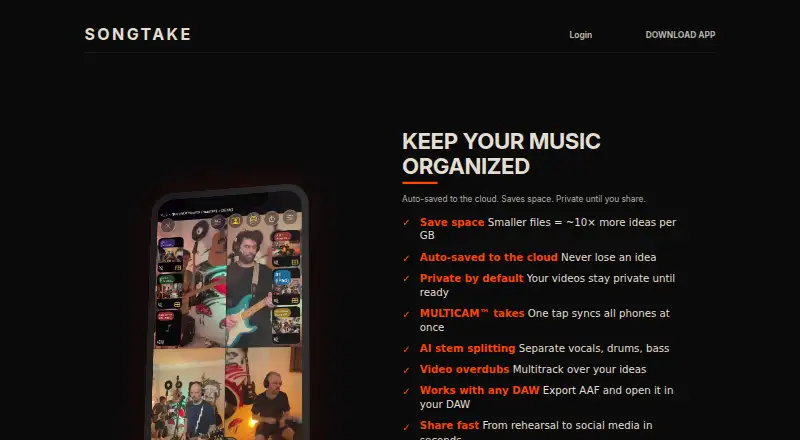
What SONGTAKE is
SONGTAKE is an iOS and macOS app for recording musical ideas and band demos with audio and video together. Ideas mode captures compressed video clips. Demos mode starts recording on several phones at once and syncs their recordings automatically, giving a band a way to collect takes from multiple devices. Projects can grow through video overdubs and multitrack recordings built over existing ideas. Bandmates can contribute or overdub remotely, and users can bring existing audio and video into projects. AI stem splitting separates vocals, drums, and bass. SONGTAKE also says projects can be exported as AAF and opened in any DAW.
The free plan includes offline recording, basic export, 250MB of storage, and up to 16 tracks per song. Offline recordings sync to servers when an internet connection becomes available. Studio Access costs $7.49/mo, billed monthly, and includes 1TB storage, offline mode, band storage sharing, pro export templates, and 4K video, alongside a 16-track limit per song. Patrons costs $11.99/mo, billed monthly, and includes 1.5TB storage and Studio Access features, plus feature voting, Patron export templates, credits, and custom app icons. The privacy policy says stored data is encrypted with AES-256 and protected in transit with SSL/TLS. Email support aims to respond within 24 hours; users can also request help through App Store reviews.
Who it suits
SONGTAKE suits musicians who want to capture ideas, record band takes, and develop demos with audio and video in one project. Its remote contributions, simultaneous recording on multiple phones, overdubbing, and AAF export can also suit bands building arrangements together.
What it does well
- Records audio and video together in projects.
- Demos mode syncs recordings from multiple phones.
- Bandmates can contribute or overdub remotely.
- AI stem splitting separates vocals, drums, and bass.
- Free plan includes offline recording and up to 16 tracks.
What to know first
- Free plan storage is limited to 250MB.
- Available platforms are iOS and macOS.
- Studio Access and Patrons require monthly payment.
Limits
The free plan provides 250MB of storage and up to 16 tracks per song. Studio Access provides 1TB and 16 tracks per song; Patrons provides 1.5TB and Studio Access features.
Plans
| Plan | Billed and limits | Price |
|---|---|---|
| Patrons | $11.99/mo · 1.5TB storage · Studio Access features · feature voting · Patron export templates · credits · custom app icons | $11.99 a month |
| Studio Access | $7.49/mo · 1TB storage · 16 tracks per song · offline mode · band storage sharing · pro export templates · 4K video | $7.49 a month |
| FREE | $0/mo · 250MB storage · 16 tracks per song · offline recording · basic export · referral bonus up to 2GB | On request |
As songtake.com lists them, read 7 Oct 2026. The maker's own page has the final word.
Getting started
- Visit the SONGTAKE website.
- Use an iOS or macOS device.
- Choose the free plan or a paid plan.
- Record an idea or start a demo on multiple phones.
- Import existing audio or video, or invite bandmates to contribute.
SONGTAKE is an iOS and macOS app for capturing musical ideas and developing band recordings into demos. It suits musicians who want audio and video takes organized in one place, especially when collaborators record from separate phones. Its focus is recording and arranging performances, with AI stem separation and DAW export extending the workflow beyond a quick voice memo.
Overview
The app offers two recording approaches: Ideas mode saves compressed video clips for quick capture, while Demos mode starts recording on multiple phones and syncs their recordings automatically. That makes SONGTAKE relevant both when a single musician wants to preserve an idea and when a band wants to collect a take from several devices.
Projects can grow through video overdubs and multitrack recording over existing ideas. Bandmates can contribute remotely, and existing audio or video can be imported. SONGTAKE also says recordings can be exported as AAF for opening in any DAW, giving users a route from collaborative capture into a broader production workflow.
Key features
Capture, sync and build
Compressed video capture favors quick documentation over keeping every clip at full resolution. For band takes, starting several phones together and syncing the recordings can help gather performances without relying on one device for every angle or part. Users can then add video overdubs and build multitrack demos over an idea.
AI stems and export
AI stem splitting separates vocals, drums and bass, which can help users work with those parts individually. AAF export is useful for musicians who want to move a project into a DAW after developing it in SONGTAKE. The app does not include lyric, chord or melody tools, so song development here centers on recorded performances rather than writing aids.
Offline recording and data protection
The free plan supports offline recording; local data syncs to servers when an internet connection becomes available. The privacy policy says stored data is encrypted with AES-256 and SSL/TLS protects data in transit. Email support aims to respond within 24 hours, and users can also ask for help through App Store reviews.
Pricing
SONGTAKE has a free plan and two paid monthly plans. The free tier includes 250MB of storage, up to 16 tracks per song, offline recording and basic export. A referral bonus can raise storage by up to 2GB. That is a practical way to try the recording workflow, though the small base allowance may constrain users who keep many video projects.
Studio Access costs $7.49 a month, billed $7.49/mo. It raises storage to 1TB while retaining the 16-track-per-song limit and offline mode. It adds band storage sharing, pro export templates and 4K video. This is the most direct upgrade for a band that needs room to share projects and wants higher-resolution video, but it does not increase the track cap.
Patrons costs $11.99 a month, billed $11.99/mo. It includes Studio Access features and 1.5TB of storage, plus feature voting, Patron export templates, credits and custom app icons. It fits users who value those added benefits and extra storage; for recording capacity, it still specifies 16 tracks per song.
Platforms
SONGTAKE is available on iOS and macOS. That suits Apple users who want to record on phones and work across the app’s supported devices, but it rules out musicians who need Android, Windows or web access.
Who it's for
SONGTAKE is best suited to musicians capturing song ideas, recording band takes and shaping demos with remote contributions. The combination of synchronized phone recording, video overdubs, offline mode and DAW export gives it a clear role between first capture and later production. It is less suitable for writers looking for lyric, chord or melody assistance, or for teams that need more than 16 tracks per song.
Pros and cons
- Pros: Ideas and Demos modes cover quick capture and coordinated multi-phone recording.
- Pros: Remote overdubs, imports and AAF export support a path from shared takes to DAW work.
- Pros: Free offline recording and 16 tracks per song make it possible to develop a demo before paying.
- Cons: Free storage starts at 250MB, a tight allowance for projects containing video.
- Cons: Every listed plan retains a 16-track-per-song limit, including the higher-priced Patrons tier.
- Cons: iOS and macOS support leaves Android, Windows and web users without a listed platform.
- Cons: Lyric, chord and melody tools are absent, so songwriting assistance must come from elsewhere.
Alternatives
For songwriting software, browse the Songwriting Software directory.
- Song Cage is a better fit for writers seeking chord palettes, voicings, modulation and word tools, with a free web app for one song and broader platform support.
- Songwriter's Pad suits lyric-focused writers who want AI word generation; its free plan allows 750 AI word tokens and up to three songs.
- SundayMusic is an option for users who want browser access or a one-off Apple app purchase rather than SONGTAKE’s monthly recording plans.
- Suno is an alternative for people seeking AI music generation, with a free plan offering 50 credits per day and an eight-minute audio upload limit.
- Topline is a free iOS and Android option for personal, non-commercial use.
- Udio offers an alternative centered on AI song generation, with a free tier of 10 daily and 100 monthly credits.
- Zoundroom is a cross-platform alternative for project-based recording and sharing, with a free plan capped at two active projects and sharing with up to two artists.
- Boomy is a web-based alternative for creating songs, with a free tier capped at 25 saves and no downloads or commercial use.
Verdict
Choose SONGTAKE if you want to capture performances with audio and video, collect band takes across phones and develop demos through overdubs and remote collaboration. Its free offline recording and 16-track capacity make it approachable, while paid plans add substantial storage and useful export and video options. Look elsewhere if you need more than 16 tracks per song, songwriting tools, or access beyond iOS and macOS.
Verdict
Choose SONGTAKE if you want to capture musical ideas and band takes with audio and video, then build demos through overdubs and remote collaboration. The free plan includes offline recording and 16 tracks per song, while paid plans add storage and other features. Look elsewhere if you need a platform beyond iOS or macOS.
Questions
Is SONGTAKE free?
Yes. Its free plan includes 250MB of storage, up to 16 tracks per song, offline recording, basic export, and a referral bonus of up to 2GB.
How much do the paid plans cost?
Studio Access is $7.49/mo, billed $7.49/mo. Patrons is $11.99/mo, billed $11.99/mo.
Which platforms does SONGTAKE support?
SONGTAKE is available for iOS and macOS.
Can projects be opened in a DAW?
SONGTAKE says users can export AAF and open it in any DAW.
Can bandmates collaborate remotely?
Yes. Bandmates can add to projects or overdub remotely.
How does SONGTAKE describe its data protection?
Its privacy policy says data is encrypted with AES-256 in cold storage and SSL/TLS protects data in transit.
Facts from SONGTAKE's own pages
- AI stems
- The app can separate vocals, drums, and bass using AI stem splitting. · songtake.com, 7 Oct 2026
- Collaboration
- Bandmates can add or overdub remotely, and users can import existing audio and video into projects. · songtake.com, 7 Oct 2026
- DAW export
- SONGTAKE says users can export AAF and open it in any DAW. · songtake.com, 7 Oct 2026
- Free tier limits
- The free plan includes 250MB of storage and supports up to 16 tracks per song. · songtake.com, 7 Oct 2026
- Headquarters
- Dover, Delaware, United States · songtake.com, 28 Sept 2026
- Intended users
- The maker describes SONGTAKE as built by musicians to capture song ideas, record band takes, organize projects, and develop demos. · songtake.com, 7 Oct 2026
- Offline recording
- The free plan includes offline recording, and the privacy policy says local data syncs to servers when internet is available. · songtake.com, 7 Oct 2026
- Overdubbing
- Users can add video overdubs and build multitrack recordings over existing ideas. · songtake.com, 7 Oct 2026
- Platforms
- The App Store listing specifies compatibility with iPhone, iPad, and Mac, requiring iOS 18.0, iPadOS 18.0, and macOS 15.2 or later respectively. · apps.apple.com, 7 Oct 2026
- Purpose
- SONGTAKE records and organizes musical ideas and band demos with audio and video together. · songtake.com, 7 Oct 2026
- Recording modes
- Ideas mode captures compressed video clips, while Demos mode starts recording on multiple phones at once and automatically syncs the recordings. · songtake.com, 7 Oct 2026
- Security
- The privacy policy says user data is encrypted with AES-256 in cold storage and SSL/TLS protects data in transit. · songtake.com, 7 Oct 2026
- Support
- The support page says email support aims to respond within 24 hours and users can also request help through App Store reviews. · songtake.com, 7 Oct 2026
Where SONGTAKE stands on Freedom251
- Songwriting Software#14 of 30