Freedom251 › AI Afrobeats Music Generators
Solmi AI Cover Generator
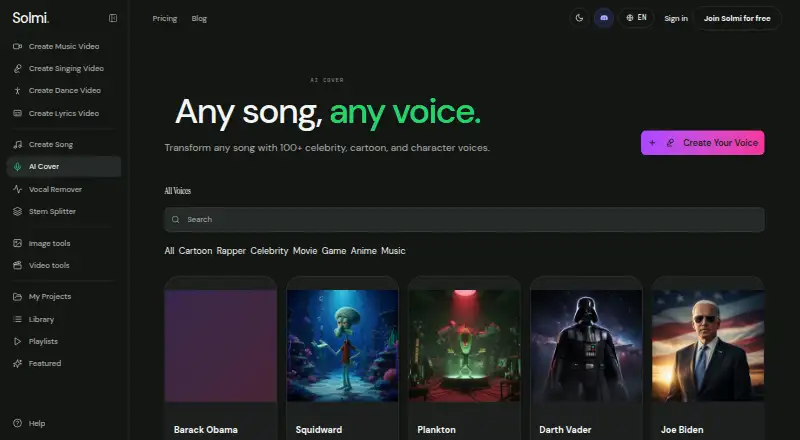
What Solmi AI Cover Generator is
Solmi AI Cover Generator makes a new vocal version of a song while preserving its original instrumental. Users upload a track and choose a built-in AI voice or a custom voice trained on their recordings. Solmi separates the vocal, re-sings the melody, and mixes the new vocal with the instrumental. The tool is available on Android, iOS, and the web, and covers can be used with Solmi’s vocal remover, stem splitter, and music video generator in the same app. Solmi says its platform is for professional musicians, content creators, and people who love music. Users should use tracks they have rights to use, such as their own uploads or songs generated in Solmi. Paid plans include commercial use, but publishing also requires rights to the underlying song and consent for any real person’s voice. The Free plan costs nothing, provides 5 credits per cover, and refills credits to 10 daily without a credit card. Plus costs $35 a month and includes 2,000 credits and commercial use. The service is self-service software, not manual production or editing.
Who it suits
It suits musicians and creators who want to make alternate-voice covers from tracks they have rights to use. Custom voice creation is available for users with their own recordings.
What it does well
- Choose built-in AI voices or train a custom voice.
- Keeps the original instrumental in the new cover.
- Works on Android, iOS, and the web.
- Free plan includes 5 credits per cover.
- Plus includes 2,000 credits and commercial use.
What to know first
- Free plan has 5 credits per cover.
- Free plan does not include commercial use.
- Publishing requires rights to the song and voice consent where applicable.
- No free trial is listed.
Limits
The Free plan costs nothing and provides 5 credits per cover, with credits refilling to 10 daily. Plus costs $35 a month and includes 2,000 credits and commercial use.
Plans
| Plan | Billed and limits | Price |
|---|---|---|
| Free | 5 credits per cover · credits refill to 10 daily · no credit card | Free |
| Plus | $35/month · 2,000 credits · commercial use | $35 a month |
As solmi.ai lists them, read 8 Oct 2026. The maker's own page has the final word.
Getting started
- Open https://solmi.ai/ai-cover on the web, or use Solmi on Android or iOS.
- Upload a song you have rights to use.
- Choose a built-in voice or train a custom voice from your own recordings.
- Use the Free plan or choose Plus for commercial use.
- Create the cover and, if useful, use it with Solmi’s other music tools.
Solmi AI Cover Generator re-sings an uploaded song in a different voice while preserving its original instrumental. It suits musicians, creators, and music fans who want a voice-swapped cover without rebuilding the backing track. The free tier is useful for occasional experiments, while regular publishing requires attention to credits, rights, consent, and the paid plan.
Overview
Solmi’s workflow is focused: upload a song, select a voice, and let the service separate the vocal, re-sing the melody, then mix the result back over the original instrumental. Vocal uploads and custom voice creation are supported, so you can choose a built-in AI voice or train one from your own recordings. That combination makes Solmi more suitable for cover production than for composing an entirely new arrangement.
The same app connects covers with a vocal remover, stem splitter, and music video generator. Those related tools can keep a project in one place, although Solmi describes the product as self-service software rather than a manual production or editing service.
Key features
Voice-swapped covers
Keeping the original instrumental is the central advantage. You can change the vocal identity while retaining the song’s existing backing, which fits demos, fan versions, and creator content built around a familiar arrangement.
Built-in and custom voices
Built-in AI voices provide a quick starting point. Training a custom voice gives musicians and creators a more personal result, but it also raises a clear responsibility: Solmi requires consent before publishing a cover that uses a real person’s voice.
Rights and privacy
Use only tracks you have rights to use, including your own uploads or songs generated in Solmi. Paid plans include commercial use, but commercial permission does not replace rights to the underlying song or consent for a real person’s voice. Solmi’s privacy policy covers data handled by its sites, apps, AI tools, subscriptions, credits, and downloads, with Singapore’s PDPA among the laws it addresses where applicable.
Pricing
Free
The Free plan costs nothing and requires no credit card. Each cover uses 5 credits, and the balance refills to 10 credits daily. That effectively supports limited, short-run experimentation rather than dependable production volume; unused capacity and project length can matter when you need repeated revisions.
Plus
Plus costs $35 a month, billed at $35/month. It includes 2,000 credits and commercial use, making it the practical choice for creators who publish regularly or need a predictable monthly allowance. Compared with Free, you pay for substantially more generation capacity and the right to use output commercially; the plan does not remove your obligation to clear the song and voice rights.
There is no free trial. Choose Free to assess the workflow without payment, then move to Plus when daily refills are too restrictive or commercial publishing is part of the plan.
Platforms
Solmi runs on Android, iOS, and the web. That broad device coverage suits creators who move between phone-based uploads and browser work, while the self-service model means production and account management remain your responsibility. For account or billing help, contact [email protected] from the signup email and include a project link; Solmi says business-day replies typically arrive within 24 to 48 hours.
Who it's for
Professional musicians can use custom voices and higher credit capacity for cover workflows, provided publishing rights are in order. Content creators benefit from the connected vocal, stem, and video tools when a cover is part of a wider release. Music fans who want occasional voice experiments are best served by the no-card Free plan.
Pros and cons
- Pro: Re-singing over the original instrumental preserves the arrangement while changing the vocal character.
- Pro: Built-in voices and custom voice training cover both quick experiments and more individualized projects.
- Pro: Vocal removal, stem splitting, and music-video creation extend the workflow beyond a single cover tool.
- Con: The Free allowance is tight for iteration: a cover costs 5 credits against a 10-credit daily refill.
- Con: Commercial use is tied to Plus, and paid access still requires song rights and voice consent.
- Con: There is no free trial and no manual editing service for users who want production assistance.
Alternatives
Browse the AI Song Cover Generators list for a wider comparison.
- BeMusic AI Cover is a better fit if you want Android, iOS, desktop, and web coverage plus a Creator plan at $12 a month when billed yearly, with 1,600 credits and up to 160 songs.
- Revocalize AI suits users who want a free trial, API or extension access, and a Free plan with 5 conversion minutes per month and one Starter AI voice.
- Applio is the alternative for users who prefer free, open-source software under the MIT license, with no accounts or paywalls and support for desktop, web, and self-hosted use.
- InsMelo AI Beat Maker is an option when beat-making is the priority; its Free plan includes 3.9 credits.
- Kits AI is worth considering for web, Windows, or API workflows, with a Free plan offering 15 conversion minutes, voice designer/blender tools, and Kits generative vocals.
- SoulX-Singer is a free, Apache 2.0-licensed choice for researchers and developers using Linux, web, or self-hosted setups.
- SunoMV is for users who need lyric-sync and storyboard video previews rather than primarily voice-swapped covers; its Free Preview allows three link imports per day and personal, non-commercial use.
- AI Song Creator is aimed at broader song generation, with a Free plan allowing two songs per month and one music generation per month for personal use.
Verdict
Choose Solmi if you want a focused, cross-platform way to recast a song’s vocals, with custom voice training and companion stem and video tools in the same app. Its main reason to look elsewhere is the combination of a constrained Free allowance and strict publishing obligations: frequent or commercial users need Plus, cleared songs, and consent for any real voice.
Verdict
Solmi provides a clear upload-and-voice workflow with built-in and custom voice options. Review song rights, voice consent, and credit limits before publishing or choosing a plan.
Questions
Is Solmi AI Cover Generator free?
Yes. The Free plan costs nothing and provides 5 credits per cover; credits refill to 10 daily, and no credit card is required.
How much does Plus cost?
Plus costs $35 a month and includes 2,000 credits and commercial use.
Which platforms are supported?
Solmi AI Cover Generator is available on Android, iOS, and the web.
Can I use my own voice recordings?
Yes. You can train a custom voice on your own recordings.
Can I publish covers commercially?
Paid plans include commercial use. Publishing also requires rights to the underlying song and consent for any real person’s voice.
How can I contact Solmi about an account or billing issue?
Solmi lists [email protected] for inquiries. For account or billing questions, it asks users to write from their signup email and include a project link.
Facts from Solmi AI Cover Generator's own pages
- Account help
- For account or billing questions, Solmi asks users to write from their signup email and include a project link. · solmi.ai, 8 Oct 2026
- Commercial use
- The AI cover page says paid plans include commercial use and users need rights to the underlying song and consent for any real person’s voice before publishing. · solmi.ai, 8 Oct 2026
- How it works
- Upload a song, choose a voice, and Solmi separates the vocal, re-sings the melody, and mixes it back over the original instrumental. · solmi.ai, 8 Oct 2026
- Input rights
- Solmi says to use tracks the user has rights to use, including songs generated in Solmi or the user’s own uploads. · solmi.ai, 8 Oct 2026
- Platforms
- Solmi says it runs on the web, iOS, and Android. · solmi.ai, 8 Oct 2026
- Privacy
- Solmi’s privacy policy says it covers personal data for its websites, apps, AI tools, subscriptions, credits, and downloads, and is intended to reflect applicable privacy laws including Singapore’s PDPA where it applies. · solmi.ai, 8 Oct 2026
- Purpose
- The AI cover generator re-sings a song in a new voice while keeping the original instrumental. · solmi.ai, 8 Oct 2026
- Related tools
- Covers can be used with Solmi’s vocal remover, stem splitter, and music video generator in the same app. · solmi.ai, 8 Oct 2026
- Service model
- Solmi describes itself as self-service software and says its team does not provide manual video production or editing services. · solmi.ai, 8 Oct 2026
- Support
- Solmi lists [email protected] for inquiries and says it typically responds within 24 to 48 hours on business days. · solmi.ai, 8 Oct 2026
- Voice options
- Users can choose built-in AI voices or train a custom voice on their own recordings. · solmi.ai, 8 Oct 2026
- Who it is for
- Solmi says its platform is for professional musicians, content creators, and people who love music. · solmi.ai, 8 Oct 2026
Where Solmi AI Cover Generator stands on Freedom251
- AI Afrobeats Music Generators#4 of 26
- AI Music Video Generators#4 of 23
- AI Song Generators#9 of 31
- AI Song Cover Generators#25 of 56