SnesFox
What SnesFox is
SnesFox is a free Super NES emulator for macOS and Windows that runs SNES ROMs, including Super FX (GSU) games such as Star Fox. ROMs can be opened from the debug interface, the File menu, or by dragging them into the application. A bare game window supports resizing and fullscreen, while a separate debug mode exposes CPU, PPU, APU, and GSU state, an instruction log, and playback controls. Debug tools include editable palette swatches, a full-VRAM tile viewer, and a GSU work-RAM viewer for Super FX titles. Command-line utilities inspect ROM headers, capture PPU and VRAM snapshots, disassemble ROMs, reassemble supported dumps, and record execution coverage. Coverage can annotate disassembly, but reflects only instructions reached during a particular run. An in-binary self-test checks CPU, PPU, and S-DSP regression behavior without a ROM. The project uses an MIT license. macOS builds use clang++, Xcode Command Line Tools, and SDL2; the Windows executable is cross-compiled with mingw-w64. No Linux build path is documented.
Who it suits
SnesFox suits macOS or Windows users who want to run SNES ROMs, especially Super FX titles, and developers interested in emulator debugging and ROM-analysis tools.
What it does well
- Runs SNES ROMs, including Super FX games
- Includes CPU, PPU, APU, and GSU debug state
- Provides VRAM, palette, and Super FX work-RAM viewers
- Offers ROM inspection and disassembly command-line tools
- Includes an in-binary regression self-test
What to know first
- No Linux build path yet
- Coverage may miss game execution paths
- Windows build is cross-compiled
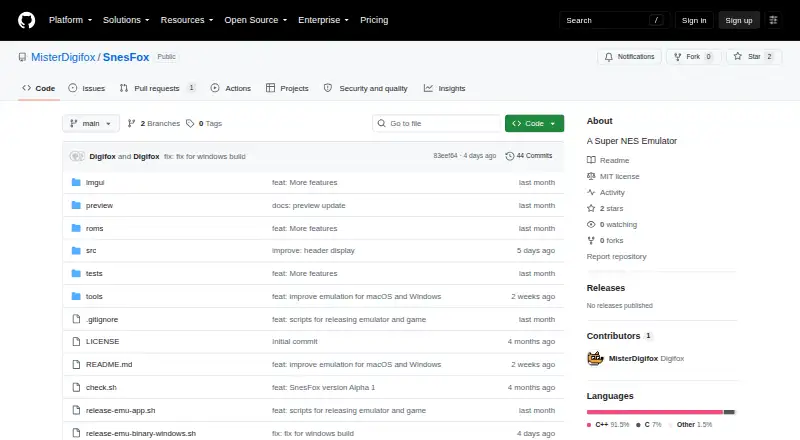
- Repository Releases page has no listed entries
Limits
Linux has no documented build path. Execution coverage reflects one recorded run and may not include every path in a game.
Getting started
- Open the public SnesFox GitHub repository
- On macOS, install clang++, Xcode Command Line Tools, and SDL2
- Build the Windows executable from macOS or Linux with mingw-w64
- Launch SnesFox and open a ROM through the debug interface or File menu
- Drag a ROM into the application when preferred
Verdict
SnesFox pairs SNES playback with extensive debugging and ROM-analysis features at no cost. Its documented builds target macOS and Windows, while Linux users lack a build path.
Questions
Is SnesFox free?
Yes. The project lists a free plan and an MIT license.
Which systems does it support?
Supported platforms are macOS and Windows.
Can it run Super FX games?
Yes. It supports Super FX (GSU) games, including titles such as Star Fox.
How can ROMs be loaded?
ROMs can be opened from the debug interface, the File menu, or by drag and drop.
Does it include testing tools?
An in-binary self-test runs CPU, PPU, and S-DSP regression tests without a ROM.
Facts from SnesFox's own pages
- Availability
- The GitHub repository is public and its Releases page shows no listed release entries. · github.com, 3 Oct 2026
- Build dependency
- SDL2 is the only external library dependency listed for the macOS build; Dear ImGui is vendored in the repository. · github.com, 4 Oct 2026
- Coverage limitation
- Execution coverage records what the emulator executed in a particular run and may not represent every path in a game. · github.com, 3 Oct 2026
- Debug interface
- Its optional debug UI shows CPU, PPU, APU, and GSU state, an instruction log, and controls for pausing, stepping, advancing a frame, and resetting. · github.com, 4 Oct 2026
- Display controls
- The game window supports resizing and fullscreen, with Space, F11, and Escape shortcuts documented for stepping, fullscreen, and pause or exit-fullscreen behavior. · github.com, 4 Oct 2026
- Execution coverage
- A coverage command records instruction addresses executed during a run and can annotate disassembly; the README cautions that a run may not cover every game path. · github.com, 4 Oct 2026
- Graphics tools
- The debug UI includes editable CGRAM palette swatches and a full-VRAM tile viewer, plus a GSU work-RAM viewer for Super FX titles. · github.com, 4 Oct 2026
- Integrations and security
- The project README does not state any third-party integrations or security/compliance certifications. · github.com, 4 Oct 2026
- License
- The repository lists an MIT license. · github.com, 4 Oct 2026
- Linux limitation
- The README says there is no Linux build path yet, though Linux can be used as a host to cross-compile the Windows executable. · github.com, 3 Oct 2026
- macOS build
- The documented macOS build uses clang++, Xcode Command Line Tools, and SDL2; Dear ImGui is vendored in the repository. · github.com, 3 Oct 2026
- Product
- SnesFox is a Super NES emulator that runs SNES ROMs, including Super FX (GSU) games such as Star Fox. · github.com, 3 Oct 2026
- Purpose
- SnesFox is a Super NES emulator for running game ROMs, including Super FX (GSU) titles such as Star Fox. · github.com, 4 Oct 2026
- ROM loading
- Users can open ROMs through the debug UI, the File menu, or drag and drop. · github.com, 4 Oct 2026
- ROM tools
- The command-line tools can inspect ROM headers, capture PPU/VRAM snapshots, disassemble ROMs, reassemble supported dumps, and record execution coverage. · github.com, 3 Oct 2026
- ROM workflows
- Command-line tools can inspect ROM headers, dump PPU/VRAM snapshots, disassemble ROMs, and reassemble supported dumps. · github.com, 4 Oct 2026
- Super FX
- The emulator supports Super FX (GSU) games and includes GSU state panels and a work-RAM viewer in its debug UI. · github.com, 3 Oct 2026
- Support
- The repository page does not describe a support channel or support terms. · github.com, 4 Oct 2026
- Supported builds
- The README documents macOS builds and a Windows executable cross-compiled with mingw-w64; it says there is no Linux build path yet. · github.com, 4 Oct 2026
- Testing
- An in-binary self-test runs CPU, PPU, and S-DSP regression tests without requiring a ROM. · github.com, 4 Oct 2026
- Window modes
- SnesFox offers a bare game-only window and a debug UI mode, and the bare window supports resizing and fullscreen. · github.com, 3 Oct 2026
- Windows audio
- The Windows backend uses DirectSound, while the macOS backend uses SDL2 for audio. · github.com, 4 Oct 2026
- Windows build
- The documented Windows executable is cross-compiled from macOS or Linux with mingw-w64, and the repository says there is no native Windows toolchain path. · github.com, 3 Oct 2026
Where SnesFox stands on Freedom251
- SNES Emulators#21 of 30