Skim
What Skim is
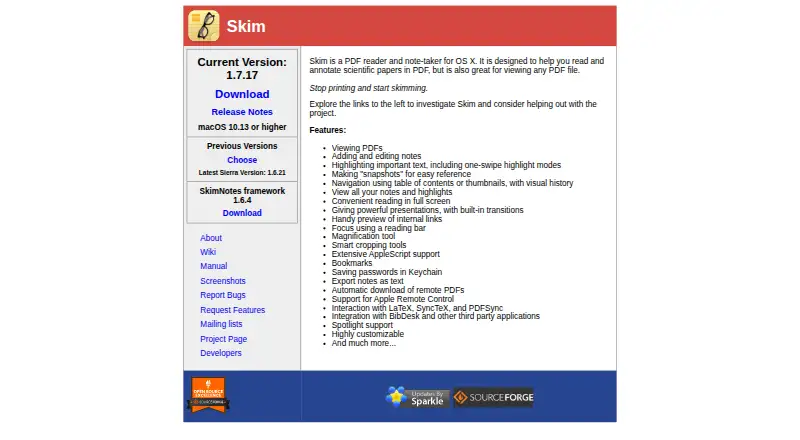
Skim is a free PDF reader and note-taking app for macOS, designed for scientific papers while also supporting other PDF files. Readers can search documents, add notes, highlight sections, bookmark files, and take snapshots for reference. Navigation tools include table-of-contents and thumbnail views, visual history, a reading bar, magnification, and smart cropping. Skim also offers full-screen reading and PDF presentations with built-in transitions. It works with LaTeX, SyncTeX, PDFSync, BibDesk, and other third-party applications, and AppleScript can access its windows, documents, pages, notes, and highlights. Skim stores notes and highlights in extended attributes rather than in the PDF itself. Emailing a PDF can therefore remove those annotations unless the transfer method preserves the attributes. Notes can be exported as text or in Skim, PDF bundle, and FDF formats. The current release requires macOS 10.13 or higher; older releases are listed for macOS 10.4 through 10.12. The project is described as free and open-source and developed by volunteer contributors. The listed Free plan costs nothing.
Who it suits
Skim suits macOS users who read and annotate scientific papers or other PDFs. It may be useful for people working with LaTeX or BibDesk, provided their file-sharing method preserves extended attributes when annotations need to travel with a PDF.
What it does well
- Searches PDFs and supports notes and highlights
- Offers full-screen reading and presentations
- Works with LaTeX, SyncTeX, and BibDesk
- Exports notes in several formats
- Free and open-source
What to know first
- Current release requires macOS 10.13 or higher
- Emailing PDFs can strip notes and highlights
- OCR support is not available
Limits
The free plan is the PDF reader and note-taker for macOS 10.13 or higher. Notes and highlights are stored outside the PDF data, and email can strip them unless the transfer method preserves extended attributes.
Plans
| Plan | Billed and limits | Price |
|---|---|---|
| Free | macOS 10.13 or higher · PDF reader and note-taker | Free |
As skim-app.sourceforge.io lists them, read 8 Oct 2026. The maker's own page has the final word.
Getting started
- Open the Skim website.
- Use a Mac running macOS 10.13 or higher for the current release.
- Choose the free plan.
- Open a PDF to search, annotate, or present it.
Verdict
Skim combines PDF reading, annotation, and presentation features for macOS. Keep its extended-attribute storage in mind when moving annotated files between devices or people.
Questions
How much does Skim cost?
Skim is free. Its Free plan is listed as free.
Which platforms does Skim support?
Skim supports macOS and is a desktop app. The current release requires macOS 10.13 or higher; older releases cover macOS 10.4 through 10.12.
Is Skim open-source?
Yes. The project is described as free and open-source and developed by volunteer contributors.
Can I export Skim annotations?
Notes can be exported as text or in Skim, PDF bundle, or FDF formats.
Does Skim support OCR?
No. OCR support is listed as none.
Facts from Skim's own pages
- Annotation tools
- Yes · skim-app.sourceforge.io, 24 Sept 2026
- Automation
- Skim supports AppleScript access to its windows, documents, pages, notes, and highlights. · sourceforge.net, 8 Oct 2026
- Export
- Skim can export notes as text and provides options to export notes in Skim, PDF bundle, or FDF formats. · skim-app.sourceforge.io, 8 Oct 2026
- Free plan
- Yes · skim-app.sourceforge.io, 24 Sept 2026
- Integrations
- Skim lists interaction with LaTeX, SyncTeX, and PDFSync, as well as integration with BibDesk and other third-party applications. · skim-app.sourceforge.io, 8 Oct 2026
- License and project
- The project wiki describes Skim as free and open-source and says it is developed by volunteer contributors. · sourceforge.net, 8 Oct 2026
- Navigation
- Features include table-of-contents and thumbnail navigation, visual history, a reading bar, magnification, and smart cropping. · skim-app.sourceforge.io, 8 Oct 2026
- Notes storage
- Skim stores its notes and highlights in extended attributes, so they are not stored in the PDF data itself. · sourceforge.net, 8 Oct 2026
- Older versions
- The project wiki lists older Skim releases for macOS versions from 10.4 through 10.12. · sourceforge.net, 8 Oct 2026
- Password handling
- Skim lists saving passwords in Keychain as a feature. · skim-app.sourceforge.io, 8 Oct 2026
- PDF tools
- Users can search PDFs, add notes, highlight sections, bookmark documents, and take snapshots for reference. · skim-app.sourceforge.io, 8 Oct 2026
- Platform support
- desktop · skim-app.sourceforge.io, 24 Sept 2026
- Portability limit
- Emailing a PDF loses its extended attributes and therefore its Skim notes unless the file is sent using a method that preserves them. · sourceforge.net, 8 Oct 2026
- Presentations
- Skim supports full-screen reading and full-screen PDF presentations with built-in transitions. · skim-app.sourceforge.io, 8 Oct 2026
- Supported system
- The current release requires macOS 10.13 or higher. · skim-app.sourceforge.io, 8 Oct 2026
- What it does
- Skim is a PDF reader and note-taker designed for reading and annotating scientific papers, and can also view other PDF files. · skim-app.sourceforge.io, 8 Oct 2026
Where Skim stands on Freedom251
- PDF Readers#18 of 24