Freedom251 › Stock Illustration Websites
SketchValley
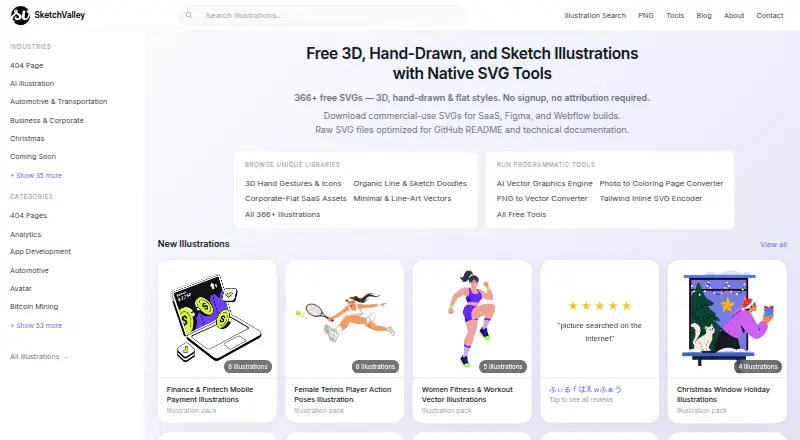
What SketchValley is
SketchValley is a free illustration library and browser-based design toolkit for people making web pages, apps, or presentations. Its artwork comes in hand-drawn, flat, 3D, and minimal styles, with SVG and PNG formats for personal and commercial projects. Users may modify illustrations and use them commercially without attribution, but may not resell them unchanged or redistribute them as a competing library. Browser tools include AI vector graphic generation, image conversion, SVG color editing, and image export. The vector editor has a pen tool, Shape Builder, Pathfinder, layers, and undo history, with SVG or PNG export. It imports SVG, PNG, JPG, GIF, WebP, and compatible Adobe Illustrator files; live text and embedded raster images in AI files are not converted yet. SketchValley says editor work stays in the browser rather than being uploaded. Its tools have no usage limits, watermarks, or signup requirement. Free templates cover creator, social, business, and event designs, and can be downloaded as PNG at 1×–4× size or SVG. The browser editor runs on Windows, Mac, and Chromebook.
Who it suits
It suits designers, developers, and creators who need illustrations, browser-based vector tools, or ready-made templates. It may also suit people who want commercial-use artwork without attribution, provided they follow the limits on resale and redistribution.
What it does well
- Illustrations available in SVG and PNG.
- Commercial use allowed without attribution.
- Browser tools have no usage limits or signup.
- Editor work is not uploaded to a server.
- Templates download as PNG or SVG.
What to know first
- Live text in imported AI files is not converted.
- Embedded raster images in AI files are not converted.
- Artwork cannot be resold as-is or redistributed as a competing library.
Plans
| Plan | Billed and limits | Price |
|---|---|---|
| Free | Free · Illustrations and tools · no signup · no attribution required | Free |
As sketchvalley.com lists them, read 8 Oct 2026. The maker's own page has the final word.
Getting started
- Open https://sketchvalley.com/ in a browser.
- Choose illustrations, templates, or a browser tool.
- Edit in the browser; tools do not require signup.
- Download artwork or templates in an available SVG or PNG format.
SketchValley is a browser-based illustration library and set of design tools for people creating websites, apps, and presentations. It suits designers, developers, and creators who need downloadable artwork plus lightweight editing without creating an account. The strongest case is its combination of commercial-use illustrations, an in-browser vector editor, and templates at no cost; Illustrator users with complex files may need another editor.
Overview
SketchValley provides illustrations in SVG and PNG, covering hand-drawn, flat, 3D, and minimal styles. Those formats suit both editable design work and quick raster placement in presentations or social graphics. Personal and commercial use is permitted without attribution, which removes a common obligation for client and business projects.
The license still has a material boundary: you may modify the artwork, but you cannot resell it unchanged or redistribute it as a competing library. That makes SketchValley appropriate for finished designs and adapted assets, not for assembling a rival stock collection.
Key features
Browser tools and editor
Free browser tools generate AI vector graphics, convert images, edit SVG colors, and export images. The vector editor includes a pen tool, Shape Builder, Pathfinder, layers, undo history, and SVG or PNG export, giving users a workable set of path and layout controls rather than a download-only library.
Imports cover SVG, PNG, JPG, GIF, WebP, and compatible Adobe Illustrator files. AI files with live text or embedded raster images are not converted yet, so Illustrator workflows that depend on those elements may require cleanup or a different application.
The editor runs in the browser and states that work is not uploaded to a server. The tools page also states there are no usage limits, watermarks, or signup requirement. That combination is useful for occasional work, private browser-based editing, and teams that do not want an account gate.
Templates
Free templates cover YouTube thumbnails, social posts, business cards, certificates, logos, invitations, posters, and LinkedIn banners. Downloads are available as PNG at 1× through 4× size or as SVG, making the collection practical for both fixed-size publishing and further vector editing. The editor runs in a browser on Windows, Mac, and Chromebook.
Pricing
| Plan | Price | Includes |
|---|---|---|
| Free | free | Illustrations and tools; no signup; no attribution required |
The free plan includes unlimited downloads, commercial use, and PNG raster files. There is no free trial because the offering is free, and the tools carry no stated usage cap or watermark. It is the clear fit for independent creators, prototypes, client work, and anyone testing a browser editor without a subscription. Users who need advanced Illustrator-file conversion should weigh the import limitation before making it their primary workflow.
Platforms
SketchValley is web-based. Its editor is stated to run in browsers on Windows, Mac, and Chromebook, while the broader platform listing is web.
Who it's for
Choose SketchValley for commercial web, app, presentation, and social-design work when editable SVG/PNG assets, templates, and quick browser tools matter more than a full desktop design suite. It is especially suitable when no-signup access and unlimited tool use are priorities. It is less suitable for teams whose source files rely on live text or embedded raster content inside Adobe Illustrator files, or for anyone intending to redistribute downloaded art as a library.
Pros and cons
Pros
- Commercial use without attribution: modified illustrations can be used in business projects without a credit line.
- Broad browser toolkit: vector editing, image conversion, SVG color changes, AI vector generation, and export are gathered in one place.
- No account or tool cap: the tools page states no signup requirement, usage limits, or watermarks.
- Useful output choices: templates export as SVG or PNG from 1× to 4×, while illustrations are supplied in SVG and PNG.
Cons
- Adobe Illustrator conversion is incomplete: live text and embedded raster images in AI files are not converted.
- Redistribution is prohibited: unchanged artwork cannot be resold or used to build a competing library.
- Web-only access: users looking for a native desktop or mobile application are not served by the platform listing.
Alternatives
Browse the Stock Illustration Websites list for a wider comparison of illustration sources.
- Ouch! by Icons8 is the better pick when you need Android, iOS, desktop, API, or extension access; its free illustrations require attribution.
- Pixabay suits broader free media downloads across web, mobile, and API, though full-resolution photo and video downloads require signup.
- DrawKit is worth considering for unlimited free content without an account, with a paid Pro tier at $79 a year.
- GetIllustrations fits developers needing an API, including a free tier with 1,500 calls per month.
- IllustCenter focuses on free transparent PNG illustrations with per-download quantity limits.
- Rawpixel offers a free tier with 10 creative assets per day and 100 MB cloud storage, plus paid Creative access.
- Storyset is another free illustration source for personal and commercial projects, but attribution is required.
- SuperStock is a paid stock service with a student license offering 30 images and 10 videos per month for eligible .edu users.
Verdict
SketchValley is a strong choice for creators who want free, commercially usable illustrations, templates, and practical vector tools directly in a browser with no account barrier. Its main reason to look elsewhere is the incomplete Adobe Illustrator import support, especially for files built around live text or embedded raster images; users with that requirement should choose a more capable file-conversion workflow.
Verdict
SketchValley brings illustrations, editing tools, and templates together in a browser-based offering with no signup requirement. Users should note the limits on Adobe Illustrator imports and the restrictions on reselling or redistributing artwork.
Questions
What does SketchValley cost?
The Free plan costs nothing.
Is there a free plan or trial?
The Free plan includes illustrations and tools. There is no free trial.
Which platforms does it support?
SketchValley is web based. Its editor runs in a browser on Windows, Mac, and Chromebook.
Can I use the illustrations commercially?
Yes. You may modify and use them commercially without attribution, but may not resell them as-is or redistribute them as a competing library.
Which file formats are available?
Illustrations are available as SVG and PNG. The vector editor exports SVG or PNG and imports SVG, PNG, JPG, GIF, WebP, and compatible Adobe Illustrator files.
Do the tools require an account?
No. The tools page says they have no signup requirement.
Facts from SketchValley's own pages
- Browser tools
- SketchValley offers free browser-based tools for generating AI vector graphics, converting images, editing SVG colors, and exporting images. · sketchvalley.com, 8 Oct 2026
- File imports
- The vector editor imports SVG, PNG, JPG, GIF, WebP, and compatible Adobe Illustrator files; live text and embedded raster images in AI files are not converted yet. · sketchvalley.com, 8 Oct 2026
- Illustration formats
- Illustrations are available in SVG and PNG formats for personal and commercial use. · sketchvalley.com, 8 Oct 2026
- License limits
- Users may modify and use illustrations commercially without attribution, but may not resell them as-is or redistribute them as a competing library. · sketchvalley.com, 8 Oct 2026
- Privacy
- The vector editor runs in the browser and states that work is not uploaded to a server. · sketchvalley.com, 8 Oct 2026
- Product
- SketchValley is a free illustration library for designers, developers, and creators making web pages, apps, or presentations. · sketchvalley.com, 8 Oct 2026
- Styles
- The library includes hand-drawn, flat design, 3D, and minimal illustrations. · sketchvalley.com, 8 Oct 2026
- Support
- The contact page provides a form and [email protected] for custom illustration inquiries. · sketchvalley.com, 8 Oct 2026
- Template downloads
- Templates can be downloaded as PNG at 1×–4× size or as SVG, and the page says the editor runs in a browser on Windows, Mac, and Chromebook. · sketchvalley.com, 8 Oct 2026
- Templates
- Free templates include designs for YouTube thumbnails, social posts, business cards, certificates, logos, invitations, posters, and LinkedIn banners. · sketchvalley.com, 8 Oct 2026
- Tool limits
- The tools page says tools have no usage limits, watermarks, or signup requirement. · sketchvalley.com, 8 Oct 2026
- Vector editor
- The vector editor includes a pen tool, Shape Builder, Pathfinder, layers, undo history, and SVG or PNG export. · sketchvalley.com, 8 Oct 2026
Where SketchValley stands on Freedom251
- Stock Illustration Websites#21 of 31