Singularity
What Singularity is
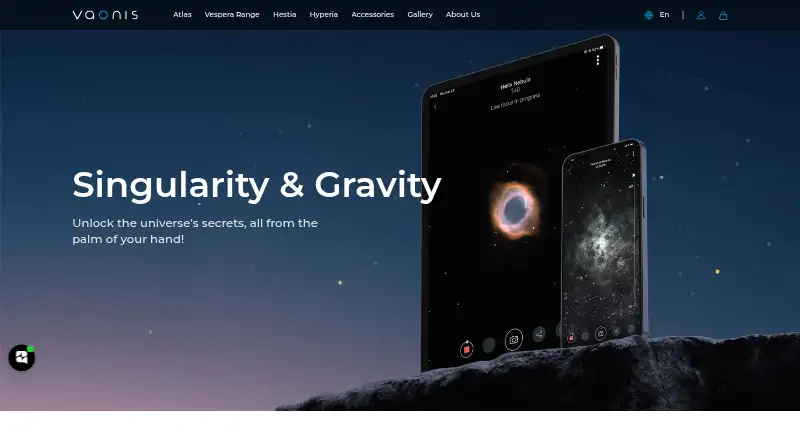
Singularity is Vaonis’s free mobile app for controlling Stellina, Vespera, and Hyperia telescopes. GPS helps locate the telescope, adjust focus, and prepare an observation in under five minutes. Users can select catalog objects or enter celestial coordinates for automatic pointing and tracking, while successive images are combined in real time to reveal more detail and color. CovalENS stitches images from the same stellar region into a wider view, and Solar Mode supports sunspot observing and photography with a Vaonis solar filter. Space Center combines weather forecasts, saved locations, telescope settings, astronomy news, and advice. Expert Mode offers coordinate pointing plus manual exposure and gain controls. Plan My Night schedules unattended sessions, with photos retrieved by USB for Stellina or Wi‑Fi FTP for Vespera. Photos can be stored on a device or Vaonis Cloud, and events added to a calendar. The app supports iOS 14 or later and Android 8–9 or later. An account and internet access are required, and most features need a connected Vaonis telescope.
Who it suits
Singularity suits Vaonis telescope owners who want mobile control, automated pointing, observation planning, image processing, and optional expert camera settings.
What it does well
- Controls Stellina, Vespera, and Hyperia telescopes
- Combines images progressively during observation
- Supports automatic pointing and celestial-coordinate tracking
- Schedules unattended observation sessions
- Available free on iOS and Android
What to know first
- Most features require a connected Vaonis telescope
- Internet is required during download and use
- Solar observing requires a separate Vaonis solar filter
- App data is reported as unencrypted on Google Play
Limits
The free app and account include features that mostly require a connected Vaonis telescope. Solar observing requires a separately purchased solar filter; unsupported-telescope users can access only account creation and some informational content.
Plans
| Plan | Billed and limits | Price |
|---|---|---|
| Singularity | Free app and account · most features require a connected Vaonis telescope · solar observing requires a separately purchased solar filter | Free |
As vaonis.com lists them, read 8 Oct 2026. The maker's own page has the final word.
Getting started
- Install Singularity from the Apple App Store or Google Play.
- Create an account and use Wi-Fi internet during download and use.
- Connect a Stellina, Vespera, or Hyperia telescope to access most features.
- Use GPS to locate the telescope, adjust focus, and prepare for observing.
- Choose an object from the catalog or enter celestial coordinates to point and track.
- For solar observing, use a Vaonis solar filter with Solar Mode.
Verdict
Singularity provides telescope control, planning, imaging, and scheduling in a free mobile app. Its telescope requirement, internet dependence, and separate solar filter requirement define the practical limits.
Questions
Is Singularity free?
Yes. Singularity is a free app and account.
Which devices and platforms does it support?
It is available on Android and iOS through Google Play and the Apple App Store. Vaonis’s terms state support for iOS 14 or later and Android 8–9 or later.
Which telescopes does Singularity control?
The app controls Vaonis Stellina, Vespera, and Hyperia telescopes.
Can I use Singularity without a Vaonis telescope?
Users without a supported telescope have access only to account creation and some informational content; most features require a connected Vaonis telescope.
Does the app work offline?
No. Wi-Fi internet is required during download and use.
What does Solar Mode require?
Solar Mode supports observing and photographing sunspots when used with a Vaonis solar filter.
Facts from Singularity's own pages
- Account and requirements
- An account is required for app features, Wi-Fi internet is required during download and use, and unsupported-telescope users have access only to account creation and some informational content. · vaonis.com, 8 Oct 2026
- AI features
- Optional features include text-to-speech for app content and text or voice questions to GPT, with voice converted to text before transmission to OpenAI. · vaonis.com, 8 Oct 2026
- Data safety
- Google Play reports that the app may share app info and performance data, may collect location and personal information, does not encrypt data, and allows users to request deletion. · play.google.com, 8 Oct 2026
- Expert controls
- Expert Mode supports coordinate pointing and lets users set camera exposure time and gain for later manual image processing. · play.google.com, 8 Oct 2026
- Headquarters
- Castelnau-le-Lez, France · vaonis.com, 28 Sept 2026
- Imaging
- The app combines successive images in real time to progressively reveal detail and color. · play.google.com, 8 Oct 2026
- Mosaics
- CovalENS automatically stitches images of the same stellar region to provide a wider view. · play.google.com, 8 Oct 2026
- Night scheduling
- Plan My Night can schedule observations to run unattended, with photos retrieved by USB for Stellina or Wi-Fi FTP for Vespera. · play.google.com, 8 Oct 2026
- Observation planning
- Space Center includes weather forecasts, saved observation locations, telescope settings, astronomy news, and advice. · play.google.com, 8 Oct 2026
- Platform support
- The app is distributed through Apple App Store and Google Play and supports iOS 14 or later and Android 8–9 or later, according to Vaonis's terms. · vaonis.com, 8 Oct 2026
- Purpose
- Singularity controls Vaonis telescopes including Stellina, Vespera, and Hyperia. · vaonis.com, 8 Oct 2026
- Setup
- The app uses GPS to locate the telescope, adjust focus, and prepare it for observing in under five minutes. · play.google.com, 8 Oct 2026
- Solar observing
- Solar Mode supports observing and photographing sunspots when used with a Vaonis solar filter. · play.google.com, 8 Oct 2026
- Storage and calendar
- Users can save observation points, store telescope photos on their device or Vaonis Cloud, and add skywatching events to a calendar. · vaonis.com, 8 Oct 2026
- Support
- The Google Play listing provides Vaonis support at [email protected]. · play.google.com, 8 Oct 2026
- Targeting
- Users can select objects from the catalog or enter celestial coordinates for automatic pointing and tracking. · play.google.com, 8 Oct 2026
Where Singularity stands on Freedom251
- Astronomy Apps#18 of 35