Freedom251 › Game Save Managers
SideSave
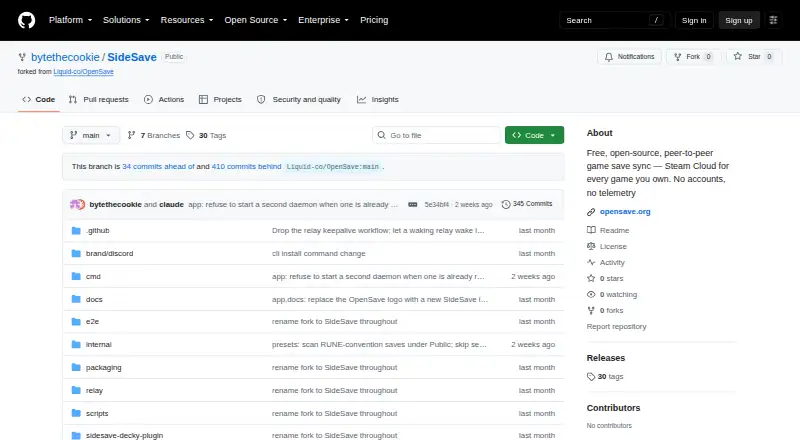
What SideSave is
SideSave syncs tracked save data for non-Steam games that you have added to Steam as shortcuts between two specific machines. Pair two approved machines to sync tracked saves over a local network or through an internet relay. SideSave identifies eligible shortcuts through Steam’s shortcuts.vdf file and offers their Proton save locations for tracking. It transfers changed content blocks and keeps versioned snapshots, branches, and snapshot history. If saves changed independently on each machine, you can choose to keep the local version, the remote version, or both. Snapshots also let you restore a save or individual files. The scan covers non-Steam shortcuts; it excludes Steam Cloud games, emulator saves, repack-wrapper detection, and portable installs. SideSave is free and open source, with no accounts or subscriptions. The project documents ways to build a CLI and daemon, desktop app, and relay server, plus a Steam Deck Flatpak and Decky plugin. It publishes no releases, so getting started requires building from source. Optional backup providers include Google Drive, Dropbox, OneDrive, WebDAV, a webhook, or a local or NAS folder. Saves stay in configured local storage unless you enable cloud backup. Relay connections are encrypted, but not end-to-end.
Who it suits
SideSave suits Linux and Steam Deck users who want to sync saves for non-Steam games added to Steam across two machines. It is a fit for users comfortable building software from source and choosing how to handle sync conflicts or optional backups.
What it does well
- Syncs saves over a LAN or internet relay.
- Transfers only content blocks that have changed.
- Keeps snapshots, branches, and restorable save history.
- Offers local, NAS, and several cloud backup options.
- Requires approval before devices can sync.
What to know first
- The fork publishes no releases; users must build from source.
- Scanning excludes Steam Cloud games, emulator saves, and portable installs.
- Relay encryption is not end-to-end.
Limits
The free plan has no subscriptions, but the fork publishes no releases and requires building from source. Google Drive’s built-in OAuth credentials may expire weekly; the guide suggests a custom client ID or another provider for always-on cloud sync.
Plans
| Plan | Billed and limits | Price |
|---|---|---|
| Free | No accounts or subscriptions stated · build from source; no published releases | Free |
As github.com lists them, read 7 Oct 2026. The maker's own page has the final word.
Getting started
- Open the SideSave GitHub repository.
- Choose a documented build route: CLI and daemon, desktop app, or relay server.
- Build the selected software from source; the fork does not publish releases.
- On Steam Deck, use the documented Flatpak or Decky Loader plugin route.
- Pair the two devices and approve the pairing request.
- Select eligible non-Steam shortcuts and track their offered Proton save locations.
Verdict
Pick SideSave if you want free, open-source syncing of tracked saves for non-Steam Steam shortcuts across two machines and value snapshots, conflict choices, and optional backup providers. Look elsewhere if you need published releases, scheduled backups, broader save detection, or end-to-end encryption for relay traffic.
Questions
How much does SideSave cost?
SideSave is free and open source. The project says it has no subscriptions.
Which platforms does it support?
The listed platform is Linux. The repository also documents a Steam Deck Flatpak and Decky Loader plugin.
How do I install it?
The fork publishes no releases. Its repository documents building the CLI and daemon, desktop app, and relay server from source.
What does SideSave sync?
It tracks saves for non-Steam games added to Steam as shortcuts, and offers their Proton save locations. Its scan excludes Steam Cloud games, emulator saves, repack-wrapper detection, and portable installs.
Can I back up saves to cloud storage?
Optional providers are Google Drive, Dropbox, OneDrive, WebDAV, a webhook, and a local or NAS folder. You must enable Cloud Backup and choose a provider.
Can the relay operator read my saves?
Relay connections are encrypted but not end-to-end, so the relay operator can read save data passing through it.
Facts from SideSave's own pages
- Availability
- The fork does not publish releases and instructs users to build it from source. · github.com, 7 Oct 2026
- Cloud backup integrations
- Optional cloud-backup providers listed in the privacy policy are Google Drive, Dropbox, OneDrive, WebDAV, a webhook, and a local or NAS folder. · github.com, 7 Oct 2026
- Cloud credentials
- OAuth tokens for backup providers are stored locally and are not sent to the SideSave project. · github.com, 7 Oct 2026
- Conflict handling
- When independently changed saves conflict, SideSave asks the user whether to keep the local version, remote version, or both. · github.com, 7 Oct 2026
- Data handling
- The relay routes WebSocket frames and says it writes no save data to disk or retains it after a device disconnects. · github.com, 7 Oct 2026
- Delta transfer
- SideSave hashes content-defined blocks and transfers only blocks that changed. · github.com, 7 Oct 2026
- Google Drive limitation
- The user guide says the built-in Google Drive OAuth credentials may expire weekly and suggests using a custom client ID or another backup provider for always-on cloud sync. · github.com, 7 Oct 2026
- History
- It stores versioned snapshots with branches and supports restoring saves or individual files from snapshots. · github.com, 7 Oct 2026
- History and conflicts
- The sync engine supports snapshot history and branches, and detects conflicts through sync lineage for user resolution. · github.com, 7 Oct 2026
- Install options
- The repository documents building a CLI and daemon, a desktop app, a relay server, and a Steam Deck Flatpak and Decky plugin. · github.com, 7 Oct 2026
- Local data
- The privacy policy says saves and snapshots stay on the user's machine in configured storage folders unless the user opts into cloud backup. · github.com, 7 Oct 2026
- Optional backup integrations
- Cloud Backup can mirror snapshots to Google Drive, Dropbox, OneDrive, WebDAV, a webhook, or a local/NAS folder. · github.com, 7 Oct 2026
- Pairing
- Devices sync only after explicit pairing approval, and users can unpair a device from the Devices screen. · github.com, 7 Oct 2026
- Platforms and installation
- The repository documents building the CLI, desktop app, and relay from source, and describes a Steam Deck Flatpak and Decky Loader plugin; it says the fork publishes no releases. · github.com, 7 Oct 2026
- Pricing
- The project describes itself as free and open source, and its user guide says it has no subscriptions. · github.com, 7 Oct 2026
- Privacy
- SideSave says it has no accounts or telemetry and does not upload saves to third parties unless the user enables Cloud Backup and chooses a provider. · github.com, 7 Oct 2026
- Purpose
- SideSave syncs save data for non-Steam games added to Steam as shortcuts between two specific machines, peer-to-peer. · github.com, 7 Oct 2026
- Relay security
- The privacy policy says relay connections are encrypted but not end-to-end, so the relay operator can read save data passing through the relay. · github.com, 7 Oct 2026
- Save detection
- It identifies non-Steam shortcuts through Steam’s shortcuts.vdf file and offers their Proton save locations for tracking. · github.com, 7 Oct 2026
- Scope
- SideSave detects non-Steam Steam shortcuts and excludes real Steam Cloud games, emulator saves, repack-wrapper detection, and portable installs from its scan scope. · github.com, 7 Oct 2026
- Support
- The user guide directs users to the SideSave Discord for help and GitHub Issues for bug reports. · github.com, 7 Oct 2026
- Sync
- Tracked saves sync between paired devices over LAN or through an internet relay using changed-block transfers and versioned snapshots. · github.com, 7 Oct 2026
Where SideSave stands on Freedom251
- Game Save Managers#17 of 27