Freedom251 › Audio Visualizer Software
Serato Visualizer
What Serato Visualizer is
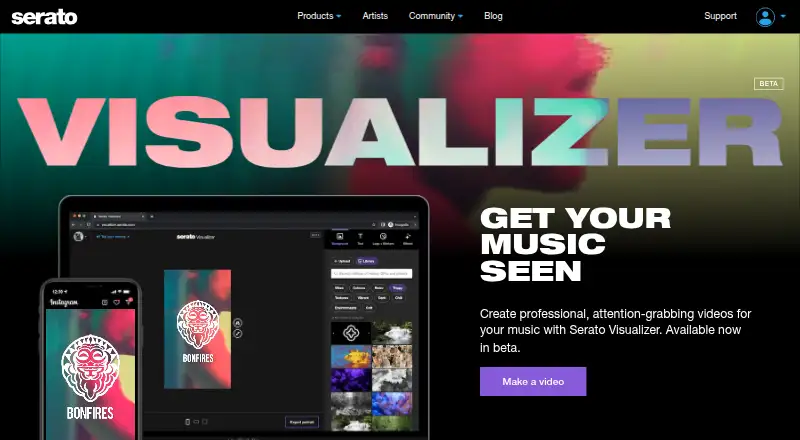
Serato Visualizer is a browser-based tool for making videos and other visuals to accompany music productions and share on social media. Serato describes it as designed for music producers, and it is currently in beta. To use it, you need a free Serato.com account. Upload an MP3 or WAV file up to 200 MB, then search a library of more than 3 million videos, photos, GIFs, and stickers, or add your own logos, artwork, and other material.
The effects library includes audio-reactive effects and filters, with up to two effects available per visual. Finished videos can be exported in portrait, landscape, and square formats for social posts, animated cover art, and Spotify canvases. The free plan has no limits or watermarks. Serato recommends the latest Microsoft Edge or Google Chrome on a desktop computer. Serato Studio can export a song as an MP3 and open Visualizer in a browser. Serato says its content is royalty-free, though GIPHY-provided material may not be cleared for commercial use.
Who it suits
It suits music producers who want to create and export visuals for social posts, cover art, or Spotify canvases. Users need a free Serato.com account and a supported desktop browser is recommended.
What it does well
- Free plan has no limits or watermarks
- Accepts MP3 and WAV files up to 200 MB
- Searchable library has more than 3 million assets
- Supports portrait, landscape, and square video exports
- Users can add their own artwork and logos
What to know first
- The tool is currently in beta
- A free Serato.com account is required
- Serato recommends a desktop computer
- GIPHY content may not be cleared for commercial use
Limits
The free plan has no limits or watermarks. The tool is in beta, and GIPHY-provided content may not be cleared for commercial use.
Plans
| Plan | Billed and limits | Price |
|---|---|---|
| Serato Visualizer | No limits or watermarks; beta; Serato.com account required | Free |
As serato.com lists them, read 10 Oct 2026. The maker's own page has the final word.
Getting started
- Create a free Serato.com account.
- Use a desktop computer with the latest Microsoft Edge or Google Chrome, as Serato recommends.
- Open Serato Visualizer in a browser.
- Upload an MP3 or WAV file up to 200 MB.
- Build a visual with library content, your own assets, and up to two effects, then export a video.
Verdict
Serato Visualizer offers music-focused visual creation with a large searchable asset library and several export formats. Its beta status, account requirement, and commercial-use caveat for GIPHY material are useful to consider before choosing content.
Questions
How much does Serato Visualizer cost?
Its free plan costs nothing and has no limits or watermarks.
Is a free trial available?
No. Serato Visualizer is offered as a free plan, and no free trial is available.
Which platforms does it support?
Serato Visualizer is web-based. Serato recommends the latest Microsoft Edge or Google Chrome and a desktop computer.
What audio files can I use?
It accepts MP3 or WAV files up to 200 MB.
Can I use the content commercially?
Serato describes its content as royalty-free, but GIPHY-provided content may not be cleared for commercial use.
Facts from Serato Visualizer's own pages
- Account requirement
- Users need a free Serato.com account to use Visualizer. · serato.com, 10 Oct 2026
- Audio input
- Visualizer accepts MP3 or WAV audio files up to 200 MB. · serato.com, 10 Oct 2026
- Beta status
- Visualizer is currently available in beta. · support.serato.com, 10 Oct 2026
- Browser support
- Serato recommends the latest Microsoft Edge or Google Chrome and recommends using a desktop computer. · support.serato.com, 10 Oct 2026
- Content library
- The product page says users can search more than 3 million videos, photos, GIFs, and stickers. · serato.com, 10 Oct 2026
- Custom assets
- Users can add their own logos, artwork, and other content to visuals. · serato.com, 10 Oct 2026
- Effects
- The effects library includes audio-reactive effects and filters, and the support guide says up to two effects can be applied per visual. · support.serato.com, 10 Oct 2026
- Exports
- Visualizer exports portrait, landscape, and square videos for social posts, animated cover art, and Spotify canvases. · serato.com, 10 Oct 2026
- Headquarters
- Auckland, New Zealand · serato.com, 28 Sept 2026
- Intended users
- Serato describes Visualizer as designed for music producers. · serato.com, 10 Oct 2026
- Privacy and security
- Serato says it does not sell collected information and describes using restricted-access systems and encryption in transit to help protect personal information. · serato.com, 10 Oct 2026
- Purpose
- Serato Visualizer is an online tool for creating visuals to accompany music productions and share on social media. · support.serato.com, 10 Oct 2026
- Studio integration
- Serato Studio can export a song as an MP3 and open Serato Visualizer in a browser to create visuals. · support.serato.com, 10 Oct 2026
- Support
- Serato provides a Visualizer support guide and a request-support option. · support.serato.com, 10 Oct 2026
- Third-party content limit
- Serato says its content is royalty-free, but GIPHY-provided content may not be cleared for commercial use. · support.serato.com, 10 Oct 2026
Where Serato Visualizer stands on Freedom251
- Audio Visualizer Software#19 of 35