Freedom251 › Audio Visualizer Software
Plane9
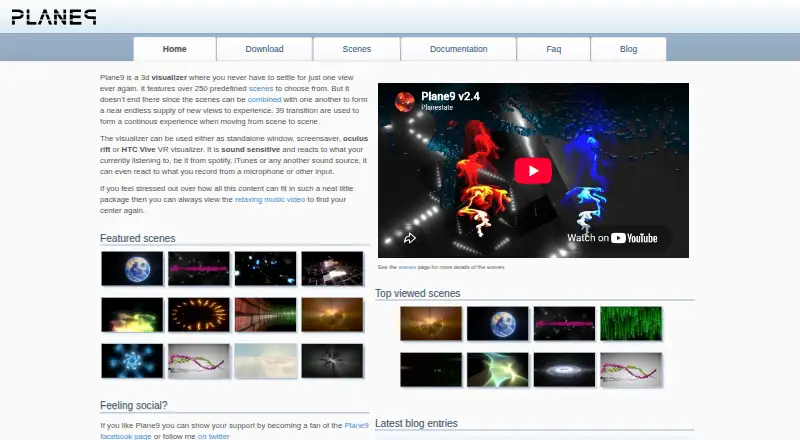
What Plane9 is
Plane9 is a free Windows 3D music visualizer and sound-responsive screensaver that can also run in a standalone window or as a VR visualizer. It offers 250 scenes that can be combined into more than 10,000 views, along with 39 transition scenes. Plane9 responds to audio from computer sources such as Spotify and iTunes and can analyze sound from recording devices. Its download page lists OpenVR/HTC Vive and Oculus Rift support. A studio application can record videos from the visualizer, and the software supports multiple monitors and sound analysis from up to 18 speakers. The listed free download costs nothing and supports Windows 7, 8, 8.1, and 10. A graphics card capable of OpenGL 3.3 is the minimum; the FAQ recommends a recent OpenGL 4.0 or newer card. Audio analysis does not work with unprocessed digital audio such as DTS. Commercial use of scenes and generated content requires a commercial use license.
Who it suits
Plane9 suits Windows users who want audio-reactive visuals as a screensaver, window, or VR visualizer. Its multiple-monitor support may also suit users working with several displays.
What it does well
- 250 scenes and 39 transition scenes
- Works with computer audio and recording devices
- Supports OpenVR/HTC Vive and Oculus Rift
- Studio application records videos from the visualizer
- Supports multiple monitors
What to know first
- Requires a graphics card with OpenGL 3.3
- Audio analysis does not support unprocessed DTS audio
- Commercial use requires a commercial use license
Limits
Plane9 is free for Windows and requires at least an OpenGL 3.3-capable graphics card. Audio analysis does not work with unprocessed digital audio such as DTS, and commercial use of scenes or generated content requires a commercial-use license.
Plans
| Plan | Billed and limits | Price |
|---|---|---|
| Plane9 | Free download · Windows 7/8/8.1/10 · OpenGL 3.3 capable graphics card | Free |
As plane9.com lists them, read 11 Oct 2026. The maker's own page has the final word.
Getting started
- Open the Plane9 website
- Download the free Windows application
- Install it on a system with an OpenGL 3.3-capable graphics card
- Choose window, screensaver, or VR visualizer mode
- Connect audio from a computer source or recording device
- Use the studio application when you want to record visualizer video
Verdict
Plane9 offers several ways to display and record music-reactive visuals, with a large scene collection and VR support. Check graphics compatibility and the commercial-use license terms before relying on it for a paid project.
Questions
How much does Plane9 cost?
Plane9 is listed as free, with a free plan and free download.
Which platforms does Plane9 support?
The listed platform is Windows, including Windows 7, 8, 8.1, and 10.
Does Plane9 support virtual reality?
Yes. The download page lists OpenVR support for HTC Vive and Oculus Rift.
Can Plane9 export video?
Yes. Its studio application records videos from the visualizer, and video export is available.
What audio can Plane9 analyze?
It can react to computer audio sources such as Spotify and iTunes and analyze recording-device sound. Unprocessed digital audio such as DTS is not supported for analysis.
Is Plane9 suitable for commercial content?
Commercial use of scenes and generated content requires a commercial-use license.
Facts from Plane9's own pages
- Audio input
- Plane9 reacts to sounds from computer audio sources such as Spotify and iTunes, and can analyze sound from recording devices. · plane9.com, 11 Oct 2026
- Audio limitation
- The download page says audio analysis does not work with unprocessed digital audio such as DTS. · plane9.com, 11 Oct 2026
- Commercial use
- Commercial use of scenes and generated content requires a commercial use license, and the license says refunds are generally not required except where law requires them. · plane9.com, 11 Oct 2026
- Crash reports
- Crash reports are optional, and users can examine the information to be sent before allowing transmission. · plane9.com, 11 Oct 2026
- Displays
- Plane9 supports multiple monitors and can analyze sound from up to 18 speakers. · plane9.com, 11 Oct 2026
- Product
- Plane9 is a 3D music visualizer and sound responsive screensaver that can run as a standalone window, screensaver, or VR visualizer. · plane9.com, 11 Oct 2026
- Recording
- The software includes a studio application for recording videos from the visualizer. · plane9.com, 11 Oct 2026
- Scenes
- The site describes 250 scenes that can be combined into more than 10,000 unique views, with 39 transition scenes. · plane9.com, 11 Oct 2026
- Support
- The maker invites users to send questions if the documentation is lacking and provides a contact page. · plane9.com, 11 Oct 2026
- System requirements
- The minimum graphics requirement is OpenGL 3.3; the FAQ recommends a recent OpenGL 4.0 or newer graphics card. · plane9.com, 11 Oct 2026
- Usage data
- Anonymous usage reporting can be disabled in the configuration program, and the site says the reported usage information does not personally identify the user or machine. · plane9.com, 11 Oct 2026
- VR support
- The download page lists OpenVR/HTC Vive and Oculus Rift VR support. · plane9.com, 11 Oct 2026
Where Plane9 stands on Freedom251
- Audio Visualizer Software#18 of 35