Security Code Scan
What Security Code Scan is
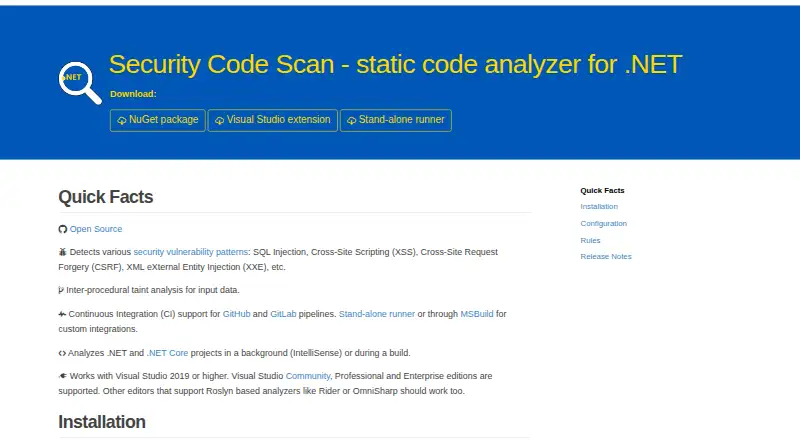
Security Code Scan is a free, open-source static analyzer for .NET code written in C# and VB.NET. It looks for vulnerability patterns including SQL injection, cross-site scripting, CSRF, and XML external entity injection. Its inter-procedural taint analysis follows input data across code. The analyzer can run in the background as IntelliSense or during a build. For automated workflows, the project lists GitHub and GitLab pipeline support, MSBuild, and a stand-alone runner for custom integrations. Those custom integrations can produce SARIF results and display warnings alongside other build messages. Users can configure taint sources, sinks, sanitizers, validators, and project-specific settings. It supports Visual Studio 2019 or higher; the project says other Roslyn analyzer editors such as Rider or OmniSharp should work. Downloads include a NuGet package, a Visual Studio extension, and a stand-alone runner. The maker warns that installing the extension or NuGet package can slow the IDE because the analyzer performs extensive static analysis, and recommends CI/CD pipelines as the more common use case.
Who it suits
Security Code Scan suits .NET developers who want vulnerability analysis in an editor, during builds, or in CI/CD pipelines. Teams can also define custom taint rules and project settings.
What it does well
- Analyzes C# and VB.NET vulnerability patterns.
- Uses inter-procedural taint analysis.
- Supports GitHub and GitLab pipelines.
- Custom taint sources, sinks, and validators are configurable.
- Available as a NuGet package, extension, or runner.
What to know first
- Visual Studio extension or NuGet installation can slow the IDE.
- Audit mode can produce more warnings when enabled.
- Automated fixes are not available.
Limits
The free plan is an open-source static analyzer for .NET source code. Automated fixes are not included; enabling audit mode can also produce additional warnings about data with unknown taint state.
Plans
| Plan | Billed and limits | Price |
|---|---|---|
| Security Code Scan | Open source static analyzer for .NET | Free |
As security-code-scan.github.io lists them, read 9 Oct 2026. The maker's own page has the final word.
Getting started
- Visit the Security Code Scan website.
- Choose a NuGet package, Visual Studio extension, or stand-alone runner release.
- Use it with Visual Studio 2019 or later, or another Roslyn analyzer editor such as Rider or OmniSharp.
- For automated analysis, configure a GitHub or GitLab pipeline, MSBuild, or a custom runner integration.
- Configure project settings and any custom taint sources, sinks, sanitizers, or validators as needed.
Verdict
Security Code Scan offers configurable static analysis for .NET projects, with options for editor and pipeline workflows. The maker recommends CI/CD for common use and warns that IDE installations can slow performance.
Questions
How much does Security Code Scan cost?
The listed plan is free.
Is Security Code Scan open source?
Yes. The project is open source, and its repository identifies the license as LGPL-3.0.
Which platforms does it support?
The listed platforms are Linux, Windows, and self-hosted environments.
Which languages and issues does it analyze?
It analyzes .NET source code in C# and VB.NET for patterns including SQL injection, cross-site scripting, CSRF, and XML external entity injection.
Can it run in CI/CD?
Yes. The project lists GitHub and GitLab pipeline support, MSBuild, and a stand-alone runner for custom integrations.
Does it provide automated fixes?
No. Automated fixes are not included.
Facts from Security Code Scan's own pages
- CI recommendation
- The maker says CI/CD is the more common use case and recommends pipeline integrations for that use. · security-code-scan.github.io, 9 Oct 2026
- Customization
- Users can configure custom taint sources, sinks, sanitizers, validators, and project-specific settings. · security-code-scan.github.io, 9 Oct 2026
- Detection
- It detects patterns including SQL injection, cross-site scripting, CSRF, and XML external entity injection. · security-code-scan.github.io, 9 Oct 2026
- Downloads
- Official releases are offered as a NuGet package, a Visual Studio extension, and a stand-alone runner. · github.com, 9 Oct 2026
- Editors
- It supports Visual Studio 2019 or higher and says other Roslyn analyzer editors such as Rider or OmniSharp should work. · security-code-scan.github.io, 9 Oct 2026
- Integrations
- The site lists GitHub and GitLab pipeline support, plus MSBuild and a stand-alone runner for custom integrations. · security-code-scan.github.io, 9 Oct 2026
- License
- The project repository identifies its license as LGPL-3.0. · github.com, 9 Oct 2026
- Limitations
- Audit mode is off by default and can produce more warnings about data with unknown taint state when enabled. · security-code-scan.github.io, 9 Oct 2026
- Performance
- The maker warns that installing it as a Visual Studio extension or NuGet package can slow the IDE because it performs extensive static analysis. · security-code-scan.github.io, 9 Oct 2026
- Purpose
- Security Code Scan is a static code analyzer for .NET that detects vulnerability patterns in C# and VB.NET. · security-code-scan.github.io, 9 Oct 2026
- Results
- For custom integrations, it can produce SARIF results and show warnings alongside other build messages. · security-code-scan.github.io, 9 Oct 2026
- Support
- The maker provides a troubleshooting guide and directs users to project issues and contributions on GitHub. · github.com, 9 Oct 2026
- Taint analysis
- The analyzer performs inter-procedural taint analysis for input data. · security-code-scan.github.io, 9 Oct 2026
- Usage
- It analyzes projects in the background as IntelliSense or during a build. · security-code-scan.github.io, 9 Oct 2026
Where Security Code Scan stands on Freedom251
- SAST Tools#13 of 26