Freedom251 › Secrets Scanning Software
Secretlint
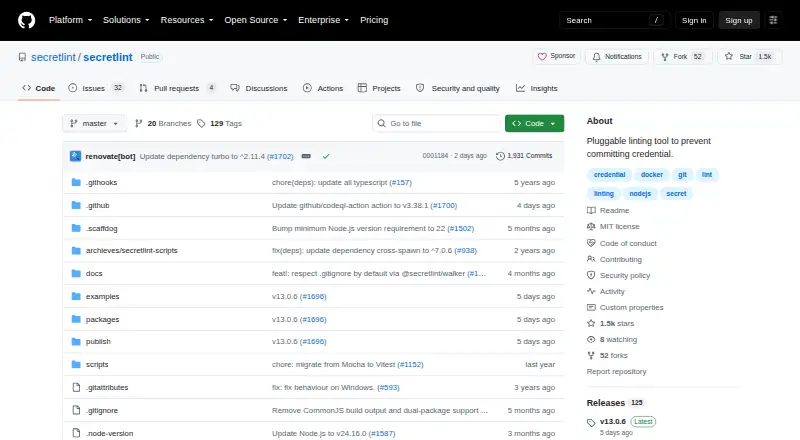
What Secretlint is
Secretlint is a free, MIT-licensed tool for finding credentials in projects and helping prevent them from being committed. Its command-line interface scans files and glob patterns, and can also read from standard input. Rules are separate modules, and users can build custom rules as npm packages. Secret values are masked by default in lint error messages, helping limit their exposure in logs and terminal output.
Secretlint supports Git workflows, including documented pre-commit integrations with Husky and lint-staged, pre-commit, and Git hooks. Its documentation also covers GitHub Actions scanning and pull-request annotations through the GitHub formatter. Other listed integrations include Mega-Linter, SARIF formatting, a macOS clipboard app, and a browser extension. The WebExtension works with Chrome and Firefox DevTools to help web developers notice credentials in requests and responses.
It is available for Linux, macOS, and Windows, with an extension as well. Installation options include Node.js, Docker, and a standalone executable that does not require Node.js; the Node.js route requires version 22 or later. Secretlint detects secrets but does not automatically fix them.
Who it suits
Secretlint suits developers and teams who want credential checks in local Git workflows or CI/CD, including GitHub Actions. It also fits web developers who want to look for credentials in requests and responses through Chrome or Firefox DevTools.
What it does well
- Scans files, glob patterns, and standard input.
- Masks secret values in lint errors by default.
- Supports pre-commit, pull-request, and CI/CD scanning.
- Users can create custom detection rules as npm packages.
- Offers Node.js, Docker, and standalone executable installation routes.
What to know first
- Does not automatically fix detected secrets.
- Node.js installation requires Node.js 22 or later.
Plans
| Plan | Billed and limits | Price |
|---|---|---|
| Secretlint | MIT-licensed project; no paid plans or pricing stated | Free |
As github.com lists them, read 9 Oct 2026. The maker's own page has the final word.
Getting started
- Open the Secretlint GitHub project website.
- Choose an installation route: Node.js, Docker, or the standalone executable.
- For the Node.js route, use Node.js 22 or later.
- Configure scanning for files or glob patterns, or provide input through stdin.
- Add the documented pre-commit or CI integration that fits your workflow.
Verdict
Choose Secretlint to add configurable credential detection to Git workflows and CI/CD without a software charge. Look elsewhere if you need detected secrets to be fixed automatically; Secretlint does not provide automatic fixes.
Questions
How much does Secretlint cost?
The listed Secretlint plan is free. It is an MIT-licensed open-source project, with no paid plans stated.
Which platforms does Secretlint support?
The listed platforms are Linux, macOS, Windows, and an extension. The WebExtension integrates with Chrome and Firefox DevTools.
Can Secretlint scan in CI and before commits?
Yes. It supports CI/CD, pre-commit, pull-request, and push-protection scanning. Its documentation includes GitHub Actions and pre-commit integrations.
Can users add detection rules?
Yes. Rules are separate modules, and users can create custom rules as npm packages.
Does Secretlint fix detected secrets?
No. Secretlint does not automatically fix detected secrets, although its mask-result formatter can mask secrets in an input file.
What support does the project offer?
The README directs users to create a GitHub issue for bugs and feature requests.
Facts from Secretlint's own pages
- Additional integrations
- The README lists Mega-Linter, a browser extension, a macOS clipboard app, and SARIF formatter support. · github.com, 9 Oct 2026
- Browser extension
- The WebExtension integrates with Chrome and Firefox DevTools to help web developers notice credentials in requests and responses. · github.com, 9 Oct 2026
- CI integration
- The documentation shows running Secretlint in GitHub Actions and emitting pull request annotations with the GitHub formatter. · github.com, 9 Oct 2026
- Installation
- Secretlint can be installed with Node.js, run in Docker, or used as a single-executable binary that does not require Node.js. · github.com, 9 Oct 2026
- License
- The repository states that Secretlint is licensed under MIT. · github.com, 9 Oct 2026
- Notable limitation
- Secretlint does not automatically fix detected secrets, although its mask-result formatter can mask secrets in an input file. · github.com, 9 Oct 2026
- Pre-commit
- The project documents pre-commit integrations with Husky and lint-staged, pre-commit, and Git hooks. · github.com, 9 Oct 2026
- Purpose
- Secretlint is a pluggable linting tool to find credentials in projects and prevent committing them. · github.com, 9 Oct 2026
- Rules
- Rules are separate modules, and users can create custom rules as npm packages. · github.com, 9 Oct 2026
- Runtime requirement
- The Node.js installation instructions require Node.js 22 or later. · github.com, 9 Oct 2026
- Scanning
- The CLI scans files or glob patterns and supports stdin input. · github.com, 9 Oct 2026
- Secret masking
- Secret values are masked in lint error messages by default to help prevent exposure in logs and terminal output. · github.com, 9 Oct 2026
- Support
- The README directs users to create a GitHub issue for bugs and feature requests. · github.com, 9 Oct 2026
Where Secretlint stands on Freedom251
- Secrets Scanning Software#14 of 24