Freedom251 › Secrets Scanning Software
Git Secret Scanner
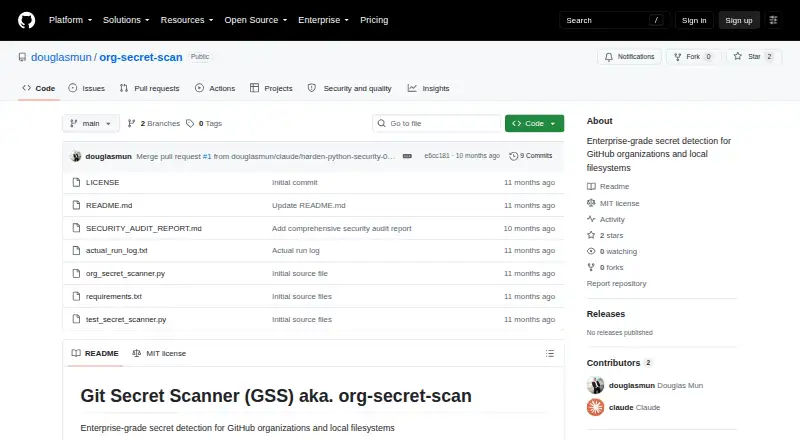
What Git Secret Scanner is
Git Secret Scanner is a free tool for finding hardcoded credentials in GitHub organizations and local filesystems. It combines pattern matching with Shannon entropy analysis, context scoring, and denylist filtering to reduce false positives. Listed patterns include AWS, GCP, Azure, GitHub, Slack, Stripe, JWT, SSH and PEM keys, and database URIs. Findings can be exported as JSON, CSV, or SARIF; the README describes SARIF compatibility with GitHub Advanced Security, Azure DevOps, GitLab Security Dashboard, and SonarQube. GitHub Actions and GitLab CI examples are provided, along with guidance for uploading SARIF to GitHub Advanced Security. Findings may include severity, immediate actions, prevention steps, provider-specific rotation commands, and documentation links. The scanner does not authenticate with or test detected credentials, so matches need manual verification. Findings are masked in logs, and reports containing finding details should be encrypted. Installation requires Python 3.8+ and Git 2.20+; organization scans also need a GitHub token and organization name. Documented defaults include a 10 MB maximum file size, local scan depth of 10, and concurrency of 5 repositories and 50 files. The tool is MIT licensed for personal or commercial use.
Who it suits
It suits security, DevOps/SRE, development, and compliance teams looking for credential scans in GitHub organizations or local filesystems. Teams should be prepared to verify matches manually and protect reports containing finding details.
What it does well
- Scans GitHub organizations and local filesystems
- Exports findings in JSON, CSV, or SARIF
- Includes CI examples for GitHub Actions and GitLab
- Provides remediation details and rotation commands
- MIT licensed for personal and commercial use
What to know first
- Matches require manual verification
- Organization scans require a GitHub token and organization name
- Installation requires Python 3.8+ and Git 2.20+
- Maximum file size defaults to 10 MB
Limits
The documented defaults limit files to 10 MB, local scan depth to 10, and concurrency to five repositories and 50 files. Findings are not validated through authentication and require manual verification.
Plans
| Plan | Billed and limits | Price |
|---|---|---|
| Git Secret Scanner | MIT licensed · free for commercial and personal use | Free |
As github.com lists them, read 5 Oct 2026. The maker's own page has the final word.
Getting started
- Open the GitHub repository.
- Install Python 3.8+ and Git 2.20+.
- For an organization scan, provide a GitHub token and organization name.
- Use a local filesystem scan, or connect a scan through the documented GitHub Actions or GitLab CI examples.
- Export findings as JSON, CSV, or SARIF for review.
Verdict
Git Secret Scanner combines broad credential patterns with multiple output formats and CI examples. Its findings are leads rather than verified credentials, and reports with details need encryption.
Questions
How much does Git Secret Scanner cost?
It is free under the MIT license for personal and commercial use.
What can it scan?
It detects hardcoded credentials in GitHub organizations and local filesystems. GitHub organization scanning requires a token and organization name.
Does it check whether detected credentials work?
No. It does not attempt to authenticate with or test detected credentials, so matches need manual verification.
What report formats are available?
Findings can be exported as JSON, CSV, or SARIF. The README describes SARIF compatibility with GitHub Advanced Security, Azure DevOps, GitLab Security Dashboard, and SonarQube.
Can it run in CI/CD or before commits?
Yes. CI/CD scanning and pre-commit scanning are supported, and the README provides GitHub Actions and GitLab CI examples.
What software is required to install it?
Installation requires Python 3.8+ and Git 2.20+. A GitHub organization scan also needs a GitHub token and organization name.
Facts from Git Secret Scanner's own pages
- Coverage
- It lists patterns for credentials and tokens including AWS, GCP, Azure, GitHub, Slack, Stripe, JWT, SSH/PEM keys, and database URIs. · github.com, 5 Oct 2026
- Detection
- The README describes pattern matching, Shannon entropy analysis, context scoring, and denylist filtering to reduce false positives. · github.com, 5 Oct 2026
- Integrations
- The README provides GitHub Actions and GitLab CI examples and documents SARIF upload to GitHub Advanced Security. · github.com, 5 Oct 2026
- License
- The repository states that the tool is MIT licensed and may be used and modified for personal or commercial projects. · github.com, 5 Oct 2026
- Limits
- The documented defaults include a 10 MB maximum file size, local scan depth of 10, and concurrency of 5 repositories and 50 files. · github.com, 5 Oct 2026
- Platforms
- The README documents macOS Spotlight, Linux locate, and Windows PowerShell optimizations, with Python filesystem traversal as a fallback. · github.com, 5 Oct 2026
- Purpose
- Git Secret Scanner detects hardcoded credentials in GitHub organizations and local filesystems. · github.com, 5 Oct 2026
- Remediation
- Findings can include severity, immediate actions, prevention steps, provider-specific rotation commands, and documentation links. · github.com, 5 Oct 2026
- Reports
- It exports findings as JSON, CSV, or SARIF, with SARIF described as compatible with GitHub Advanced Security, Azure DevOps, GitLab Security Dashboard, and SonarQube. · github.com, 5 Oct 2026
- Requirements
- Installation requires Python 3.8+ and Git 2.20+; GitHub organization scanning requires a GitHub token and organization name. · github.com, 5 Oct 2026
- Security behavior
- The scanner says it does not attempt to authenticate with or test detected credentials; matches require manual verification. · github.com, 5 Oct 2026
- Security handling
- The security guidance says findings are masked in logs and advises encrypting reports that contain finding details. · github.com, 5 Oct 2026
- Who it is for
- The README lists security teams, DevOps/SRE, developers, and compliance teams as use cases. · github.com, 5 Oct 2026
Where Git Secret Scanner stands on Freedom251
- Secrets Scanning Software#11 of 24