Freedom251 › Reverse Image Search Software

SearchReverseImage
What SearchReverseImage is
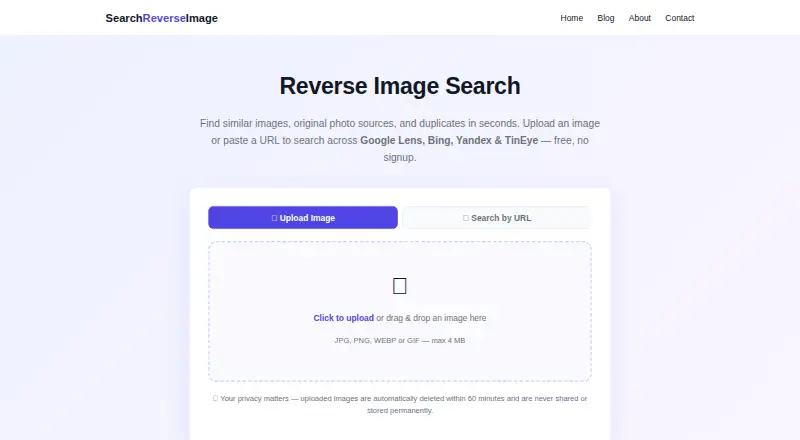
SearchReverseImage is a browser-based service for searching with an image. Upload a picture or paste its URL, and it queries Google Lens, Bing Visual Search, Yandex Images, and TinEye through one workflow. Results can show similar images, pages containing the image, higher-resolution versions, and original sources. It accepts JPG/JPEG, PNG, WEBP, and GIF files up to 4 MB. The service is free, with unlimited searches and no registration, watermarks, or hidden fees; it requires no software installation and works in a browser on mobile devices including iPhone and Android. SearchReverseImage says uploaded images are temporarily processed and automatically deleted within approximately 60 minutes. It also says it does not permanently store, view, analyze, share, or sell uploads, or associate them with a user identity. Traffic and uploads use HTTPS/TLS encryption. Its terms prohibit automated scripts or bots from making bulk requests. The site identifies photographers, shoppers, journalists, researchers, online daters, travelers, and brand owners as possible users.
Who it suits
It suits people who want to look up an image or its source from a browser, including photographers, shoppers, journalists, and researchers. Mobile users can access it without installing an app.
What it does well
- Searches across four visual search engines in one workflow.
- Accepts image uploads or image URLs.
- Unlimited searches without registration or watermarks.
- Available in mobile browsers without installation.
What to know first
- Uploads are limited to 4 MB.
- Automated scripts and bots cannot make bulk requests.
- Uploaded images may remain during temporary processing for about 60 minutes.
Limits
The free plan allows unlimited photo searches, but uploaded files must be 4 MB or smaller. The terms prohibit automated scripts or bots from making bulk requests.
Plans
| Plan | Billed and limits | Price |
|---|---|---|
| Free | 100% Free · unlimited photo searches · no signup · no watermarks · JPG/JPEG, PNG, WEBP or GIF up to 4 MB | Free |
As searchreverseimage.com lists them, read 30 Sept 2026. The maker's own page has the final word.
Getting started
- Open https://searchreverseimage.com/ in a browser on your device.
- Upload a JPG/JPEG, PNG, WEBP, or GIF image up to 4 MB, or paste an image URL.
- Run the search across the available visual search engines.
- Review the similar images, pages, higher-resolution versions, and source results.
SearchReverseImage is a browser-based reverse image search for people who want to check a picture across four visual search services at once. It is best suited to occasional, individual lookups on a phone or computer. The unlimited free searches are compelling, but the 4 MB upload cap and restriction on bulk requests limit its role in larger workflows.
Overview
Upload a supported image or paste an image URL to search Google Lens, Bing Visual Search, Yandex Images and TinEye in one workflow. Results can include visually similar images, pages containing the image, higher-resolution versions and original sources. Combining the services saves repeating the same search, though the results come from those third-party engines rather than a separate SearchReverseImage index.
Searches require no account, carry no watermark and have no fee. That makes the service a practical choice for checking an image without committing to a subscription or installing software. The 4 MB maximum file size is the main constraint: a larger original will need to be reduced before upload.
Key features
Four services, one lookup
A single upload reaches four visual search engines, which can help when looking for a source, related appearances or a larger version of an image. Shoppers checking product photos and photographers looking for copies may benefit from that breadth. It does not guarantee a match; results depend on the third-party engines.
Formats, access and privacy
JPG/JPEG, PNG, WEBP and GIF files are accepted, up to 4 MB. The site works in a browser on any device, including iPhone and Android, so there is no separate installation requirement. Uploaded images are automatically deleted within approximately 60 minutes after temporary processing. The company says it does not permanently store, view, analyze, share or sell them, or associate them with a user's identity; uploads and site traffic use HTTPS/TLS encryption.
The privacy policy says visitors may have access, correction and deletion rights under laws including GDPR and CCPA. That is useful context for privacy-conscious users, but the temporary processing window still matters for anyone handling sensitive images.
Pricing
Free
The Free plan costs nothing, billed 100% Free. It includes unlimited photo searches, no signup, no watermarks and the supported JPG/JPEG, PNG, WEBP or GIF formats up to 4 MB. There is no paid tier to unlock a larger file allowance, so users with oversized images must resize them or choose another tool. The terms prohibit automated scripts and bots from making bulk requests, making this a poor fit for high-volume collection work.
Platforms
SearchReverseImage is available on the web and works through mobile browsers on Android and iPhone. Browser access keeps the workflow device-flexible, but it does not remove the upload-size or bulk-request limits.
Who it's for
It fits people making individual checks: shoppers verifying an image's context, photographers seeking appearances of their work, or journalists and researchers tracing an image's source. Travelers, online daters and brand owners are also among the site's intended users. Anyone processing image libraries automatically should look elsewhere because bulk requests are prohibited.
Questions, technical support, business and advertising inquiries can be sent to [email protected]; usual replies take 24–48 hours.
Pros and cons
- Four search engines in one workflow: avoids repeating an upload across Google Lens, Bing Visual Search, Yandex Images and TinEye.
- Unlimited searches at no charge: useful for repeated personal lookups without an account or watermarks.
- Broad browser access: works on computers and mobile devices without installing software.
- 4 MB file cap: larger source images must be resized before searching.
- No automated bulk requests: rules out routine collection-scale processing.
- Third-party results: the service brings search engines together but does not provide its own independent index.
Alternatives
Reverse Image Search Software is a useful starting point for comparing more tools in the category.
Choose LocalLens if open-source software and self-hosting matter more than a browser-only lookup; it is free, with no paid plans or usage limits stated. ImageRights Discovery offers a free pilot for the first 100 images, which may suit a finite initial review better than unlimited individual searches. Imagga Visual Search is the more API-oriented option: its Indie plan is $79 a month, billed monthly, and includes 70,000 API requests alongside visual search, background removal, barcode recognition and OCR/text recognition APIs.
RIMG is another free reverse-image-search option for Android, iOS and web. Berify has free basic searches and paid monthly plans for 1,000 or 6,000 images, making it an alternative to consider when those image-count plans suit the job. PimEyes offers 10 searches per day and no takedowns on its free plan; its PROtect plan includes 125 searches per day, 20 alerts and 200 takedowns. Pixsy is a monitoring-focused alternative, with 500 monitored images and unlimited case submission on its free plan, but no takedown notices. Reverse Image Search Anywhere is another option.
Verdict
Choose SearchReverseImage for free, unlimited personal lookups when sending one image through four visual search engines is more useful than working with a single service. Its browser access and lack of signup keep the barrier low. Look elsewhere for images over 4 MB or automated bulk workflows, which the service's limits do not accommodate.
Verdict
SearchReverseImage offers a free way to search an image across several services from a browser. Check the 4 MB file cap and bulk-request restriction before using it for larger workflows.
Questions
How much does SearchReverseImage cost?
The Free plan costs nothing.
Do I need to create an account?
No. The service provides unlimited photo searches without registration.
Which devices can I use?
It works in a browser on any device, including iPhone and Android through a mobile browser.
Which image formats and sizes are supported?
JPG/JPEG, PNG, WEBP, and GIF files are supported, up to 4 MB.
What happens to uploaded images?
The company says images are automatically deleted within approximately 60 minutes after temporary processing and are not permanently stored, viewed, analyzed, shared, or sold.
Facts from SearchReverseImage's own pages
- Browser access
- It works in a browser on any device and requires no software installation. · searchreverseimage.com, 30 Sept 2026
- Core function
- Users can upload an image or paste an image URL to search across Google Lens, Bing Visual Search, Yandex Images and TinEye. · searchreverseimage.com, 30 Sept 2026
- Image deletion
- Uploaded images are automatically deleted within approximately 60 minutes after temporary processing. · searchreverseimage.com, 30 Sept 2026
- Image privacy
- The company says it does not permanently store, view, analyze, share or sell uploaded images and does not associate them with user identity. · searchreverseimage.com, 30 Sept 2026
- Intended users
- The site describes use cases including photographers, shoppers, journalists, researchers, online daters, travelers and brand owners. · searchreverseimage.com, 30 Sept 2026
- Mobile support
- The site says it works on iPhone and Android through a mobile browser. · searchreverseimage.com, 30 Sept 2026
- No account
- The service provides unlimited photo searches without registration, watermarks or hidden fees. · searchreverseimage.com, 30 Sept 2026
- Privacy rights
- The policy says visitors may have access, correction and deletion rights under laws including GDPR and CCPA. · searchreverseimage.com, 30 Sept 2026
- Results
- The tool returns visually similar images, pages containing the image, higher-resolution versions and original sources. · searchreverseimage.com, 30 Sept 2026
- Search engines
- SearchReverseImage combines four third-party visual search engines in one upload workflow. · searchreverseimage.com, 30 Sept 2026
- Support
- Questions, technical support, business and advertising inquiries can be emailed to [email protected], with usual replies within 24–48 hours. · searchreverseimage.com, 30 Sept 2026
- Supported files
- Supported formats are JPG/JPEG, PNG, WEBP and GIF, with a maximum file size of 4 MB. · searchreverseimage.com, 30 Sept 2026
- Transport security
- Site traffic and uploaded images are transmitted over HTTPS/TLS encryption. · searchreverseimage.com, 30 Sept 2026
- Usage limits
- The terms prohibit automated scripts or bots from making bulk requests. · searchreverseimage.com, 30 Sept 2026
Where SearchReverseImage stands on Freedom251
- Reverse Image Search Software#13 of 21