Freedom251 › AI image generators
SD.Next
What SD.Next is
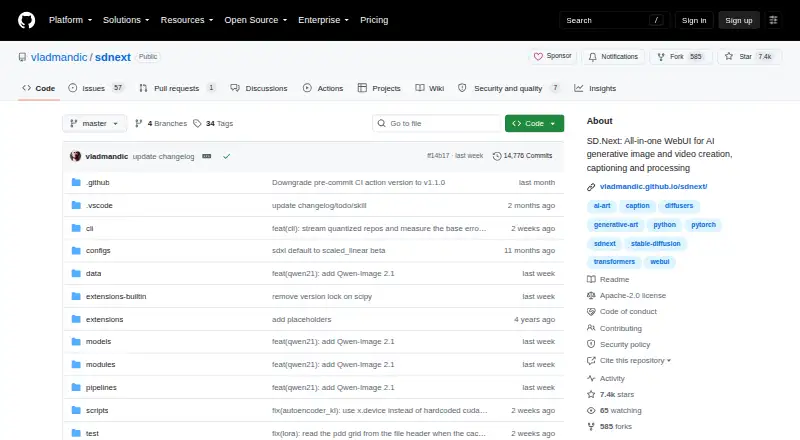
SD.Next is an open-source server application and web interface for creating and working with AI-generated images and videos. Its workflows include text-to-image, image-to-image, text-to-video, image-to-video, inpainting, and outpainting. It can also caption, tag, upscale, interpolate, colorize, filter, and correct image color, with PNG and JPG output formats. The project supports many diffusion models and can automatically download selected reference models. Guidance tools include LoRA, ControlNet, IPAdapters, and Prompt Enhance; its listed captioning and tagging options include built-in language and vision models and specialist taggers. SD.Next supports multiple computing backends, from CUDA and ROCm to Apple M1/M2 MPS and CPU-only execution. Its SDNQ quantization is described as reducing VRAM use by up to 4x, while Balanced Offload balances CPU and GPU memory for larger models. The project lists desktop and mobile interfaces, localization in about 15 languages, and API access. It is free under the Apache-2.0 license. Installation instructions include quick-start scripts for Linux and Mac, Windows batch files, and PowerShell. The security policy describes limited external connections for tasks such as package installation and user-requested model downloads.
Who it suits
SD.Next suits artists, researchers, and AI enthusiasts who want a web interface and server application for image and video generation. Its range of workflows, model guidance, and hardware backends can also suit users who need image processing alongside generation.
What it does well
- Supports image and video generation workflows, including inpainting and outpainting.
- Includes captioning, tagging, upscaling, interpolation, and color correction.
- Offers LoRA, ControlNet, IPAdapters, and Prompt Enhance guidance.
- SDNQ can reduce VRAM use by up to 4x.
- Supports API access and multiple hardware backends.
- Free and licensed under Apache-2.0.
What to know first
- Installation uses platform-specific scripts or command-line routes.
- Extensions can be downloaded when the feature is enabled.
- Some external connections are made for packages, extensions, and requested model downloads.
Plans
| Plan | Billed and limits | Price |
|---|---|---|
| SD.Next | Open-source server application and web interface | Free |
As github.com lists them, read 12 Oct 2026. The maker's own page has the final word.
Getting started
- Open the SD.Next GitHub project page.
- Choose the installation route for Linux, Mac, or Windows.
- Run the provided quick-start script, batch file, or PowerShell instructions.
- Use the web interface or API to access the application.
- Select a workflow and model; selected reference models can be downloaded automatically.
Verdict
Choose SD.Next if you want a free, open-source tool that combines image and video generation with image processing and multiple hardware backends. Its setup and operation are oriented around a server application and web interface, so users seeking a simpler hosted-only service may prefer another approach.
Questions
How much does SD.Next cost?
The listed SD.Next plan costs nothing. The project is open source under Apache-2.0.
What can SD.Next generate or edit?
It supports text-to-image, image-to-image, text-to-video, image-to-video, inpainting, and outpainting, along with image editing and processing tools.
Which platforms and hardware does it support?
Listed platforms include Linux, macOS, Windows, web, API, and self-hosted use. Hardware backends include CUDA, ROCm, ZLUDA, Intel IPEX XPU, OpenVINO, DirectML, Apple M1/M2 MPS, ONNX/Olive, and CPU-only execution.
What output formats are available?
The listed output formats are PNG and JPG.
Does SD.Next send user data externally?
Its security policy says the app does not send or share data externally, track user or system data, store user inputs or detection results, or use analytics. It may connect for indexes, packages, enabled extensions, requested model downloads, and user-submitted benchmark information.
Facts from SD.Next's own pages
- API access
- Yes · github.com, 20 Sept 2026
- Captioning and tagging
- The project lists 25+ built-in LLM and VLM models, OpenCLiP models, and WaifuDiffusion and DeepDanbooru taggers. · vladmandic.github.io, 12 Oct 2026
- Extensions
- The project supports custom scripts and extensions. · github.com, 12 Oct 2026
- External connections
- The security policy says connections may be made for indexes, installation and upgrade packages, enabled extensions, user-requested model downloads from CivitAI or Hugging Face, and user-submitted benchmark information. · github.com, 12 Oct 2026
- Guidance tools
- The project lists LoRA, ControlNet, IPAdapters, and Prompt Enhance among its guidance features. · github.com, 12 Oct 2026
- Hardware support
- The project lists CUDA, ROCm, ZLUDA, Intel IPEX XPU, OpenVINO, DirectML, Apple M1/M2 MPS, ONNX/Olive, and CPU-only execution support. · vladmandic.github.io, 12 Oct 2026
- Image editing
- Yes · github.com, 20 Sept 2026
- Image processing
- Its processing tools include captioning, tagging, upscaling, interpolation, colorization, filtering, and image color correction. · vladmandic.github.io, 12 Oct 2026
- Installation
- The project provides installation instructions and quick-start scripts for Linux and Mac, Windows batch files, and PowerShell. · vladmandic.github.io, 12 Oct 2026
- Intended users
- The README describes the application as suitable for artists, researchers, and AI enthusiasts. · github.com, 12 Oct 2026
- Interface
- The project describes desktop and mobile interfaces and localization in about 15 languages. · github.com, 12 Oct 2026
- License
- The GitHub repository identifies Apache-2.0 as the project license. · github.com, 12 Oct 2026
- Memory features
- SDNQ quantization is described as reducing VRAM use by up to 4x, and Balanced Offload balances CPU and GPU memory for larger models on limited hardware. · vladmandic.github.io, 12 Oct 2026
- Memory optimization
- Its SDNQ quantization engine can reduce VRAM use by up to 4x, and Balanced Offload balances CPU and GPU memory. · github.com, 12 Oct 2026
- Models
- The project says it supports dozens of advanced models and can automatically download selected reference models. · vladmandic.github.io, 12 Oct 2026
- Model support
- SD.Next supports a broad range of diffusion models and can automatically download selected reference models. · github.com, 12 Oct 2026
- Output formats
- PNG,JPG · github.com, 20 Sept 2026
- Platforms
- The README lists Windows, Linux, and macOS support, with GPU acceleration options and CPU-only execution. · github.com, 12 Oct 2026
- Privacy
- The security policy says the app does not send or share data externally, track user or system data, store user inputs or detection results, or use analytics services. · github.com, 12 Oct 2026
- Purpose
- SD.Next is an open-source server application and web interface for generating, editing, captioning, upscaling, and processing AI images and videos. · vladmandic.github.io, 12 Oct 2026
- Reference images
- Yes · github.com, 20 Sept 2026
- Security practices
- The security policy says code and included dependencies are automatically scanned for known vulnerabilities and commits are validated before merging. · github.com, 12 Oct 2026
- Support
- The README directs users to documentation, Discord, GitHub issues, and discussions for help. · github.com, 12 Oct 2026
- Text-to-image
- Yes · github.com, 20 Sept 2026
Where SD.Next stands on Freedom251
- AI image generators#15 of 124