Freedom251 › AI Podcast Editing Software
Scripod
What Scripod is
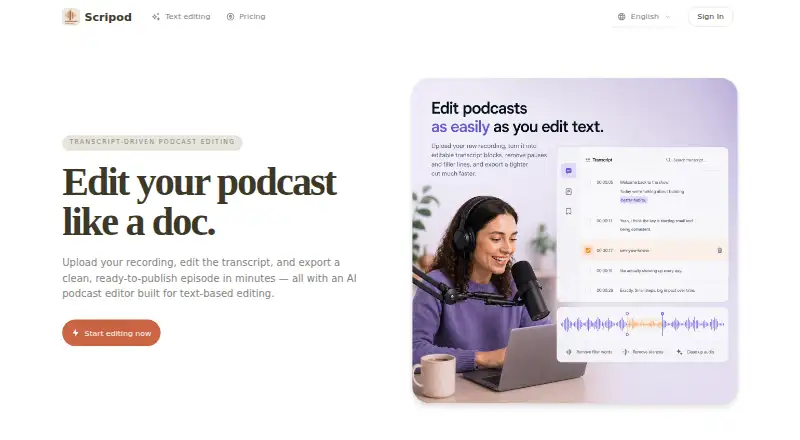
Scripod is a web-based podcast editor that turns uploaded recordings into editable transcripts and exported cuts. Users can remove words or passages from the transcript to cut the matching audio, while automatic transcription captures speaker labels and filler words. The editor synchronizes transcript and waveform views, and lets users preview edits before exporting MP3 or WAV audio; subtitles are also listed as an export option. Its AI Audio Enhancer is described as reducing background noise and echo while improving speech clarity. The AI Silence Remover detects pauses, dead air and common filler words such as “um” and “uh.” Scripod is aimed at podcast hosts, interview producers, content teams and course creators working with spoken audio. Monthly plans start with Hobby at $12 a month for 300 minutes of processing. Creator costs $24 a month for 900 minutes, while Studio costs $49 a month for 2,400 minutes and includes multi-show workflows, team review and handoff. Users retain ownership of their audio, transcripts, project files and exports. The service collects uploaded audio, transcripts, edit decisions, export records, account details and usage data.
Who it suits
Scripod is aimed at podcast hosts, interview producers, content teams and course creators working with spoken audio. Its transcript-led editing may suit people who want to cut recordings by editing text.
What it does well
- Transcript edits cut matching audio in sync
- Automatic transcription captures speaker labels and filler words
- Synchronized transcript and waveform views
- Exports include MP3, WAV and subtitles
- Users retain ownership of uploaded audio and exports
What to know first
- No free plan
- Hobby includes 300 minutes of processing per month
- Features may depend on paid-plan limits, credits or storage
- The terms prohibit adult content and other listed categories
Limits
Hobby includes 300 minutes of media processing for one month. Creator includes 900 minutes and Studio includes 2,400 minutes; plan features can also depend on credits, storage, processing limits, or export access.
Plans
| Plan | Billed and limits | Price |
|---|---|---|
| Hobby | $12/ month · 300 minutes of media processing, valid for 1 month · transcript-first editing · automatic transcription · email support | $12 a month |
| Creator | $24/ month · 900 minutes of media processing, valid for 1 month · waveform and transcript editing · flexible exports · priority email support | $24 a month |
| Studio | $49/ month · 2400 minutes of media processing, valid for 1 month · multi-show workflows · team review and handoff · priority technical support | $49 a month |
As scripod.io lists them, read 3 Oct 2026. The maker's own page has the final word.
Getting started
- Open the Scripod website
- Choose a monthly Hobby, Creator, or Studio plan
- Upload a recording
- Edit the synchronized transcript or waveform
- Preview the changes
- Export MP3, WAV, or subtitles
Verdict
Scripod offers transcript-led audio editing with synchronized waveform tools and several export options. Compare the monthly processing allowance and plan-specific features with your workflow before choosing a plan.
Questions
Does Scripod have a free plan?
No. Scripod is paid, with plans starting at $12 a month.
Which platforms does Scripod support?
Scripod is available on the web.
What audio formats can it export?
Exports include MP3 and WAV audio, with subtitles also listed as an option.
Who owns uploaded projects?
Users retain ownership of uploaded audio, transcripts, project files, and exports.
What support comes with the plans?
Hobby includes email support, Creator includes priority email support, and Studio includes priority technical support.
Facts from Scripod's own pages
- AI audio enhancer
- Its AI Audio Enhancer is described as reducing background noise and echo while improving speech clarity. · scripod.io, 3 Oct 2026
- Content ownership
- The terms say users retain ownership of their uploaded audio, transcripts, project files, and exports. · scripod.io, 3 Oct 2026
- Data collected
- The privacy policy says Scripod collects uploaded audio, transcripts, edit decisions, export records, account details, and usage data. · scripod.io, 3 Oct 2026
- Editing views
- The editor offers synchronized text and waveform views. · scripod.io, 3 Oct 2026
- Preview and exports
- Users can preview edits and export audio in MP3 or WAV, with subtitles also listed as an export option. · scripod.io, 3 Oct 2026
- Privacy and security
- Scripod says it does not sell personal information and uses access controls, authentication safeguards, and secure infrastructure practices; it does not guarantee absolute security. · scripod.io, 3 Oct 2026
- Product
- Scripod is an online, transcript-driven podcast editor that turns uploaded recordings into editable transcripts and exported cuts. · scripod.io, 3 Oct 2026
- Silence remover
- Its AI Silence Remover detects pauses, dead air, and common filler words such as “um” and “uh.” · scripod.io, 3 Oct 2026
- Support
- The site lists email support, with priority email support on Creator and priority technical support on Studio. · scripod.io, 3 Oct 2026
- Text-based editing
- Users can delete transcript text to cut the corresponding audio in sync. · scripod.io, 3 Oct 2026
- Transcription
- Automatic transcription captures speaker labels and filler words. · scripod.io, 3 Oct 2026
- Usage limits
- The terms say features may depend on paid plans, credits, processing limits, storage, or export access, and that limits may change. · scripod.io, 3 Oct 2026
- Usage restrictions
- The terms prohibit uploading or processing adult content and several other categories, including unlawful, harmful, or deceptive content. · scripod.io, 3 Oct 2026
- Use cases
- Scripod is aimed at podcast hosts, interview producers, content teams, and course creators working with spoken audio. · scripod.io, 3 Oct 2026
Where Scripod stands on Freedom251
- AI Podcast Editing Software#26 of 26