Freedom251 › Audio Editing Software

Hindenburg Pro
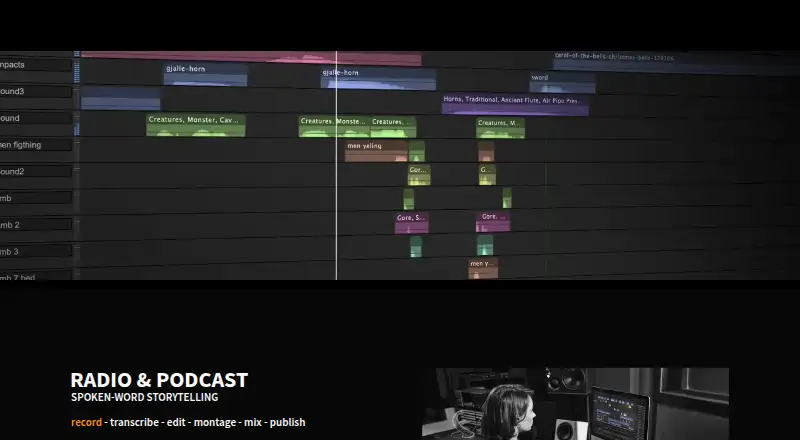
What Hindenburg Pro is
Hindenburg Pro is spoken-word audio editing software for journalists, broadcasters, podcasters, and audio storytellers. It records single-track and multitrack audio and imports BWF, WAV, MP2, MP3, MP4, and PolyWav files. Imported material is converted to uncompressed 64-bit floating-point WAV, while Auto Level aligns incoming audio with EBU loudness standards.
Its offline transcription runs locally, supports 99 languages, detects speakers, and handles multitrack projects. The Manuscript view makes transcript text searchable, supports navigation and text-based rough cuts, and allows transcript corrections. Hindenburg can capture system audio from Zoom, Google Meet, browsers, and streaming sources. Windows users can use VST3 plugins, while macOS users can use AU plugins. Publishing tools include Music Report, broadcast-ready loudness levels, and multiple publish targets.
A 30-day PRO trial includes 30 hours of transcription and Soundly sounds, requires no credit card, and ends automatically without subscription charges. Hindenburg says editing works offline and local transcription keeps sensitive material on the user's system. Windows and macOS are supported. Personal licenses cover one individual or one-person business and allow activation on up to two of that user's computers simultaneously.
Who it suits
Hindenburg Pro suits spoken-word professionals who record, edit, transcribe, and publish journalism, podcasts, broadcasts, or other audio stories. It is especially relevant to users needing local transcription, searchable manuscript editing, multitrack work, loudness preparation, and system-audio recording.
What it does well
- Records single-track and multitrack audio
- Offline transcription supports 99 languages
- Manuscript enables searchable, text-based editing
- Converts imports to 64-bit floating-point WAV
- Supports VST3 on Windows and AU on macOS
- Trial includes 30 transcription hours without a credit card
What to know first
- No free plan is offered
- Personal license is limited to one user
- Personal activation allows two computers simultaneously
- Plan allowances list 0 transcription hours for Perpetual, no allowance for Standard, 20 hours monthly for Plus, and 50 hours monthly for Premium
Limits
The 30-day trial includes 30 hours of transcription and ends automatically. Perpetual lists 0 transcription hours; Standard does not list a transcription allowance; Plus lists 20 hours per month and Premium lists 50; personal licenses cover one user and two simultaneous computer activations.
Plans
| Plan | Billed and limits | Price |
|---|---|---|
| Perpetual | 0 transcription hours | On request |
| Standard | Monthly, yearly, or perpetual options are shown; yearly prices are expressed as monthly installments; price not displayed in page text. · Basic Soundly library · No transcription hours listed | On request |
| Plus | Monthly, yearly, or perpetual options are shown; yearly prices are expressed as monthly installments; price not displayed in page text. · Basic Soundly library · 20 transcription hours per month | On request |
| Premium | Monthly, yearly, or perpetual options are shown; yearly prices are expressed as monthly installments; price not displayed in page text. · Premium Soundly library · 50 transcription hours per month | On request |
As hindenburg.com lists them, read 21 Sept 2026. The maker's own page has the final word.
Getting started
- Open the Hindenburg website
- Start the 30-day PRO trial without entering a credit card
- Install the Windows or macOS editor
- Record audio or import BWF, WAV, MP2, MP3, MP4, or PolyWav files
- Use local transcription and the Manuscript view for editing
- Add VST3 plugins on Windows or AU plugins on macOS
- Publish using loudness tools and available targets
Verdict
Choose Hindenburg Pro for spoken-word production that combines multitrack editing, local transcription, manuscript-based cuts, and broadcast-oriented publishing. Consider another option if you require a free plan or a personal license for more than one user.
Questions
Is there a free plan?
No. Hindenburg Pro offers a 30-day trial instead.
What does the trial include?
The PRO trial includes 30 hours of free transcription and Soundly sounds, requires no credit card, and expires without subscription charges.
Which platforms are supported?
Hindenburg Pro supports Windows and macOS.
Does transcription run online?
Transcription runs offline and locally on the user's system.
How many users can a personal license cover?
A personal license is for one individual or one-person business and one user, with activation on up to two of that user's computers simultaneously.
What transcription allowances do the plans list?
Perpetual lists 0 transcription hours; Standard does not list a transcription allowance; Plus lists 20 hours per month, and Premium lists 50 hours per month.
Facts from Hindenburg Pro's own pages
- Audio processing
- Imported audio is converted to uncompressed 64-bit floating-point WAV, and Auto Level aligns incoming audio using EBU loudness standards. · hindenburg.com, 8 Oct 2026
- Company and support
- The company says it provides support and lists Hindenburg Systems ApS at Knabrostraede 20, Copenhagen, Denmark. · hindenburg.com, 8 Oct 2026
- Editing
- The Manuscript provides searchable text for navigating audio, rough-cutting in text, and correcting transcript errors. · hindenburg.com, 8 Oct 2026
- Founded
- 2008 · hindenburg.com, 24 Oct 2026
- Free plan
- No · hindenburg.com, 21 Sept 2026
- Headquarters
- Copenhagen, Denmark · hindenburg.com, 28 Sept 2026
- Integrations
- Hindenburg can record system audio from Zoom, Google Meet, browsers, and streaming sources, and supports VST3 plugins on Windows and AU plugins on macOS. · hindenburg.com, 8 Oct 2026
- License limits
- A personal license is for one individual or one-person business and one user, and can be activated on up to two of that user's computers simultaneously. · hindenburg.com, 8 Oct 2026
- Multitrack editing
- Yes · hindenburg.com, 21 Sept 2026
- Noise reduction
- Yes · hindenburg.com, 21 Sept 2026
- Offline and privacy
- Hindenburg says the editor works offline and that transcription runs locally so sensitive material stays on the user's system. · hindenburg.com, 8 Oct 2026
- Platforms
- The product works on Windows and macOS; the listed minimums include Windows 11 or later and macOS 13 Ventura through macOS Tahoe. · hindenburg.com, 8 Oct 2026
- Publishing
- The product offers Music Report, broadcast-ready loudness levels, and multiple publish targets. · hindenburg.com, 8 Oct 2026
- Purpose
- Hindenburg PRO is spoken-word audio editing software built for journalists, broadcasters, podcasters, and audio storytellers. · hindenburg.com, 8 Oct 2026
- Recording and import
- The product supports single- and multitrack recording and imports audio formats including BWF, WAV, MP2, MP3, MP4, and PolyWav. · hindenburg.com, 8 Oct 2026
- Subscription and perpetual terms
- Subscriptions include updates, upgrades, and support; perpetual Hindenburg PRO 2 licenses include updates through version 2.99. · hindenburg.com, 8 Oct 2026
- Supported platforms
- Windows, macOS · hindenburg.com, 21 Sept 2026
- Third-party plugins
- Yes · hindenburg.com, 21 Sept 2026
- Transcription
- Offline transcription runs locally, supports 99 languages, and includes speaker detection and multitrack transcription. · hindenburg.com, 8 Oct 2026
- Trial
- The 30-day PRO trial includes 30 hours of free transcription and Soundly sounds, requires no credit card, and expires automatically without subscription charges. · hindenburg.com, 8 Oct 2026
- Video synchronization
- Yes · hindenburg.com, 21 Sept 2026
Where Hindenburg Pro stands on Freedom251
- Audio Editing Software#90 of 131
- AI Podcast Editing Software#23 of 26
- Podcast production software#13 of 13